


Last Updated: October 27, 2026
After burning through $700 in my first two weeks with Clay on inaccurate enrichments, I went down a rabbit hole exploring alternatives – especially newer ones that have launched in the past 2-3 years.
I ended up trying 10 Clay alternatives. For each of these alternatives, I first used Bloomberry to first come up with a focused list of companies that used a specific technology (ie. a specific SaaS product) before I enriched them.
You’ll see screenshots of everything I did so you know I tried every single tool in here 🙂
- Focused on overall data enrichment
- Freckle.io – best for ease of use and ability to try everything (Free To Try)
- Exa Websets – simpler to use than Clay (Free To Try)
- Hubspot Breeze Intelligence – company-only enrichment for existing Hubspot users (Free To Try) Focused on enrichment + GTM orchestration
- SyncGTM – most generous free trial, run it from Claude or ChatGPT (Free To Try)
- Databar.ai – best for breadth of data sources (Free To Try) Focused on contact data enrichment
- FullEnrich – best for contact-only enrichment (Free To Try)
- Cognism – best for European contact data enrichment (Requires Demo) All-in-one platforms
- Apollo.io – best value all-in-one platform (Free To Try)
- Zoominfo – best enterprise all-in-one platform (Requires Demo) Inexpensive, value options
- Airscale – best overall value (Free To Try)
- Google Sheets + N8N + Apify– the DIY option (Free To Try)
1. Freckle.io – Best for ease of use
Pros: Much easier to use than Clay, now has a CLI for Claude Code / Codex
Cons: No signal orchestration, supports Hubspot/Salesforce CRMs only
Freckle.io is a relatively new Clay alternative (they recently raised $5M in funding). It’s built especially for connecting to your CRM, cleaning/enriching your contacts and synching that data back.
If you’re not using a CRM though, you can also create your initial table by uploading a CSV, searching Google Maps, finding company lookalikes, or simply manually adding rows.
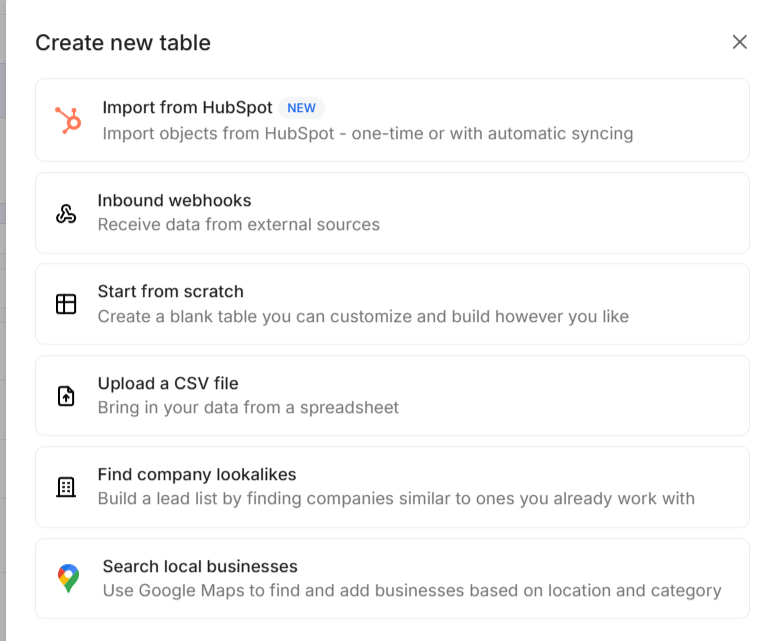
Though the options are a bit fewer than what Clay offers, I found them fairly robust in practice. For example, when I tried creating a lookalike list from 3 websites: unifygtm.com, commonroom.io, and pocus.com, it generated a very accurate list of lookalike companies.
Once you create your initial table, the user interface looks very similar to Clay’s as you can see in the screenshot below. I actually found it cleaner, faster, more intuitive, and more robust in day-to-day use. It’s very similar to Clay, except it doesn’t come with as steep of a learning curve.
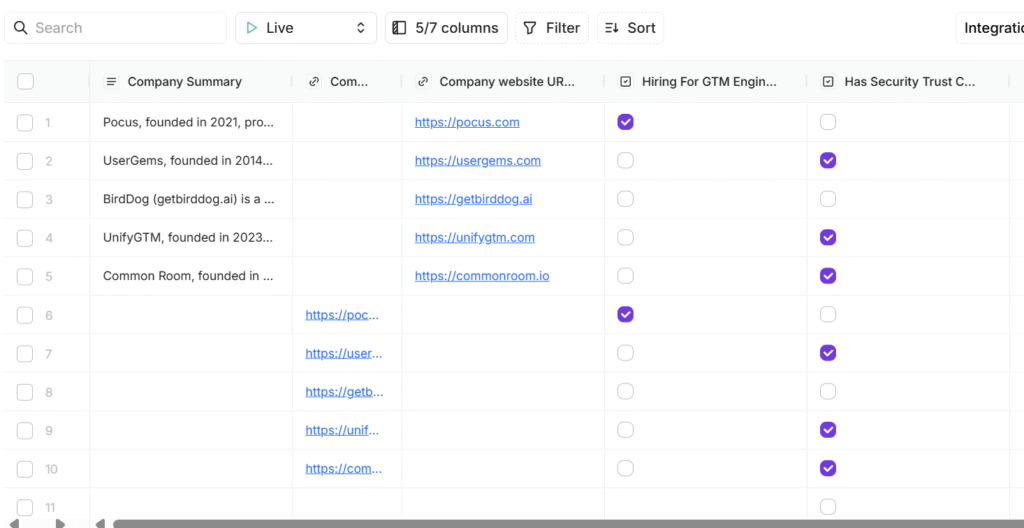
Once you have your table created (whether it’s by importing from Hubspot, or creating it from scratch), you can start adding columns to enrich your data… and this is where their simplicity/ease of use stands out.
Instead of choosing what specific data source you want to use, you just use natural language to describe your field, and Freckle does all the work in deciding what data source to query in the backend.
Let me show you what I mean…
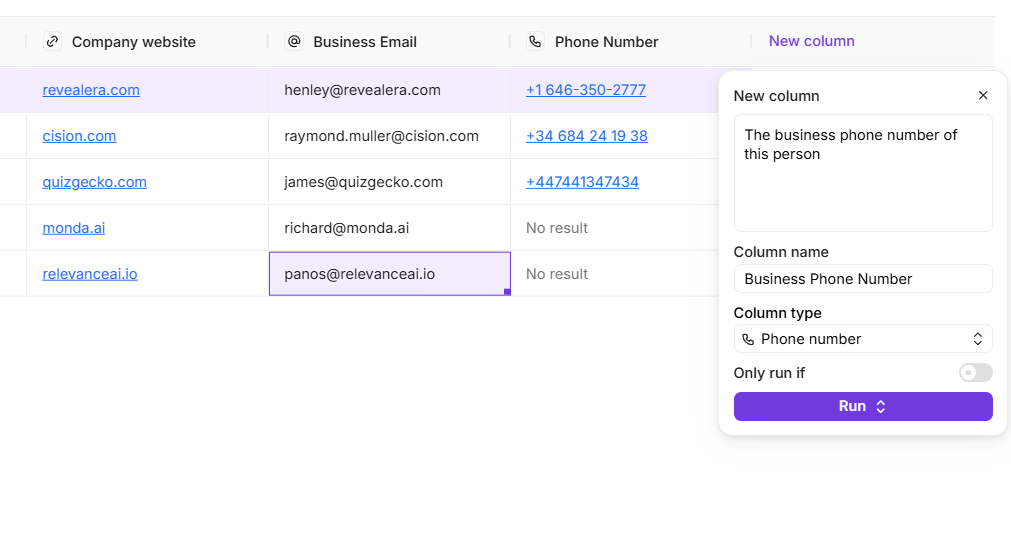
In the screenshot above, I added a column and literally typed “The business phone number for this person”, and Freckle.io was smart enough to know that I wanted the phone number for each row. When I saved and ran this for all the rows, Freckle.io handled the logic of going through their contact data providers to find the phone number for each contact.
I didn’t need to choose which data sources to query, in what order, etc. Freckle.io hides all of that for you, to keep things simple.
What if there’s no data source for what you want?
Even if there’s no data source for what you want, Freckle.io goes out and searches the internet to find the information.
During my trial, I tried adding a column to indicate whether the company website had a security trust center. It enriched each of my rows, and accurately displayed YES or NO in most cases. I imagine they had a web crawler that crawled each company’s website to check.
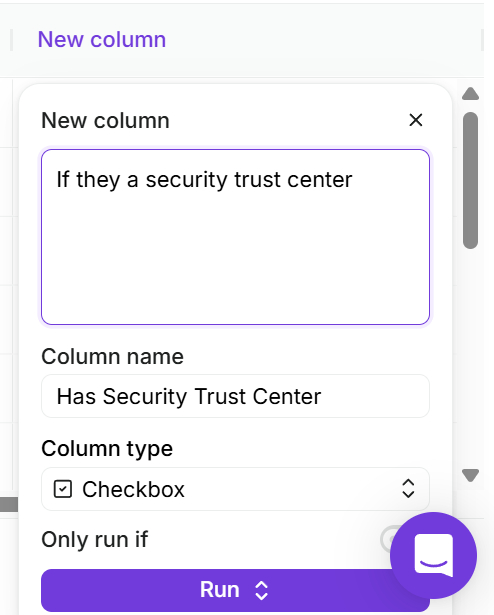
language to describe how you want to enrich it.
Once you’re done with enriching, Freckle automatically syncs everything back to your CRM. This keeps your HubSpot as a single source of truth instead of becoming a messy data mess.
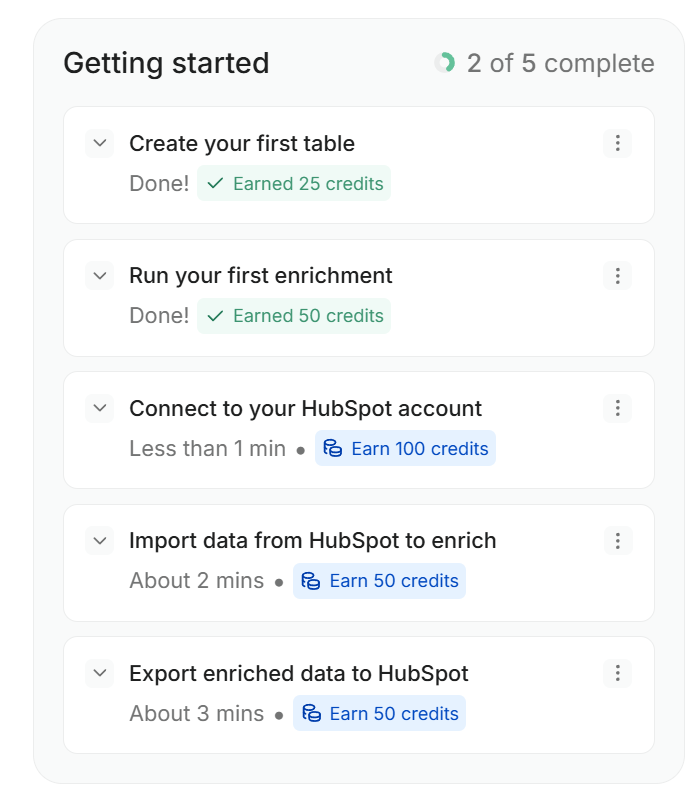
A brief note on their onboarding: I was very impressed with Freckle’s onboarding process. A lot of tools just leave some onboarding video or docs and expect you to learn everything yourself. With Freckle, they have a nice, simple check list. And they even incentivize you with credits for completing each step (smart!)
Innovation Score: Very High
Freckle.io remains one of the fastest-shipping teams on this list, and their trajectory over the past year has been genuinely surprising for a 10-person company.
The biggest news: Freckle now has a CLI. They launched the beta in June 2026, and by August they’d rewritten their own company description to lead with it – Freckle is now positioned as the way to run Clay-style GTM workflows from Claude Code, Codex or Cursor. Enrichment, research agents, signals and workflow logic, all built in natural language from the terminal instead of clicking around a UI.
What I find interesting is that it’s deterministic rather than autonomous – you define the workflow and it executes predictably, rather than letting an agent improvise. They brought on ColdIQ and Workflows.io as pre-beta design partners and turned that into a livestream series, building entire HubSpot audits and TAM maps live with nothing pre-baked.
Their other major releases over the past year:
- GTM Brain (May 2026) – a company memory layer for Claude Code and Codex, shipped as an installable plugin. It maps your CRM, product usage, call transcripts and docs into a source-backed context file so agents stop needing to be re-taught what your company does every session.
- Ads Audiences (public May 2026) – mirrors CRM lists into LinkedIn, Meta and Google and refreshes them every 24 hours, while enriching work emails into personal emails to lift match rates. One Series B customer went from a 23% to 76-80% match rate on the same contact list for a Google Ads campaign.
- Native Salesforce integration (December 2025) – two-way sync on all plans with no feature gates, plus the earlier HubSpot integration, blur columns, sentiment analysis, lookalike imports and an Apollo-powered People Search.
The use case they’ve pushed hardest lately is deanonymizing personal-email signups, since AI-native products get most of their signups from a gmail address with no company attached. Bolt ran a version of this at 100,000 signups a week and surfaced $2M+ in pipeline in four weeks.
Limitations
The major limitation of Freckle is their 40 data sources.
Clay, on the other hand has more than 150 data sources, whether it’s tech stack enrichment with BuiltWith, or simply more email enrichment sources.
Though I had success with their custom columns, it did fail a few times.
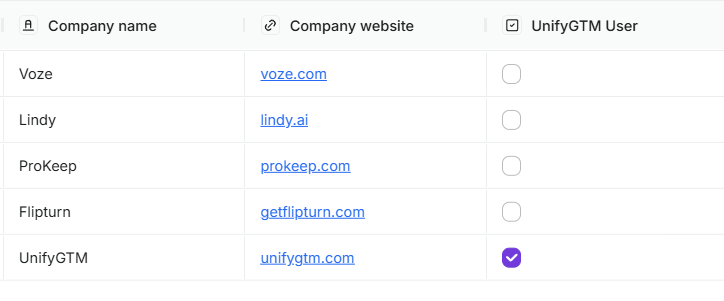
For instance, when I added a custom column to indicate whether the company was an UnifyGTM customer, Freckle.io didn’t detect it for 4 of 5 customers of UnifyGTM (it detected it for UnifyGTM itself, which was fairly obvious). I can’t say for certain if more data sources would’ve made them successful, but that’s something to keep in mind.
Lastly, they’re HubSpot + Salesforce only. There are still no native integrations with Microsoft Dynamics, Pipedrive or any other CRM. So if you need to sync data from other CRMs, you either need to manually import/export a CSV, use their HTTP API, or try another tool.
There’s also no signal orchestration – Freckle won’t watch your accounts and fire off actions when something changes.
Pricing (updated August 2026)
In terms of transparency, it’s often difficult to evaluate tools when companies hide their pricing behind a “Call for a Demo.” Freckle doesn’t do that. Their pricing breakdown is clear, so you can quickly decide whether the cost is worth it for your use case.
Freckle restructured their pricing alongside the CLI launch. The free tier now gives you 250 credits (down from 500) with no credit card, and their paid plan is a single “Build” tier starting at $99/month with a credit slider that scales from 0 all the way to 500,000 credits. Annual billing saves 15%.
Importantly, Freckle prices on outputs, not attempts – you pay 1 credit per output returned, with phone numbers costing 5 credits. The CLI is not separately priced; it runs on the same account and credit balance.
Their Clay trade-in offer is still live: you can exchange 3 Clay credits for 1 Freckle credit if you’re a paying Clay customer signing up to a Freckle paid plan (expired Clay credits don’t count). Previous Clay customers get 1,000 bonus credits.
| Plan | Price | Credits | Notes |
|---|---|---|---|
| Free | $0/month | 250 | No credit card Unlimited seats & tables Waterfall across 40+ providers |
| Build | From $99/month | Slider up to 500,000 | Unlimited rows, HTTP API BYO API keys, CRM integrations Webhooks, rollover credits, top-ups |
| Enterprise | Custom | 500,000+ | Fastest enrichment speeds Dedicated account manager |
Note: Freckle charges per output, not per attempt – 1 credit per output returned, 5 credits per phone number. Annual billing saves 15%. The CLI runs on the same credits as the web app.
Freckle’s pricing page: https://www.freckle.io/#pricing
2. Exa Websets – easier and simpler to use than Clay
Pros: Extremely easy to use, ability to try everything during the free trial
Cons: Pricing not as easy to understand, no GTM orchestration, only integrates with Hubspot/Salesforce CRM.
Exa Websets is a relatively new tool that you won’t see recommended in many of the more generic “Clay alternative” articles. But if you’re frustrated with how hard Clay is, then Exa Websets might be right up your alley. It’s very similar to Freckle.io, in that you don’t have to worry about deciding what enrichment source you want to use – you simply use natural language to tell Exa what you want.
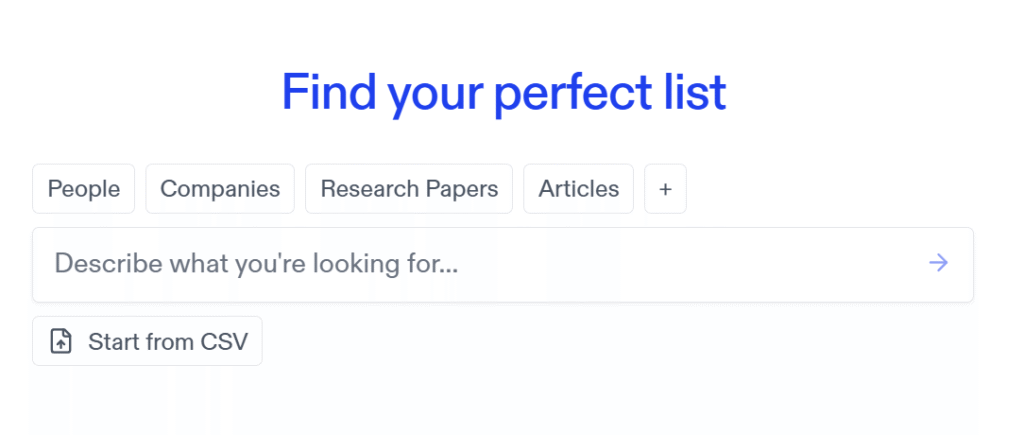
When you sign up to use Exa Websets, you’re greeted with a very simple search bar. You can choose to search for People, or Companies, and all you have to do is enter what you’re looking for in natural language, such as “VP of Sales of fintech startups in NY” or “Fintech startups based in the NYC area”.
After that, Exa generates a spreadsheet (very similar to Clay) that will slowly go out and retrieve what you’re looking for. You can also add enrichment columns. If you don’t find any that match what you’re looking for, you can just describe it and Exa will intelligently determine which data source to get it from.
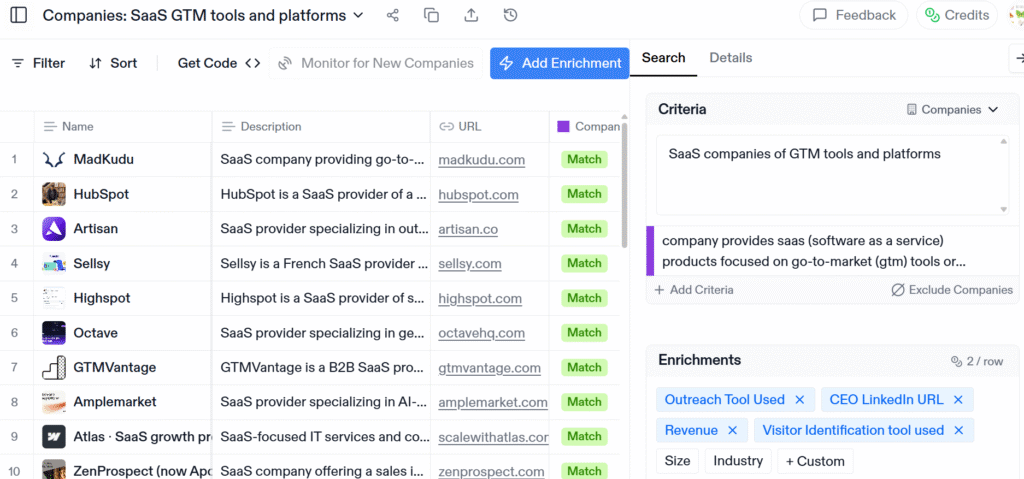
During my trial, I searched for companies that were “SaaS companies of GTM tools and companies”, and enriched them with the CEO LinkedIn url, the company’s estimated revenue, and the outreach tool they used. The list of companies they returned back, and the enrichments, for the most part, matched what I was looking for.
However, when I searched for people, it was a bit hit and miss. I searched for “Head of Partnerships in GTM Tools”, with work email and phone numbers as enrichment columns.
Exa then generated a list that looked solid at first glance, but once I delved into the people, a small number of them were people who had recently changed jobs (no longer holding the title of Head of Partnerships). Most of them were people who changed jobs within the past month. I imagine Exa probably doesn’t refresh their LinkedIn people database every single day, which is understandable, so you might have to live with a few inaccuracies.
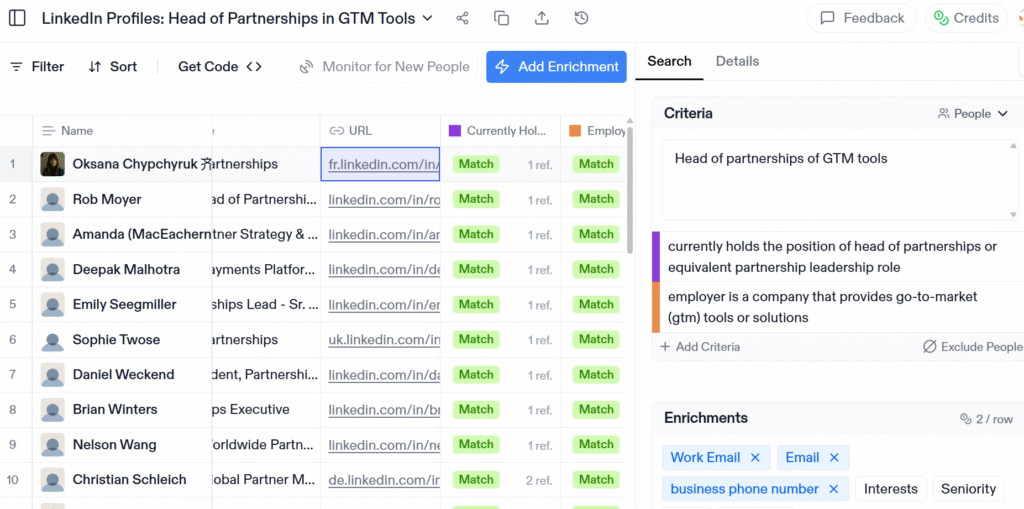
Exa did do a good job of retrieving phone numbers and business emails for most of the contacts, and most of them were correct.
Innovation Score: Very High
Exa is the most technically ambitious company on this list, and it’s not particularly close. They ship meaningful releases almost weekly, and the past year has been a step change for them.
They raised $250M at a $2.2B valuation led by a16z in May 2026, growing from roughly 25 people to over 200. Cursor, Cognition, HubSpot, OpenRouter, monday.com and much of the Fortune 500 now run on Exa, along with agents built by 500,000+ developers.
Their major launches over the past year:
- Exa Agent (June 2026) – a high-compute web research agent for deep research, list-building and enrichment workflows, which they claim runs at less than half the cost of frontier general-purpose models on the same tasks.
- Exa Connect (July 2026) – connects agents to data beyond the public web, launching with ZoomInfo, Crunchbase, Similarweb and other major data providers. This is a big deal for GTM use cases, since it closes the gap between “search the web” and “query licensed B2B databases.”
- Distribution deals almost everywhere – Grounding with Exa inside Gemini across Vertex AI and Gemini Enterprise (May), an Exa plugin in OpenAI’s Codex and ChatGPT (August), a Vercel partnership (August), and powering search for Firefox’s new AI browser (August).
- Machine Payments Protocol (August 2026) – the open standard from Tempo and Stripe. Agents can now pay Exa per request in stablecoin with no account and no API key, and they published a GTM enrichment cookbook for it. Early and strange, but it’s the first credible answer to how agents transact for data.
- Exa Skills and the GTM Toolkit (July-August 2026) – the internal skills their own team uses for lead gen, recruiting and company research, packaged and open-sourced, plus an Exa bot in Slack.
- Plus dynamic highlights (95% token reduction), state-of-the-art search across 300M+ research papers, and the Web Search Index benchmark comparing how agents perform across different search tools.
They now serve 80B pages and track 1.4T URLs, and expect to reach Google-scale index size in early 2027. The thing to understand about Exa is that Websets is a small surface on top of a much bigger search infrastructure company. That’s a strength (the underlying retrieval keeps getting better) and a weakness (GTM features aren’t necessarily their priority).
Limitations
Exa Websets doesn’t come with any signal-based orchestration. For example, you can’t have it monitor all of your people results to alert you when someone has changed their jobs. Nor can you monitor all of your company results to alert you when one of them has posted a job posting for a certain job title. Exa Websets is mostly for simple data enrichment.
Their people data freshness also still lags their company data, as I found in my testing.
Pricing (updated August 2026)
Exa’s pricing can be a bit hard to understand and a tad pricey. For starters, they charge 10 credits for each result that matches your query. This doesn’t even include any special enrichments (except for the standard ones they provide for every company/person). So right off the bat, if your query generates 100 people, that will cost you 1,000 credits.
Emails and phone numbers each cost 5 credits, and all other enrichments cost 2 credits each. One thing that has become clearer in their current pricing is that each tier also caps how many results a single search can return, how many enrichment columns you get, and how many searches can run at once.
| Plan | Price | Credits/Month | Limits |
|---|---|---|---|
| Free | $0/month | 1,000 | Up to 25 results per search Limited features |
| Core | $49/month | 8,000 | Up to 100 results per search 2 seats, 10 enrichment columns 2 concurrent searches |
| Pro | $449/month | 100,000 | Up to 1,000 results per search 10 seats, 50 enrichment columns 5 concurrent searches |
| Enterprise | Custom | Custom | Up to 5,000 results per search 100 enrichment columns + Volume discounts |
Credit Breakdown:
- 10 credits = 1 result matching all your criteria (partial matches cost 0)
- 5 credits = email or phone number
- 2 credits = any other enrichment column
- Exa Agent API (separate, usage-based): $0.10/ACU compute, $0.005 per search call, $0.02 per email, $0.07 per phone
Exa’s pricing page: https://exa.ai/websets/billing
3. Hubspot Breeze Intelligence (Clearbit) – Best for company enrichment if you already use Hubspot
Pros: Easy to use, and relatively inexpensive for existing Hubspot users
Cons: Only does company enrichment, not contact enrichment
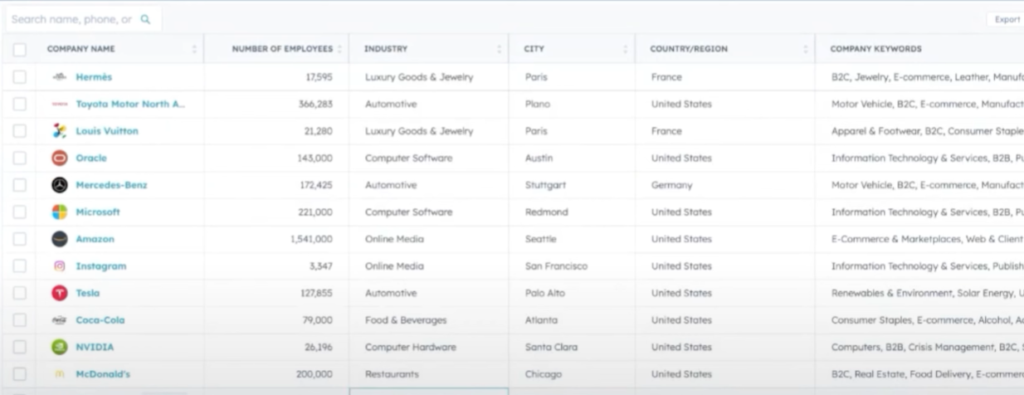
If you’re already paying for Hubspot, and only need company enrichment, Breeze Intelligence might be a good fit. They even do basic company enrichment for free. By basic company enrichment, I mean fields like annual revenue, # of employees, industry, keywords related to the company, etc.
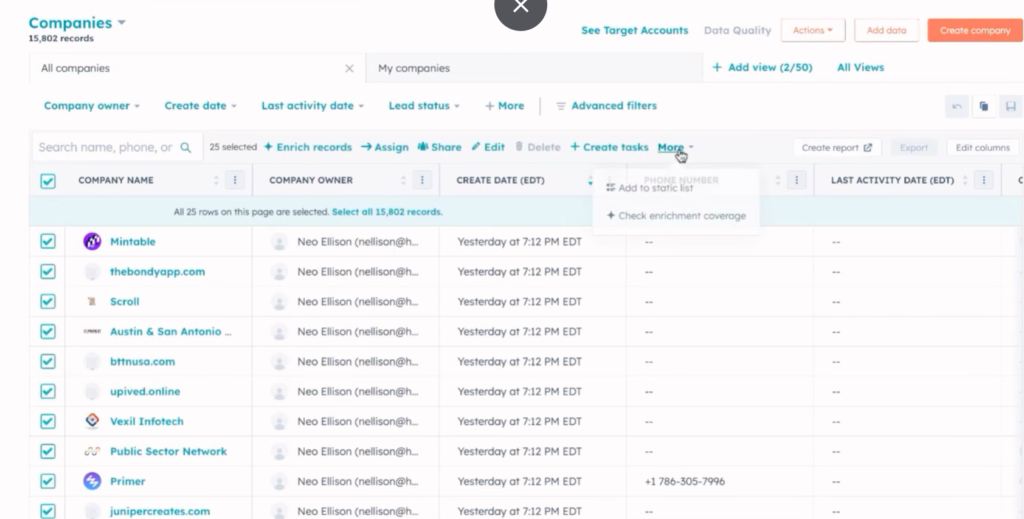
Basic company enrichment is pretty simple. Just choose the records you want within your list of companies, choose “More” and “Check enrichment coverage”. Hubspot will then go through all those companies and tell you what % of them they can enrich for you.
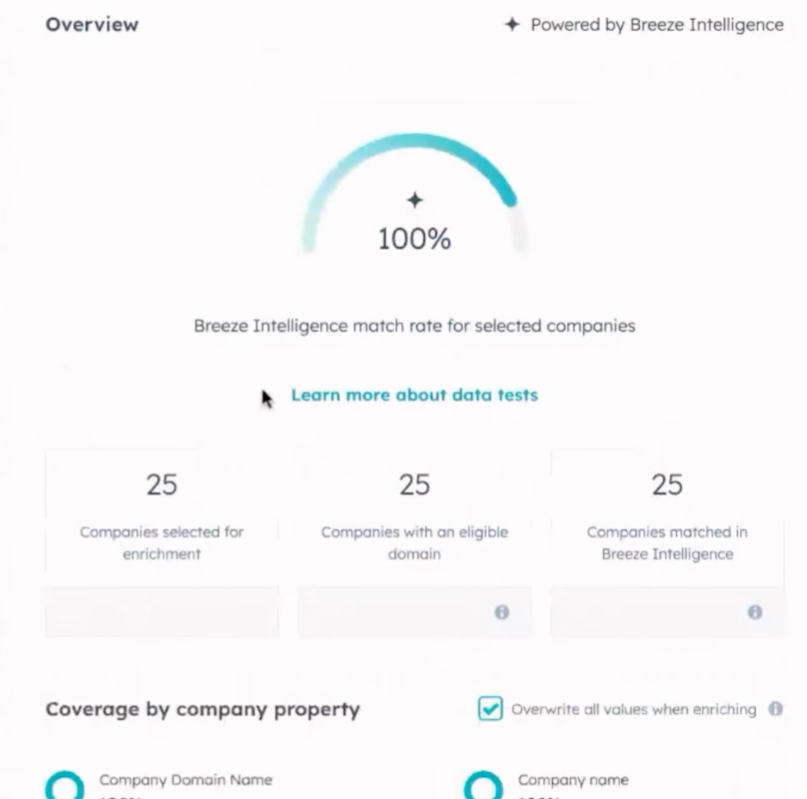
When I selected 25 companies in my CRM, Hubspot told me that all 25 had an eligible domain and could be enriched. When I pressed “Enrich” it populated basic info about each company as you can see below.
Hubspot also released a new feature called “Smart Properties” which is basically their version of Clay’s Claygent. It lets you create custom AI-powered fields that automatically populate based on a prompt you write. For example, you could create a Smart Property that determines a company’s target customer, identifies what services they offer, or figures out their tech stack – all by having the AI search public web data.
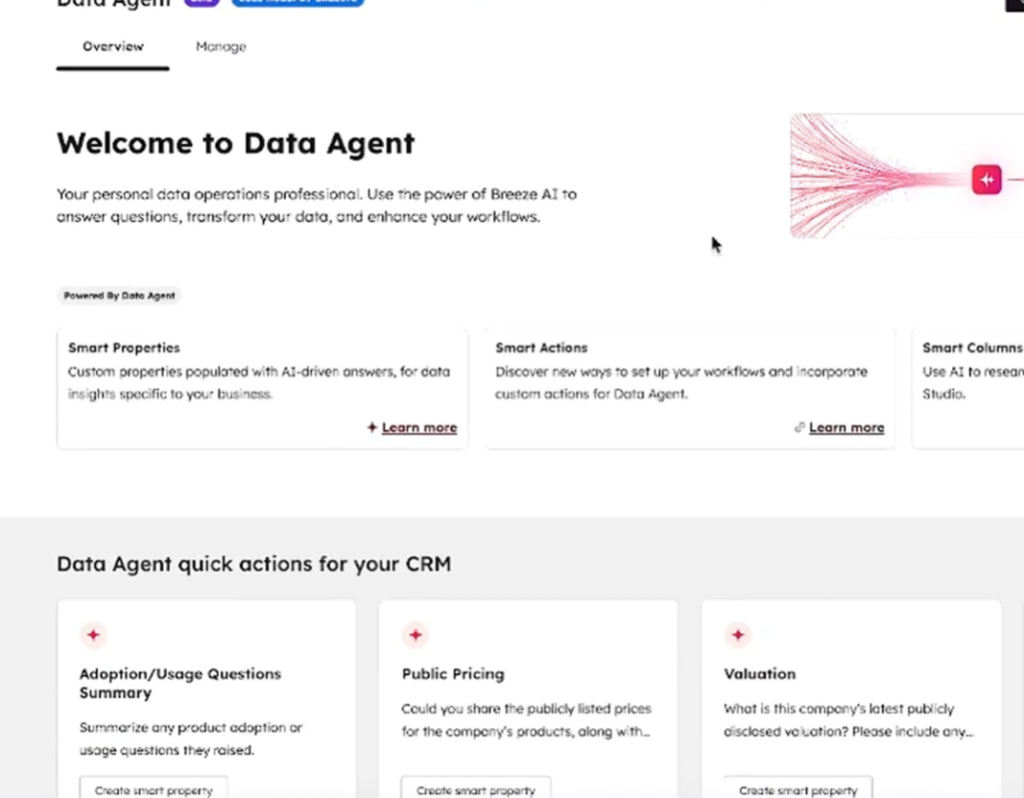
In addition to searching public web data, it can also pull from data you already have in HubSpot, like existing properties or even call transcripts if you’re using HubSpot for calls. So you could set up a prompt like “based on the last 5 call transcripts, summarize this prospect’s main objections” and have that auto-fill into a property on the contact record. It’s essentially letting you build custom enrichment without needing a separate tool.
The workflow integration is where it gets interesting for automation. You can use the Data Agent to fill Smart Properties as a workflow action, so when a new company enters your CRM or hits a certain lifecycle stage, it automatically runs the AI enrichment.
You can also set up scheduled auto-fills (daily, weekly, or monthly) on specific segments of your database. Each Smart Property fill costs 10 HubSpot credits per record, so it’s not free, but it’s all native inside HubSpot without needing to connect multiple external tools.
Lastly, HubSpot recently expanded Breeze Intelligence beyond just data enrichment with the rebuilt Prospecting Agent, which now handles the full sales lifecycle from start to finish. Instead of manually identifying buying signals, the agent automatically detects when prospects show intent -recent funding rounds, job postings, website changes, hiring activity and flags high-potential accounts in real time. It then moves beyond detection to actually book meetings and prepare pre-call briefings, reducing the manual work of researching and reaching out to leads.
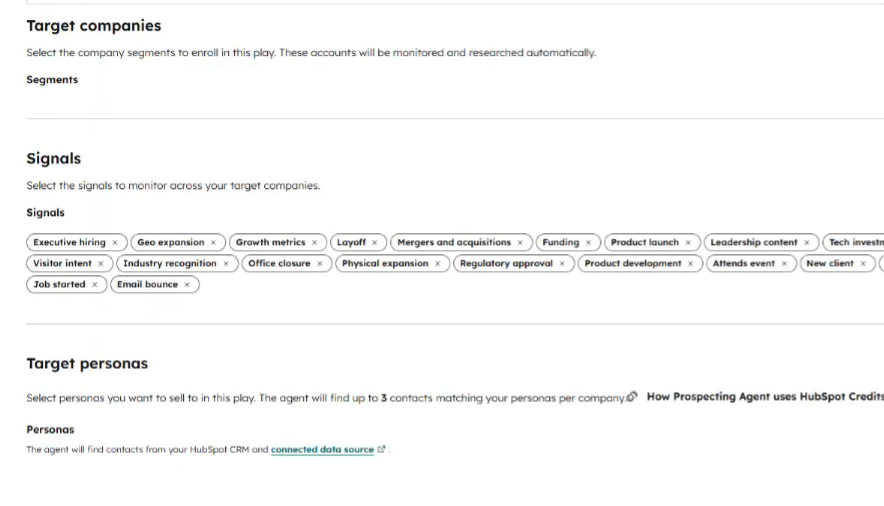
When I tried the Prospecting Agent, Hubspot gave me a whole array of signals to track for any account. You can see the list above – the signals covers everything from executive hiring, geo expansion, layoffs, funding, product launches, office closures/openings, and events attended. Like the company enrichment, the Prospecting Agents also consumes credits.
Innovation Score: High
HubSpot has moved faster here than I expected for a company of its size. Over the past year Breeze Intelligence went from “Clearbit with a new name” to a genuine enrichment-plus-agents layer: Smart Properties (their Claygent equivalent), the Data Agent as a workflow action, scheduled auto-fills, and the rebuilt Prospecting Agent that detects buying signals and books meetings.
Two structural moves stand out. First, at INBOUND 2025 they made standard enrichment free with every Core Seat, which is an aggressive shot at the paid enrichment vendors. Second, in April 2026 they shifted their agents to outcome-based pricing – you pay per recommended lead or per resolved conversation rather than per API call, which is a meaningfully different commercial model from everyone else on this list.
They’ve also partnered with ZoomInfo, whose verified data now powers the Breeze Prospecting Agent via ZoomInfo’s GTM.AI layer – a sensible admission that HubSpot’s own B2B contact data isn’t best-in-class.
The knock on them is that all of this only matters if you’re already a HubSpot customer. This is platform expansion, not a standalone product you’d choose on merit.
Limitations
Here’s where my testing hit a wall: Breeze Intelligence doesn’t enrich phone numbers or email addresses. I specifically tried enriching several contact records hoping to get mobile numbers or even just direct dials, and nothing came back for those fields.
This is a major limitation if you’re doing cold outreach or building prospect lists from scratch. You’re basically enriching around the contact info rather than getting the contact info itself, which is a mismatch for sales teams who rely on those phone numbers and verified emails to actually reach people.
In addition, one limitation with their custom AI enrichment: if you’re trying prompts that attempt to scrape LinkedIn, these enrichments get filtered out and won’t return values, so you can’t use it to check LinkedIn job postings or pull LinkedIn profile data the way you could with Clay. I imagine it’s because of legal reasons as they don’t want to scrape Linkedin.
Pricing (updated August 2026)
The pricing changed meaningfully over the past year. Following HubSpot’s INBOUND 2025 packaging update, standard company and contact data enrichment is now included for free with every Core Seat – you no longer burn credits for basic firmographic enrichment. Only “Smart Property” AI enrichment consumes credits.
Breeze Intelligence now runs on HubSpot’s unified credit system (the old separate “Intelligence Credits” were merged into the general HubSpot Credits pool, valued at roughly $0.01/credit). Credits are still sold in packs, with the entry pack of 100 credits at roughly $45/month. Extra credits run about $10 per 1,000 on monthly billing (~$9 per 1,000 annual). Credits reset monthly with no rollover, and you’ll still need an active HubSpot subscription on top.
Each Hub tier also comes with a bundled credit allowance: Starter includes 500, Professional 3,000 (5,000 on Data Hub), and Enterprise 5,000 (10,000 on Data Hub).
The big change: agents moved to outcome-based pricing in April 2026. The Prospecting Agent now costs $1 (100 credits) per recommended lead for outreach, with company research at 10 credits ($0.10) per task. It’s available on Pro and Enterprise plans with a 28-day free trial.
| What You’re Buying | Cost | Notes |
|---|---|---|
| Standard enrichment | Free | Included with every Core Seat Basic company & contact firmographics |
| Smart Property fill | 10 credits (~$0.10) | Per record, per property AI-powered custom enrichment |
| Prospecting Agent | $1 per recommended lead | 100 credits per lead (outcome-based) Company research: 10 credits/task Pro & Enterprise only, 28-day trial |
| 100-credit pack | ~$45/month | The only publicly listed pack ~10 Smart Property fills |
| Additional credits | ~$10 per 1,000 | ~$9 per 1,000 on annual billing Bundled: Starter 500 / Pro 3,000 / Ent. 5,000 |
Note: HubSpot only publicly publishes the 100-credit tier; larger packs are quoted per contract. All Breeze Intelligence usage requires an active HubSpot subscription. Credits reset monthly with no rollover.
4. SyncGTM – best for most friendly trial (lots of credits to try)
I was introduced to SyncGTM by finding it in another “Clay alternatives” article and decided to give it a try recently to see if it could replace Persana AI in my list (which recently got acquired and probably shutting down)
Signing up for SyncGTM is completely free, with no demo needed, which I appreciated as an introvert. After I signed up, I liked the dead-simple interface that asked me what I wanted to do, so I didn’t have to think about where to navigate, as you can see in the screenshot below:
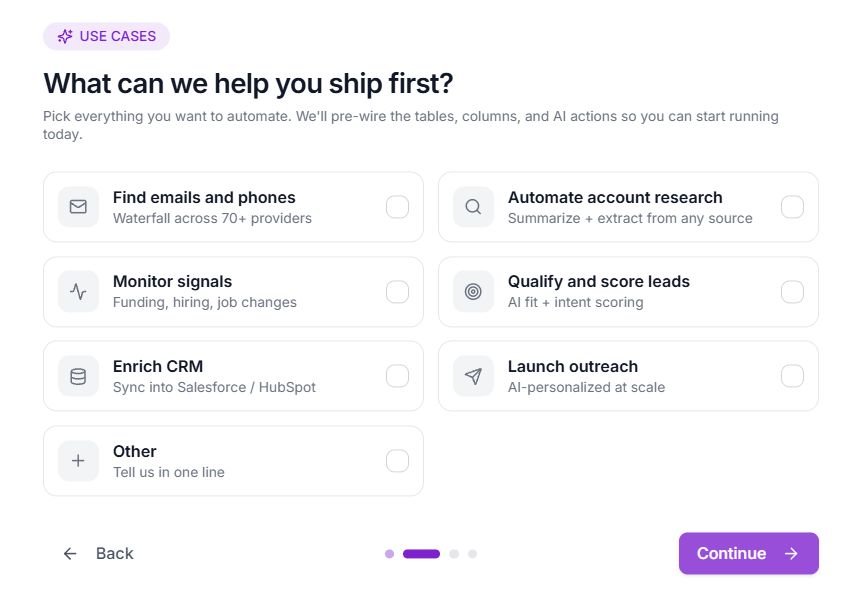
The basic options include “finding emails and phones” (probably their most popular task), monitoring signals, enriching your CRM, and automating account research.
Since it’s what the vast majority of people probably want to do, I decided to enrich emails and phones. I had a list of 20 confirmed emails of decision makers in a variety of industries, and as a test, wanted to see what % of it SyncGTM matched on.
I chose the option “Import CSV”, but you also have the option to find leads through the platform, such as searching job postings for a certain job title or keyword, scraping commenters on a Linkedin post, or scraping followers for a Twitter profile.
After I imported the CSV, SyncGTM went ahead and found their work email. It took around 5-10 seconds for it to run on 20 emails. It ended up finding 17/20 of the emails, and they matched exactly what I had. It couldn’t find an email for 3 of the emails for a 17/20 accuracy rate, which was pretty decent.
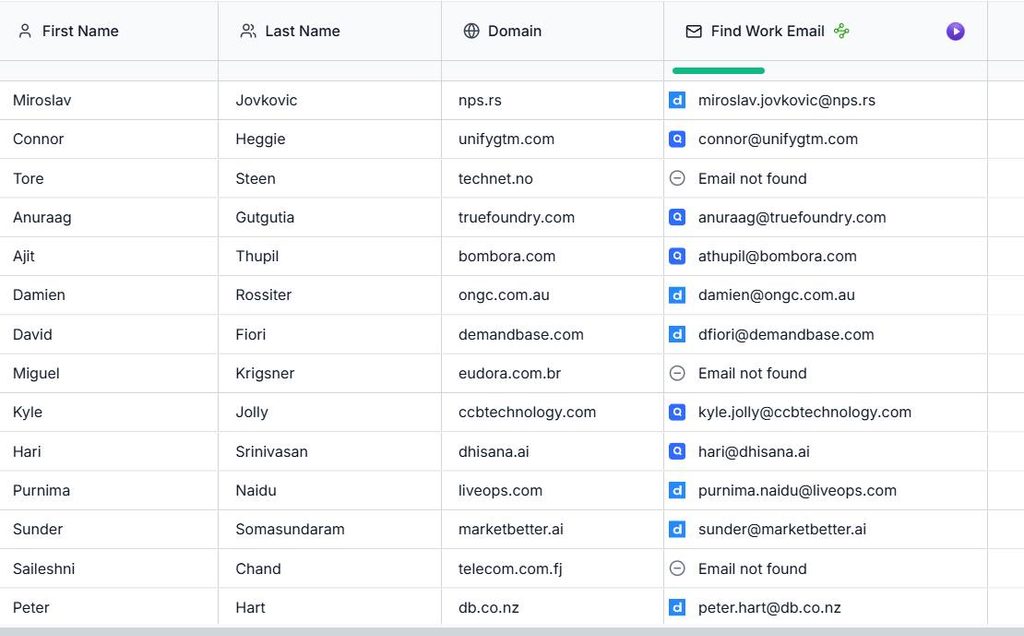
I can’t say for sure if SyncGTM have stronger coverage for US/North American companies, but I did notice that it couldn’t find emails for some of the international companies (3 of these companies were based in Brazil, Fiji and Norway), while it had the emails for all the North American companies correct.
Either way it was better that they told me they couldn’t find an email rather than guessing at one, which could negatively impact my deliverability rate.
SyncGTM isn’t just a pure enrichment platform. In addition to email/call enrichments, SyncGTM also offers signals, including monitoring a company’s upcoming events, products launches, and job changes, as you can see below.
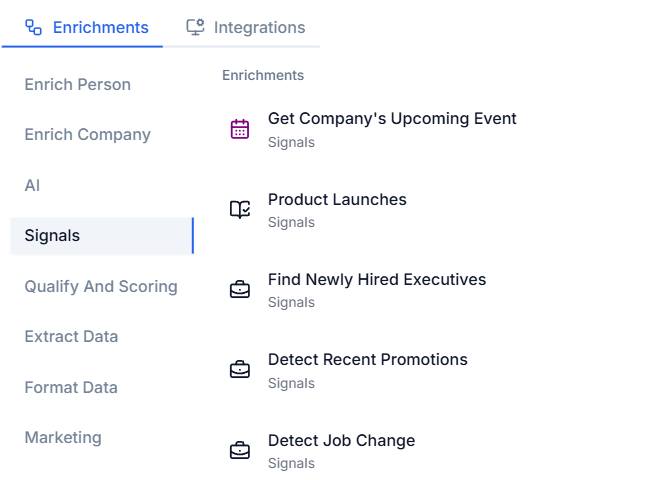
Since I’m on the lookout for sales platforms that wants to integrate our technographic intelligence data, I decided to import a list of domains for sales platforms (ie unifygtm.com, zoominfo.com) and get a list of recent product announcements.
SyncGTM returns markdown (JSON) that gives you the date and summary of all their product announcements, as you can see below.
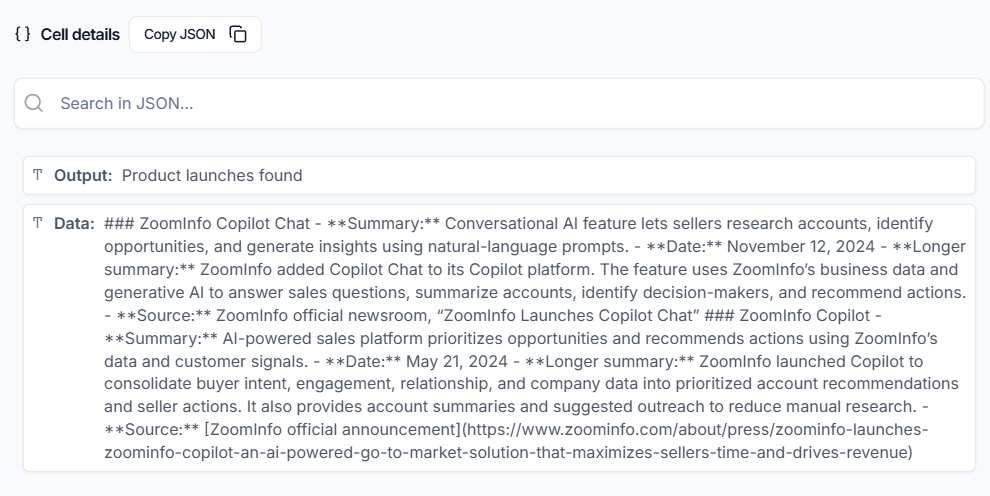
While product announcements was the main signal I tested, they offered some interesting signals I didn’t see in many other tools. One of the interesting ones were: company headcount by function, a funding prediction score (useful if you’re selling to growing startups), and a Linkedin activity score (useful for Linkedin outreach).
Like most of the other Clay alternatives in this list, SyncGTM also offers AI enrichments, which is their verison of “Clayagents”. You can create a prompt to do anything from writing a personalized email, or checking if a company fits a certain criteria such as offering a free trial, or is a B2C or B2B company. You can bring your own API key so it uses less credits. While this feature is useful, I think it’s something that’s become ubiquitous, so I won’t delve much into how good SyncGTM’s AI enrichments are.
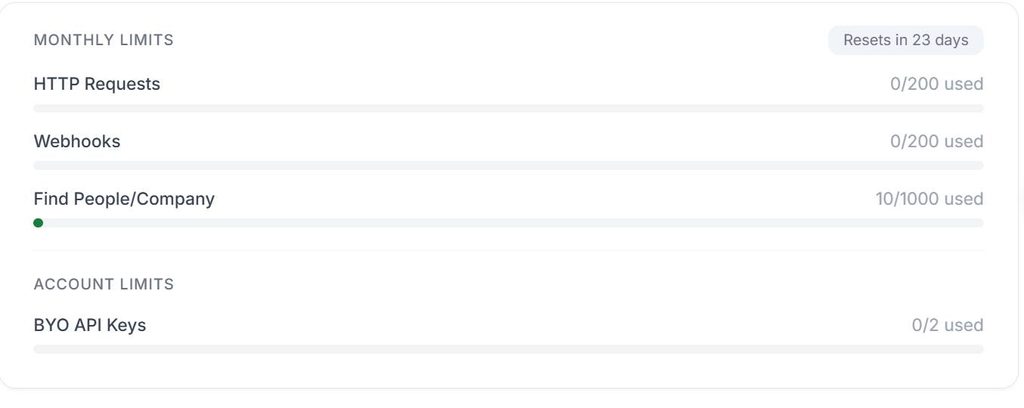
1 thing that SyncGTM really shines more than other tools it it gives you a LOT of free credits to use during your trial. For example, they give you 1000 credits (1 lead enrichment = 1 credit) to try out, which is more friendly than what Clay gives you (200-300 leads for 1000 credits on a trial), and what Freckle.io free plan gives you (250 credits for 250 lead enrichments).
They also tell you exactly how much usage you made in your current period in the Settings, so you know exactly how many credits you used, and how many are left.
Overall, if you’re looking for another self-serve replacement for Clay that has both lead enrichment + signal orchestration, and lets you try out the full feature set without worrying about running out of credits, SyncGTM is worth a look.
Innovation Score: High
SyncGTM is a very small team, and what stands out is how completely they’ve rebuilt around agents in about four months. In June their own description was a generic list of GTM capabilities. By August it was three lines: affordable Clay alternative, an MCP you run your GTM from inside Claude or ChatGPT, and waterfall enrichment. That’s a small company deciding what it actually is.
- SyncGTM MCP (June 2026) – 40+ endpoints for lead finding, waterfall enrichment, email verification, website traffic, technographics and buying signals. The detail I care about: no API keys and no Claude Code required. You connect once and it works in the consumer Claude and ChatGPT apps. Most MCP launches in this category assume you’re a developer.
- Profile Search MCP (August 2026) – search 550M+ profiles by title, location, job change, promotion, hiring activity and company growth from a chat prompt. This turns their MCP from “enrich a row I already have” into “build the list from scratch.”
- Waterfall expansion (May–June 2026) – added Forager, Leadmagic and others to the email and phone waterfall. An enrichment CLI is listed as coming soon.
- Agent skills – they publish skill files for the full MCP workflow, and run their own CRM as a Notion database driven by scheduled agents (meeting prep, transcript summarization, signup qualification, follow-up SDR). They’ve published how each one works. That level of dogfooding shows in how well-scoped the MCP is.
Limitations
There weren’t many limitations in terms of actually being use all the features freely during the trial – as mentioned they have a very friendly trial. And they had almost everything you’d expect in a Clay alternative. However, since every tool has a “Limitations” section, a small nitpick I had is their technographic enrichment focused a lot on front-end technologies.
For instance, when I tried to get the tech stack of unifygtm.com, it returns a long list of technologies like “Google Font API”, “Google Hosted Web Font Loader” and more. Which is honestly not useful unless you’re selling perhaps a web design service. It would’ve been more valuable to see what devops, security or AI tools they’re using for instance.
Pricing (updated September 2026)
SyncGTM publishes everything, with no demo gate on the self-serve tiers. It’s a single credit that covers enrichment, signals and AI research runs, so you’re not juggling separate currencies the way you now are with Clay. Annual billing saves 10%.
The free tier isn’t shown on the pricing page, but signing up gets you 1,000 credits with no credit card and no sales call – the most generous trial of anything I tested here. Clay’s trial credits get you 200–300 leads, but Freckle’s free plan is 250 credits.
| Plan | Monthly | Annual | Credits/Month | Included |
|---|---|---|---|---|
| Free | $0 | $0 | 1,000 one-time | No credit card, no demo |
| Solo | $49/month | $529/year | 1,000 | 3 seats, 15,000 rows/table, 20 action columns |
| Growth | $99/month | $1,069/year | 2,500 | 10 seats, 50,000 rows/table, 50 action columns |
| Pro | $249/month | $2,689/year | 8,000 | Unlimited seats & columns, priority support |
| Business | $649/month | $7,009/year | 25,000 | White-glove support |
| Enterprise | Custom | Custom | Custom | 100,000 rows/table |
Credit Breakdown:
- 1 credit = verified work or personal email
- 0.3 credits = email verification
- 12 credits = mobile number (1 credit to verify one)
- 1 credit = buying signal, or one AI research agent run
- Pay-per-result: only charged when a valid result comes back – matching my test, where the 3 misses cost me nothing
SyncGTM’s pricing page: https://syncgtm.com/pricing
5. Databar.ai – Best for breadth of data sources
Pros: 140+ integrations and a powerful MCP server
Cons: Flows still basic (no signal triggers), AI agent gets pricey at 5 credits per row, only 100 trial credits
Databar.ai is another Clay alternative I tried. Like Clay, it’s main user interface is a spreadsheet where every column can be an enrichment, an AI prompt, or a data source. Pretty standard stuff. What makes it unique though is how many data providers it plugs into: 146 integrations in total, and 72 of them work out of the box using Databar’s own accounts, so you don’t need to sign up for each provider separately.
As with every other tool in this article, I signed up for a trial and tested the core features myself: building a list, enriching contacts, and their version of Claygent. 1 minor gripe: the trial only gives you 100 credits, so I had to be pretty careful about what I tested.
Building the initial list
When I first clicked “Build a list” in Databar, I was a little overwhelmed by the options (in a good way). I counted around 50 different sources, organized by category: company search, people search, hiring signals, companies by tech stack, funding, and even GitHub stargazers and Hacker News posts. That’s way more ways to build your initial list than Freckle, and closer to what Clay offers.
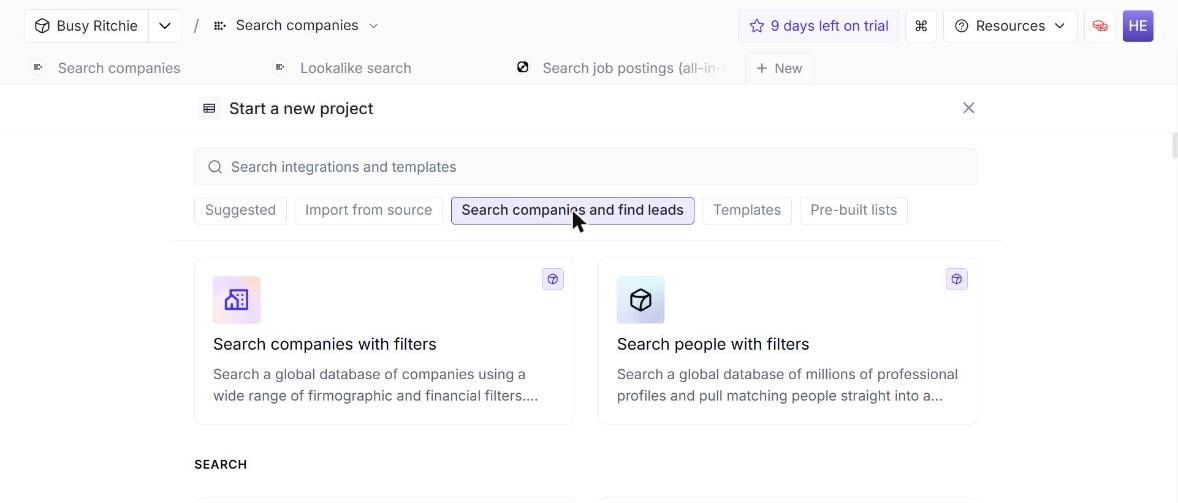
Before getting into results, one nice touch I really liked: every search shows its credit cost on the Run button before you click it, and the run logs show each query’s inputs and exactly how many credits it cost.
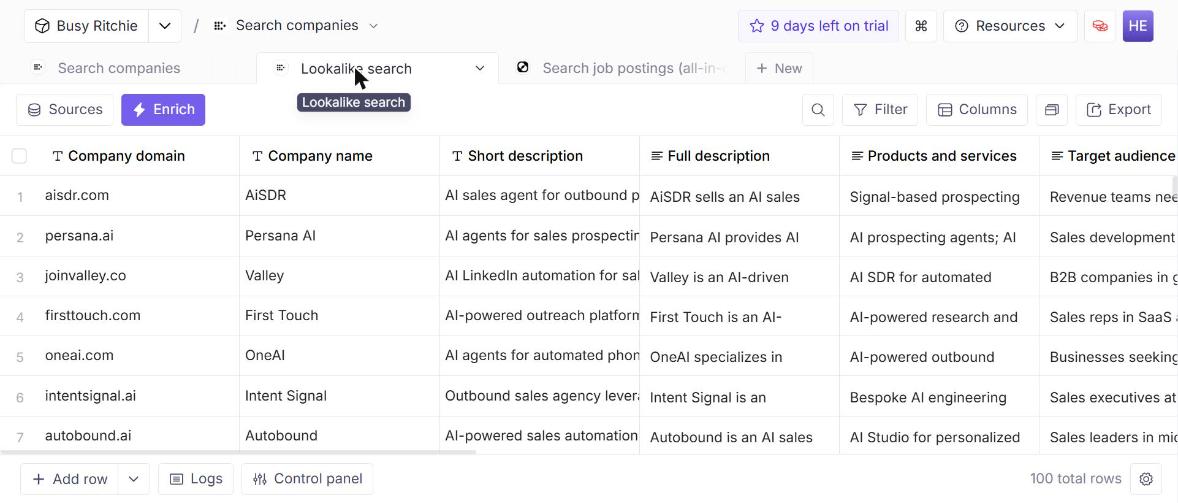
My first test was their lookalike search. I gave it unifygtm.com, the same test I ran in Freckle, and it came back with AiSDR, Persana, Valley, Autobound, ColdIQ and dozens of other AI sales tools. Out of 100 results, almost all were legit Unify competitors (though Persana recently got acquired, if I’m being nitpicky). There were only a couple of oddballs, like an AI agent for real estate leads, and SearchUnify (totally unrelated to GTM), which I suspect just matched on the name.
Next, I tried their job posting search, looking for companies hiring a “GTM Engineer”. Every single result was an actual GTM Engineer role posted that same day, from companies like Workflows.io, Transmit Security and Talentz.ai, with the full job description and company website already filled in.
A small annoyance was the search did return a few duplicates. One staffing company had posted the same role in six different cities, so it hogged most of the top results. So before you want to enrich the results, you may want to dedupe things.
Contact enrichment
Next, I tested their email enrichment with my list of 20 decision makers whose emails I’d already verified (the same list I used for SyncGTM). I uploaded a CSV with their full names and company domains, and let Databar find the emails.
Databar lists a bunch of email finders right in the enrichment panel, with their cost per row next to each one: their own in-house finder (2 credits), Limadata (3), Datagma (6), FullEnrich (8), and waterfall options like BetterContact and Waterfall.to (10). I went with Databar’s in-house finder.
Before running it, Databar showed me a confirmation with the estimated cost (40 credits for 20 rows). 1 thing to note: Databar only charges you credits if it could actually find the email
Databar ended up finding working emails for 15 of the 20 contacts. Interestingly, 5 of those weren’t the exact addresses I had (it returned “damienr@” instead of “damien@”, for example), but when I checked, they were all valid aliases that reach the same person. For the 5 it couldn’t find, it just said “No data” rather than guessing, which I appreciate since a bad email hurts deliverability. Like SyncGTM, most of the misses were international (Norway, the UK, Australia and Brazil).
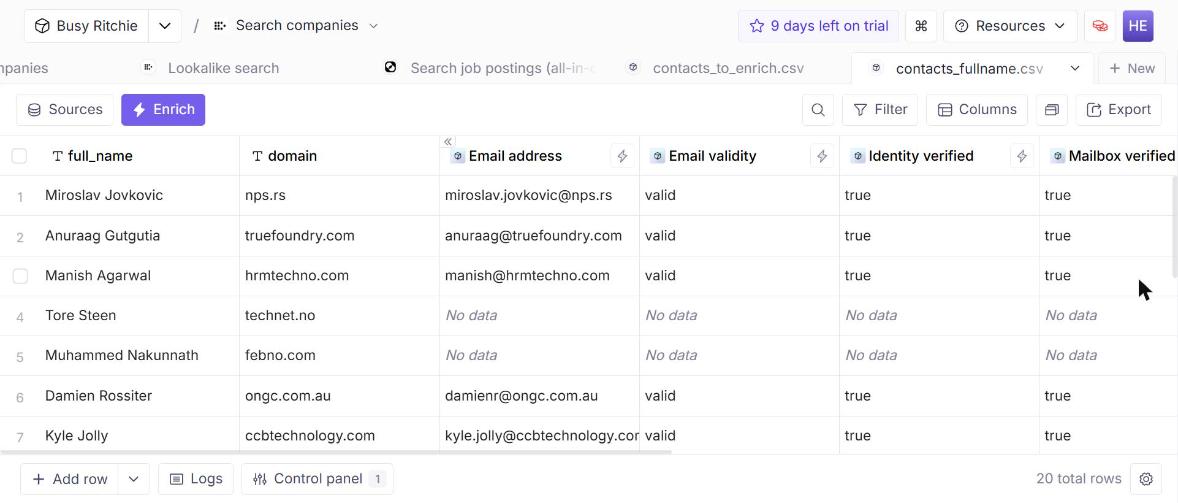
15/20 is a bit behind SyncGTM’s 17/20, but keep in mind this was the cheapest email finder on their menu (just 2 credits). And each email comes with a validity label (“valid” vs “valid-risky”), so you know which ones to use an email verifier to double-check before sending.
Custom AI enrichment (their version of Claygent)
Like most Clay alternatives now, Databar has its own version of Claygent, which they call the “AI Researcher Agent”. You give it a mission in plain English, reference any column with curly braces, and it goes out and researches the web for each row. There’s also a cheaper “Custom AI prompt” option (2 credits per row, GPT-4o Mini by default), but that one doesn’t browse the web, so it’s only useful for things like classifying data you already have.
To compare it fairly with Freckle, I ran the same test I did there: does this company have a security trust center? This time, I picked 10 companies where I already knew the answer. Five were SaaS companies with trust centers (TrueFoundry, Reply, LiveOps, Spara and Propio), and five definitely didn’t have one (a Norwegian IT reseller, Telecom Fiji, a modeling agency, and so on).
Databar got all 10 answers right, which is better than Freckle did in my test. Each answer also comes with the agent’s reasoning, so you can see why it decided what it did.
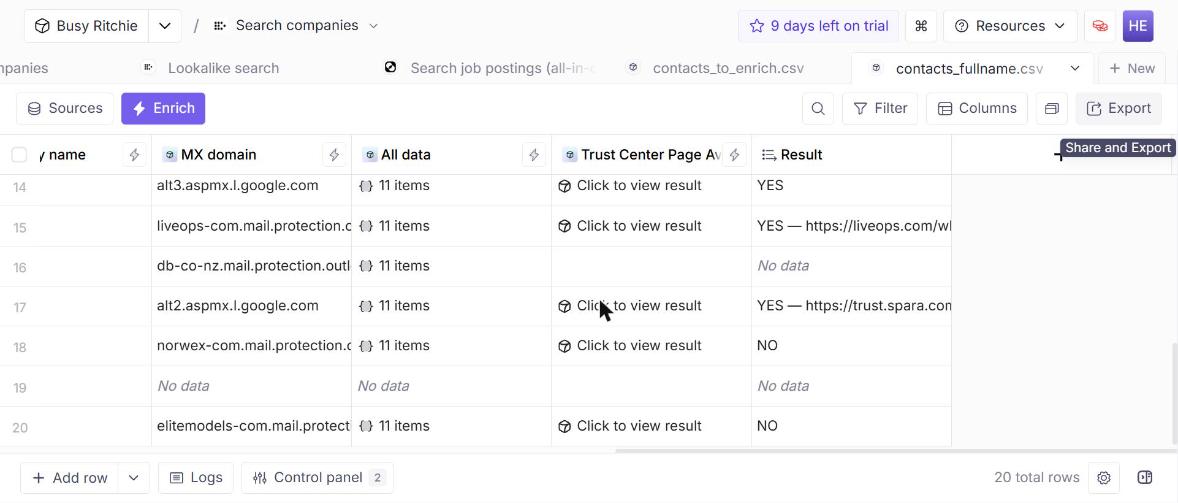
Where it was less reliable was the actual trust center URL. It nailed TrueFoundry’s exactly. But for LiveOps and Propio, it returned their generic security marketing pages instead of their actual trust centers, and it didn’t give a URL for Reply at all. That said, the main goal was to find out whether a trust center existed, and Databar’s AI Agent Researcher nailed it.
The bigger downside is cost. At 5 credits per row, those 10 rows burned through 50 credits. Running this across a list of 1,000 companies would cost you 5,000 credits, which is your entire monthly allowance on their $99 plan.
Flows
Databar recently launched “Flows” (still in beta), which is their answer to chaining enrichments together. You build a pipeline visually: a trigger, a series of steps, and an output. Each step can be an enrichment, an AI prompt, their AI web researcher, a formula, or any of their integrations.
The idea is that you build something like “company lookup → find email → verify email” once, and reuse it everywhere. Databar says flows can run on a table, on a schedule, via API, or from an AI agent over MCP. In my trial though, the builder only showed an API trigger, and scheduled runs are listed under the Enterprise plan, so check what your plan includes. There were also no templates available yet.
Integrations
The sheer # of integrations is definitely Databar’s biggest strength. They have 146 integrations, and 72 of them work out of the box using Databar’s own accounts. That means you don’t need to separately sign up for Prospeo, Hunter, FullEnrich, People Data Labs, and so on. (Full disclosure: Bloomberry is one of them!)
On the CRM side, they support HubSpot, Salesforce, Pipedrive, Attio, Close, Zoho and GoHighLevel, which is a lot broader than Freckle’s HubSpot/Salesforce-only setup. They can also push enriched data straight into sequencers like Instantly, Outreach, Smartlead and Lemlist.
Innovation Score: High
For a small team, Databar ships at a very fast pace. Over the past five months they’ve averaged several new integrations a week. In September they ran a “build week”, with one major release per day for five days after spending four months heads-down.
The headline release was Flows (September 2026), a visual canvas for chaining enrichments, waterfalls, AI research steps and if/else logic into one pipeline. The two details I like: you can test a flow on sample rows first, and every step shows its credit cost before you run it. So you know what row 10,000 will cost before you run row one.
Their MCP server came out of beta in July 2026 with 35+ tools and one-click OAuth sign-in. Unlike most GTM MCPs, which only let an agent look things up, Databar’s lets Claude actually build tables, add enrichment columns, run waterfalls and trigger Flows.
- New data sources – Explorium and Coresignal (August), Exa AI, Pipl, Limadata and Adyntel (June), Openmart and Reoon (May), and Extruct AI for lookalikes (April). Extruct is likely what powered the excellent lookalike results in my testing.
- Scraping – Apify and PhantomBuster connectors, so scraped data lands directly in a Databar table instead of a CSV.
- Push destinations – Outreach, Instantly, Close, SalesRobot, Customer.io, Brevo, Mailchimp, ActiveCampaign, Airtable, Notion and Asana, so enriched data flows straight into wherever it gets used.
You can also see the shift in how they describe themselves. In late 2024, their tagline was about accessing 1,500 APIs without code. Now it leads with their AI web scraper, waterfall enrichments and 80+ included data providers. That’s a company that has figured out it’s a Clay alternative, not an API marketplace.
Limitations
The biggest limitation is how fast the credits go. The trial only gives you 100 (plus a 50-credit bonus after your first enrichment), and between a 12-credit job search, a 10-credit lookalike search and a 5-credit-per-row AI agent, I burned through almost all of it in an afternoon. I really wished Databar gave at least 3x the # of credits for a trial.
Lastly, Flows has no signal-based triggers yet, and scheduled runs are only listed on the Enterprise plan.
Pricing (updated October 2026)
Databar’s pricing is public and pretty simple. There’s a single credit currency, every enrichment shows its credit cost upfront, and rows that come back empty aren’t charged. Annual billing saves 12%.
| Plan | Price | Credits/Month | Included |
|---|---|---|---|
| Free trial | $0 | 100 (+50 bonus) | Full app access CLI locked |
| Build | $99/month | 5,000 | 3 editors, 5 BYO API keys CRM integrations Batch up to 10k rows |
| Scale | $495/month | 50,000 | 10 editors, unlimited BYO keys & custom APIs Turbo queue Batch up to 100k rows |
| Enterprise | Custom | Custom | Unlimited editors Schedulers, SDK Dedicated support |
Credit Breakdown (from my testing):
- 2-10 credits = 1 email found, depending on the provider (2 for Databar’s in-house finder, 10 for waterfalls)
- 5 credits = 1 row researched by the AI Researcher Agent
- 2 credits = 1 row with a Custom AI prompt (GPT-4o Mini)
- 2-12 credits = 1 list-building search, depending on the source
- Pay-per-result: rows that come back with no data aren’t charged
- Real-world cost: roughly $0.02 per credit on the Build plan, so about $0.04 per email found and $0.10 per row of AI research
Databar’s pricing page: https://databar.ai/pricing
6. FullEnrich – Best for Contact Data Waterfall Enrichment
Pros: Easy to use, free trial lets you try everything, reasonable pricing, only pay when data is found
Cons: Primarily a contact enrichment tool, no workflow automation
FullEnrich’s core focus is doing one thing very well: waterfall contact enrichment, now across 20+ data providers (up from 15+ when I first reviewed them). So if you simply need to get the most accurate emails and phone numbers possible FullEnrich is a strong option. They’ve since added a list-building feature (FullEnrich Search) too, though enrichment is still where they shine.
FullEnrich aggregates contact data from providers like Apollo, Hunter, Lusha, and more, running them sequentially until it finds a match.
When I tested it, the email match rates were noticeably higher than using any single provider alone. And it was very easy to use. I simply uploaded a CSV with names + companies, and FullEnrich enriched it with contact data, spitting out a CSV back I could download.
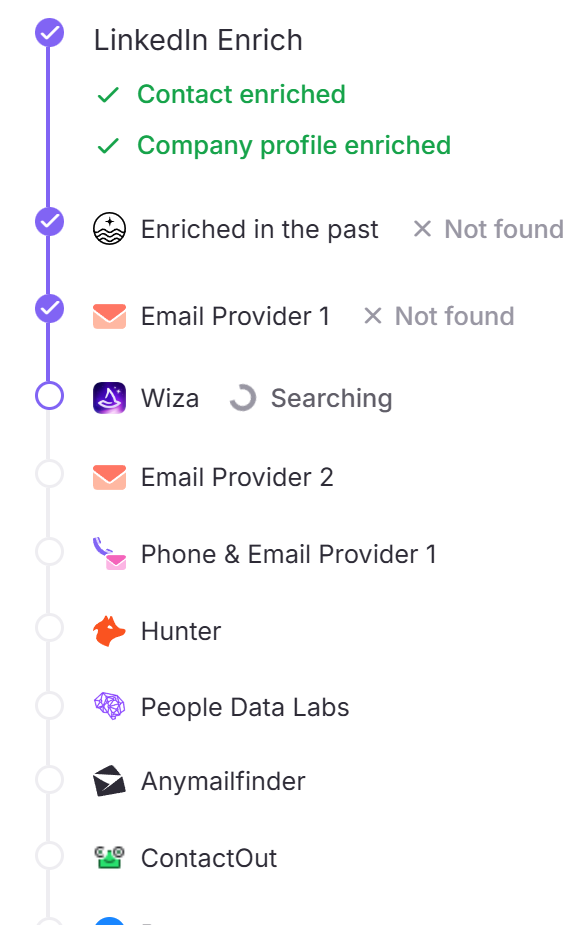
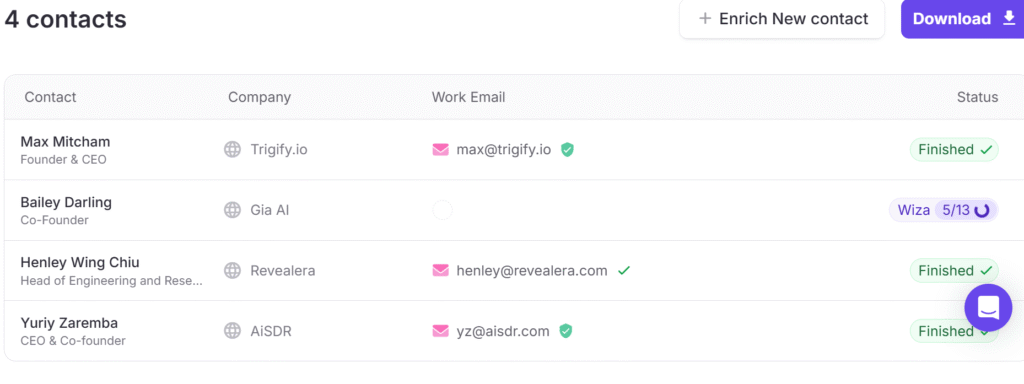
In my test of 4 contacts, FullEnrich successfully found and verified emails for 3 out of 4 (75% match rate, and that one miss was because they detected a catch-all email), with clear verification indicators next to each email address.
Innovation Score: High
FullEnrich keeps punching above its weight, and their release cadence over the past year has been impressive.
- FullEnrich Search (February 2026) – the big one. After two years of users asking them to do for list-building what their waterfall did for enrichment, they shipped it: search across 95% of any company’s headcount, filter by job title, seniority, location and tenure, add company filters like industry and size, or upload a CSV of target accounts and pull the exact people you need from inside those companies. Then enrich the whole list in one click with the same waterfall.
- MCP server + Claude integration (beta March 2026, then the Claude marketplace) – you can now ask Claude or ChatGPT to search FullEnrich’s verified data directly. They’ve also built Claude Skills for HubSpot, Attio, Monday, Notion and Airtable, so you can say “find decision-makers at Shopify and enrich their emails” and have contacts created, linked to the right company and deduped in your CRM in a single conversation.
- Reverse identity tool – de-anonymizes signups that arrive with personal emails, turning them into identified work contacts in real time. They built it for their own funnel first and report a 30% drop in their sales cycle. Credits are only used on a successful match.
- Earlier: a Chrome extension, V2 launch, n8n integration, 7 new data providers, and a recruiting-focused version of the product.
Two things they published this year interested me more than most vendor content. First, they broke out their own MCP traffic and found only 7.1% of it happens on weekends, while their traditional API automation runs twice as much on weekends as MCP does. Their conclusion, which I think is right: most “agentic” enrichment today is still a human sitting in a chat window approving things. When the human logs off, the agent stops.
Second, a third-party benchmark ran eight providers against the same 1,000 contacts across Brazil and Spanish-speaking Latin America, validating every result. FullEnrich came first on both email and phone in both regions, at 49% email coverage in Brazil against 41% for the runner-up. Worth knowing if you hit the same international gaps I did with other tools on this list.
They’re also investing heavily in community: a GTM hackathon at Station F in Paris with Anthropic and Sillage (250 participants, $10K prize pool), the weekly FullEnrich & Friends sessions, and the Dial & Sweat live cold-calling show. Whatever you think of a NASCAR sponsorship as a B2B SaaS strategy, they’ve built more brand affection than most tools this size. The consistent pattern is that they listen to users and then ship narrowly and well, rather than sprawling into orchestration.
Limitations
FullEnrich is still mainly a contact enrichment tool. Their newer Search feature now covers list-building, but they won’t help you create workflows, orchestrate signals, or automate outreach. If you need those capabilities, you’ll need to pair it with other tools.
CRM support is thinner than the all-in-one platforms too. You’ve got HubSpot, plus Zapier, n8n, Make and their API and MCP – but not the deep native two-way sync you’d get from Cognism or Apollo.
But if your only focus is enriching a list with contact data, FullEnrich is probably the best tool for that specific use case.
Pricing (updated August 2026)
FullEnrich offers transparent, credit-based pricing, and importantly they only charge you when data is actually found. The Starter plan begins at $29/month for 500 credits, while Pro starts at $55/month for 1,000 credits and scales via a credit slider up to $1,950/month for 50,000 credits. Annual billing knocks roughly 30% off. Larger Scaleups & Agencies packages are custom-quoted from around $400/month.
Their free trial gives you 50 credits with no credit card required, valid for 30 days – which, as their CPO has pointed out, is unusual in a category where “free trial” usually means “enter your card and hope you remember to cancel.”
FullEnrich’s pricing page: https://fullenrich.com/pricing
| Plan | Price (Monthly) | Price (Annual) | Credits |
|---|---|---|---|
| Free Trial | $0 | $0 | 50 credits, no credit card (500 via HubSpot signup) |
| Starter | $29/month | ~$26/month (~30% discount) | 500/month |
| Pro | $55 – $1,950/month | from ~$49/month | Credit slider: 1k, 1.5k, 2k, 5k, 10k, 15k, 25k, 50k tiers |
| Scaleups & Agencies | From ~$400/month | Custom | Custom high-volume packages |
Credit Breakdown:
- 1 credit = 1 verified work email found
- 3 credits = 1 personal email found
- 10 credits = 1 mobile phone number found
- 1 credit = 1 reverse lookup
- Credit rollover: 3 months (monthly plans), 6 months (one-time), 12 months (annual)
- Pay-per-result: Only charged when data is successfully found; landline detection is free
- Unlimited users: All plans include unlimited team members on a shared credit pool
- Waterfall enrichment: 20+ data providers for 80%+ find rate
7. Cognism – Ideal for contact data for European companies
Pros: Excellent European contact data, phone-verified mobiles, supports a lot of CRMs beyond Hubspot/Salesforce
Cons: Only specializes in contact data, no transparent pricing, need a demo to try it out, no free trial
Cognism is another tool like FullEnrich that specializes mostly in contact data enrichment, but their specialty is European markets.
Like FullEnrich, their user interface is also really simple. I simply upload a CSV of contacts or companies, and Cognism enriches it with verified emails and phone numbers.
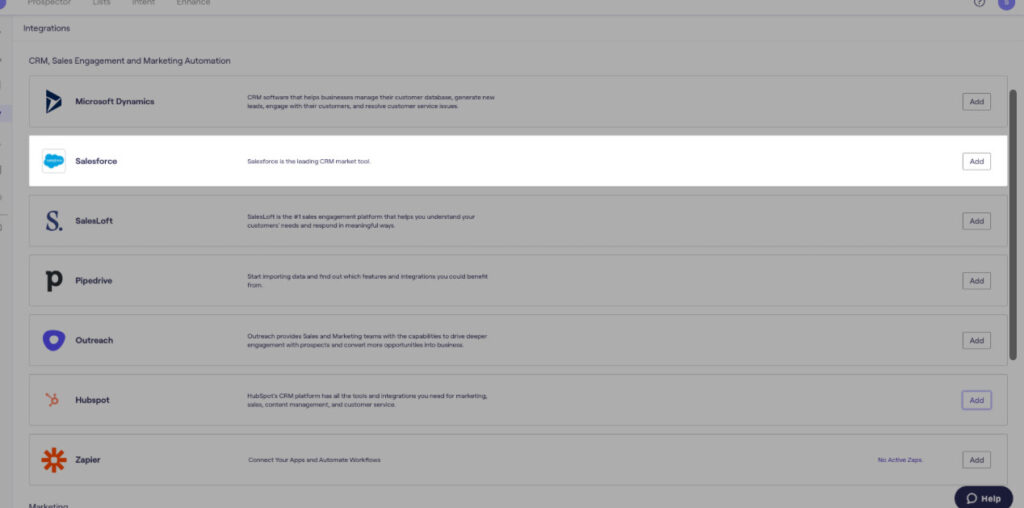
Unlike FullEnrich though, you’re not just limited to CSV files. As you can see in the screenshot above, they offer integrations to many CRMs like Salesforce, so that it can enrich your records automatically.
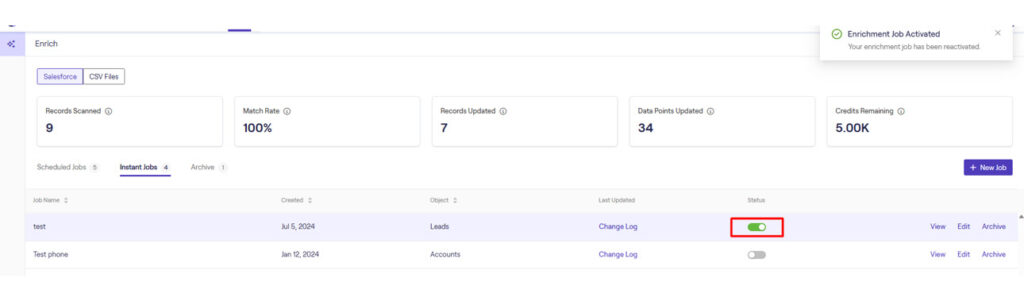
During my trial, I connected Cognism to my Salesforce account and set up automatic enrichment rules. When a new lead entered my CRM with incomplete data, Cognism automatically filled in missing contact details in real-time.
What makes Cognism stand out is their phone-verified mobile numbers – what they call Diamond Data. They have real people calling to verify contact information, cross-checked against global DNC lists, which means higher accuracy rates than most providers. They currently claim 440M+ contacts, 100M+ mobiles, and 10M+ phone-verified Diamond records.
One caveat on the marketing claims: Cognism advertises around a 3x connect-rate improvement, and some third-party write-ups repeat a 98% connect rate figure for Diamond-verified numbers. Cognism’s own help documentation puts realistic “Diamonds on Demand” success rates closer to 10-15% in the UK and 15-20% in the US. Treat the headline number as a vendor claim, not a benchmark.
Innovation Score: Moderate
Cognism ships real product work, but it’s concentrated in data quality, CRM hygiene and compliance rather than anything at the frontier. And a meaningful share of their 2026 “news” is brand rather than product.
What they actually shipped:
- Sales Companion – which Cognism calls the biggest product launch in its history, replacing a previously fragmented interface with a unified prospecting suite. The headline feature is a one-click AI ICP-fit check, plus AI research and intent signals.
- Cortex AI – the “governed-by-design” engine behind Sales Companion (Smart Personas, governed AI research, embedded intelligence). Their pitch versus generic copilots is that every output is grounded in verified data rather than generated.
- CRM Enrichment (H1 2026) – a governed enrichment layer with a live CRM Health Dashboard, auto-enrichment on record creation, and scheduled/ICP-based enrichment jobs. Salesforce first, HubSpot planned.
- HubSpot bi-directional sync – native real-time two-way sync with “In CRM” visibility inside prospecting and automatic dedup.
- Job Change Indicator – a structured signal when a previously revealed contact changes role or company, triggering re-enrichment.
- Search improvements – intent location filtering and topic thresholds, CSV company upload matching up to 100,000 organizations, keyword filters, a “Net New” toggle, and a technology filter with estimated renewal dates that they claim no other provider offers.
- Compliance depth – Norway and Finland DNC coverage added, static IPs for Salesforce to clear enterprise security reviews, and a completed SOC 2 Type II audit.
The gap that keeps them at Moderate: as of August 2026 Cognism has not shipped an MCP server or any agent-facing context layer. Their AI is accessible through a traditional REST API and Data-as-a-Service delivery. Every “Cognism MCP” you’ll find is a third-party wrapper bolted onto that REST API, not something Cognism built.
Compare that to ZoomInfo, which shipped GTM.AI to general availability in June 2026 as an explicit “API and MCP home” integrating Claude, ChatGPT, Microsoft Copilot, Salesforce Agentforce and HubSpot Breeze – then open-sourced a CLI a month later. Or to FullEnrich, Airscale, Apollo and Databar, all much smaller companies that shipped MCP integrations this year. In a market where “can my coding agent query this?” is becoming a buying criterion, Cognism is a step behind.
Meanwhile, the marketing budget is very visible. They ran a full “Fluent in Data” rebrand in April 2026 – new identity, new website, new positioning around data as infrastructure – built with creative agency BBD Perfect Storm, then appointed Croud as strategic paid media partner across the UK, France, Germany and US in May. Add the Revenue Champions and Demandism podcasts, the State of Outbound and Cold Calling reports, and the free demand-gen course, and you get a company that is genuinely excellent at content and category marketing.
None of that is a criticism of the product. It’s just worth separating: if you score Cognism on marketing velocity they’re near the top of this list. On product innovation they’re mid-pack, with a real and defensible moat in European data and compliance.
Limitations
Unlike FullEnrich, Cognism is a single data source. I’m querying their proprietary database – either they have the contact info or they don’t. While FullEnrich aggregates data from 20+ providers to maximize coverage, Cognism bets on the quality and verification of their own dataset, particularly for European contacts.
Also, while it may sound obvious, Cognism is not a full-blown Clay replacement. They specialize mostly in European contact data. If that’s what you want though, then Cognism is a strong candidate.
And as noted above, there’s no MCP or agent layer if you’re building GTM workflows in Claude Code or Codex.
Pricing (updated August 2026)
Cognism’s pricing isn’t transparent, so you’ll need to request a custom quote. There’s no free trial, no self-serve option, and annual contracts are required – which is frustrating if you’re trying to budget or compare options quickly.
What they do publish is the structure. Sales Prospecting comes in two packages, Standard and Pro, with CRM Enrichment and Data-as-a-Service available as add-ons or standalone. (If you’re reading older comparison articles, these were previously called Grow/Elevate, and before that Platinum/Diamond – a lot of blogs still use the old names.)
Usage runs on credits: 1 credit reveals 1 contact, re-viewing a contact you’ve already revealed is free, and you only get charged again when that contact changes jobs. That’s a genuinely fair model compared to tools that charge you every time you touch a record.
For actual dollar figures, you have to rely on procurement benchmarks. Here’s what buyers report:
| Source | Reported Cost | Context |
|---|---|---|
| General range | $15,000 – $25,000/year | Annual contracts required Diamond Data access adds 30–50% |
| Vendr benchmarks | ~$22,500 – $37,500/year | Entry package, 5 users: ~$22.5K Higher package, 5 users: ~$37.5K |
| Spendflo | ~$16,400 – $81,900/year | Low end: ~200-employee company High end: 1,000+ employees |
| Reported by users | ~$30,000/year | 15-person team (mid-2026) |
| Add-ons | $500 – $1,500 onboarding | Bombora intent topics: ~$75–$400 per topic |
⚠️ A warning if you’re researching this yourself: several pricing blogs present Cognism as having plans like “AI Data Agent $10,000/yr” or “AI Outbound Agent $22,000/yr.” Those are another vendor’s products, misattributed to Cognism. No source corroborates them. Ignore those numbers.
Bottom line on cost: Cognism is priced for mid-market and enterprise teams. If you’re a startup or a small agency, it will almost certainly be out of reach, and FullEnrich will get you most of the way there for a fraction of the price. If your ICP is European and phone-based, though, the Diamond Data premium can be genuinely worth it.
8. Apollo – best value all-in-one platform
Pros: Easy to use, has GTM orchestration and engagement, can test everything before paying, supports Hubspot, Pipedrive, Salesforce and many more CRMs, strong API/MCP/CLI
Cons: Waterfall enrichment not as flexible as Clay’s, free tier got much stingier
Apollo.io goes beyond both simple enrichment and provides everything to you, from prospecting, enrichment, and outreach. It’s an all-in-one platform that is meant to replace Clay, signal data providers, and outreach tools.
Using enrichment in Apollo is straightforward: I upload a CSV of contacts or companies, and Apollo enriches it with emails, phone numbers, job titles, and company data from their database.
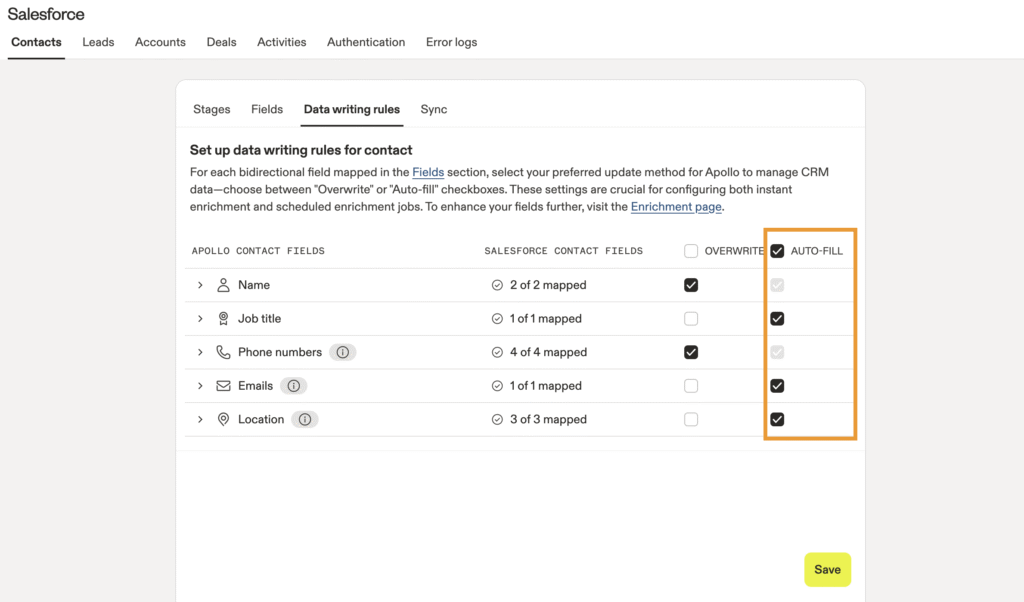
The CRM integration is where it gets really useful. I was able to connect Apollo to my Salesforce account and set up automatic enrichment rules. Now when a new lead enters my CRM with incomplete data, Apollo automatically fills in missing contact details in real-time.
It used to be that Apollo didn’t do waterfall enrichment, but that changed recently. Before, you were limited to Apollo’s database. Now you can set up a waterfall that tries Apollo first, then falls back to other providers like Prospeo, ZoomInfo, or Lusha if Apollo doesn’t have the data.
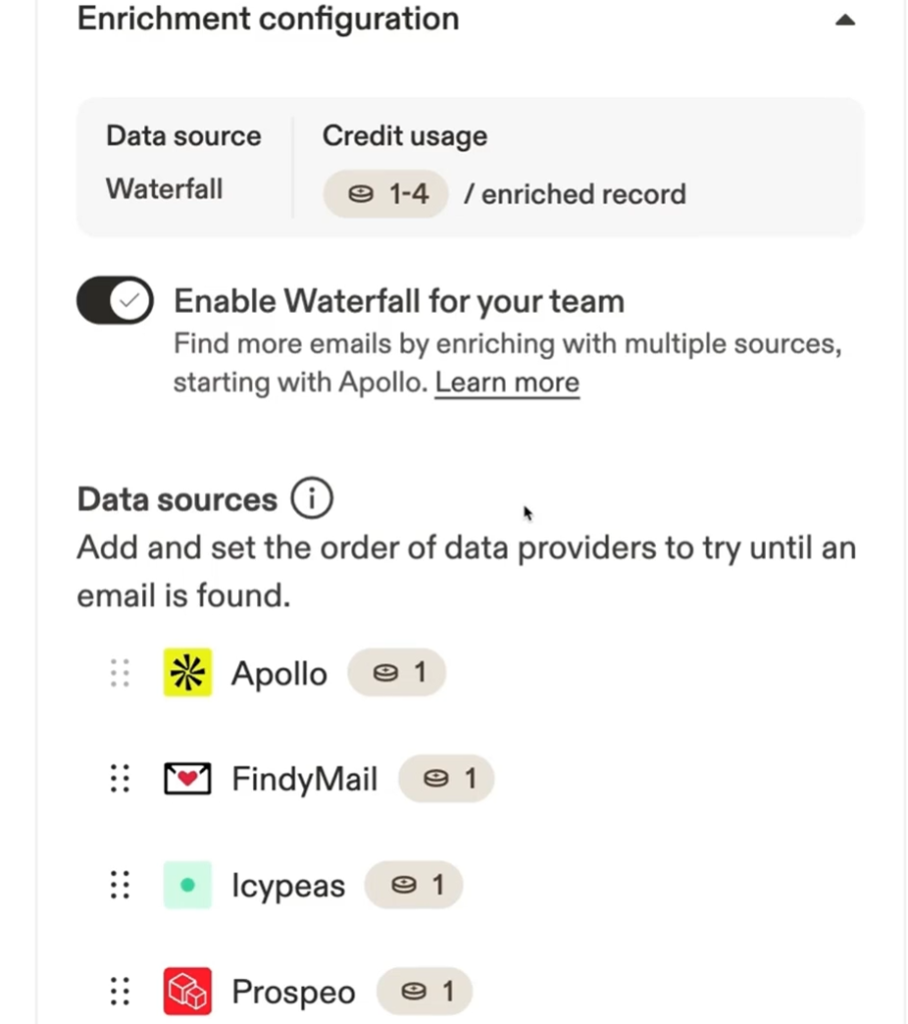
I tested this by enriching a list where Apollo only found 60% of emails. I then setup a waterfall with Prospeo as the backup provider. The match rate jumped to 82%. You can even use your own API keys for the backup providers, so you’re paying those providers directly, not Apollo.
Apollo’s prospecting is really robust as well. Clay doesn’t have a native database – you’re building lists from scratch or importing them. Apollo, on the other hand has 275M contacts and 73M companies built in, so I can search directly inside the platform.
During my trial, I wanted to find VPs of Sales at SaaS companies with 50-500 employees. I used Apollo’s filters for job title, industry, company size, tech stack (like “uses Salesforce”), and funding stage, and got back 3,400 results. You can filter by specifics like “companies hiring in the last 30 days” or “uses HubSpot but not Outreach.”
The intent data filters are useful too. I can find companies showing buying signals like recent funding rounds, job openings, or technology changes. It’s not as deep as dedicated intent platforms, but it’s built right into the prospecting interface instead of needing a separate tool.
One genuinely clever trick their team shared: go to Companies, apply your ICP filters, click “Research with AI,” run a custom prompt with Perplexity Sonar (which has live web access) asking “does {{account.name}} use [competitor]? return yes or no only”, then filter by that new AI field and enroll the Yes accounts into a displacement sequence. That’s competitor-displacement targeting without leaving the platform.
What you also get with Apollo is the seamless workflow from enrichment to outreach. Let’s say I just enriched 500 contacts with emails and phone numbers. I can immediately select those contacts, enroll them in an email sequence, and Apollo tracks opens, clicks, and replies all in one dashboard.
A typical Apollo sequence might look like this: automatic email on Day 1, LinkedIn connection request on Day 3, manual email (you review before sending) on Day 5, phone call task on Day 7, LinkedIn message on Day 9, and a final breakup email on Day 11.
Each morning you log in and Apollo shows you exactly what to do – which calls to make, which emails to personalize, which LinkedIn tasks to execute. The automatic emails fire on their own, while manual steps create tasks for you to complete.
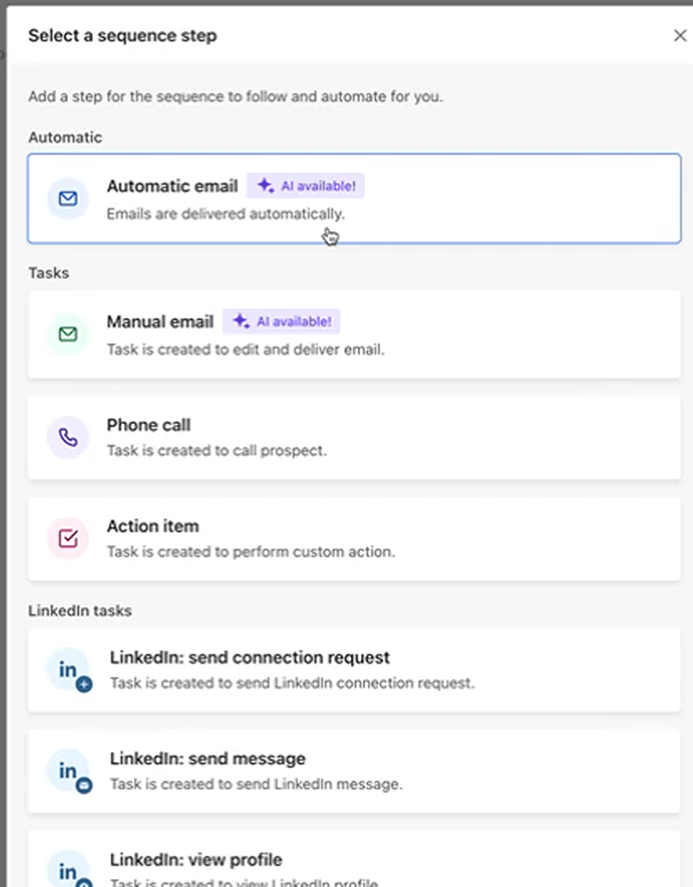
Apollo lets you use enriched data to personalize your sequence emails through dynamic variables. So if you’ve enriched a contact with their job title, company name, industry, or tech stack, you can drop variables like {{first_name}}, {{company}}, or {{title}} directly into your email templates and Apollo fills them in automatically for each recipient.
You can also use Apollo’s AI to generate personalized openers based on the enriched data, so instead of just inserting “Hi {{first_name}} at {{company}}”, the AI can write something more natural that references their role, recent company news, or other data points you’ve enriched with.
If you prefer simplicity and like the idea of consolidating multiple tools into one, Apollo is designed for that type of workflow. They handle prospecting, waterfall enrichment, and outreach sequencing and execution, so you don’t need to juggle multiple tools.
Innovation Score: High
I previously scored Apollo as Medium. They’ve earned an upgrade, mostly on the strength of a decisive bet on what they’re calling “Headless GTM.”
- API + MCP + new CLI (July 2026) – Apollo shipped a CLI and upgraded both their API and MCP server in one launch. The scale numbers they published are the interesting part: 500,000+ teams building on their API doing 230M+ calls a month, and 40,000+ teams on their MCP doing 5.6M+ calls a month. Customers are describing using Apollo as a headless enrichment engine while building custom scoring, routing and signal workflows on top.
- AI Assistant 2.0 (July 2026) – rebuilt end-to-end on LangChain’s Deep Agents framework, so it holds context instead of making you re-explain yourself at every step. Now live for all customers.
- 11,000+ teams now use Apollo inside Claude, Perplexity and ChatGPT, their Chrome extension crossed 1 million installs, and they now serve 600,000+ companies.
- Waterfall Enrichment – the biggest functional gap they closed, plus AI Power-ups, Workflows (replacing Plays), the Win Deals solution, Ask Apollo, and an improved deliverability suite.
They’ve also rewritten their own positioning to match: Apollo now calls itself an “AI GTM System” combining data, intelligence and execution in one loop, rather than a database with tools bolted on. In August 2026 they landed on the Inc. 5000 for the first time and ranked first in more than 100 of G2’s summer reports.
None of it is individually groundbreaking, but the direction is coherent: Apollo is positioning itself as the data and execution layer that other people’s agents call, rather than a UI you have to live inside. For an 800-person company, the shipping pace is respectable.
Limitations
While Apollo has waterfall enrichment, it’s not as flexible as Clay’s data orchestration. Here are some examples of things you can’t do (as of today):
- Customize your waterfall sequence or choose which providers to use in what order (Apollo decides for you)
- Build conditional enrichment logic (“if company has 50+ employees, use ZoomInfo; if less, use Apollo”)
- Chain together multiple data sources creatively (LinkedIn data + Clearbit firmographics + AI scoring + Apollo contacts)
- Use custom formulas or transformations to parse and manipulate data
- Build complex multi-step enrichment workflows with branching logic
If you need pure data enrichment flexibility with full control over your waterfall logic and data transformations, Clay is still the more configurable choice.
Also worth flagging: Apollo’s free tier got noticeably worse. Users report free credits dropping to roughly 720/month from around 10,000. If you were planning to run meaningful volume on the free plan, that window has closed.
Pricing (updated August 2026)
Apollo still offers a freemium model, and paid plans start at $49/user/month billed annually for the Basic plan. They use a credit system where different data points cost different amounts, and annual billing saves roughly 20% versus monthly.
One thing to budget for: the Organization plan has a 3-user minimum, so the real entry price there is about $357/month, not $119.
Apollo’s pricing page: https://www.apollo.io/pricing
| Plan | Price (Annual) | Price (Monthly) | Credits/Month |
|---|---|---|---|
| Free | $0/user/month | $0/user/month | ~720 credits/month (reduced from ~10,000) |
| Basic | $49/user/month | $59/user/month | Unlimited email credits 75 mobile credits 1,000 export credits |
| Professional | $79/user/month | $99/user/month | Unlimited email credits 100 mobile credits 2,000 export credits |
| Organization | $119/user/month | $149/user/month | Unlimited email credits 200 mobile credits 4,000 export credits (Min 3 users = ~$357/mo) |
Credit Breakdown:
- 1 credit = email
- 8 credits = phone number
- 1–8 credits = data enrichment per record
- 1 credit = AI research run
- 2 credits/minute = US dialer
- Additional credits: $0.20 each (min purchase: 250 monthly or 2,500 annually)
- Credits expire: All unused credits expire at end of billing cycle (no rollover)
- Real-world cost: heavy outbound users commonly report $150–$400/user/month once overages hit
9. ZoomInfo – Best all-in-one platform for enterprises
Pros: Perfect for existing ZoomInfo customers who need data enrichment and GTM orchestration; best-in-class agent/MCP layer
Cons: Enterprise pricing makes it unfeasible for startups and SMBs
I won’t lie – I almost didn’t include ZoomInfo here because for years it was clearly a data provider, not a Clay competitor. Clay literally pulls from ZoomInfo as one of its 150+ sources.
But they released a product called GTM Studio (launched May 2025), and it comes very close to replicating Clay’s functionality. They also renamed themselves on the market – they now trade as NASDAQ: GTM rather than ZI.
First, if you’ve been living under a rock, ZoomInfo is one of the biggest B2B contact databases in the world – now claiming 100M+ companies and 500M+ contacts, sourced from places like people’s Outlook signatures, CRMs, and browser extensions. Though the data certainly isn’t 100% accurate by any means, ZoomInfo has the reputation of having the most accurate contact database out of any provider.
The problem was, it was just a database. You’d export a list, then take it somewhere else to actually enrich it, or craft personalized emails (ie Clay).
ZoomInfo’s GTM Studio now adds a visual canvas where you can pull in data from ZoomInfo and/or your CRM, filter it by signals like job changes or funding rounds, enrich missing fields, and push contacts directly into sequences or rep assignments, all without leaving ZoomInfo or exporting files. Making it much closer to a Clay alternative.
My Experience with ZoomInfo GTM Studio
First, if you’re looking for a self-serve product, you can forget about giving ZoomInfo a try. I had to request a demo and sit through a 30-minute sales call before I could even touch the product. No self-serve trial like Clay.
Once I got trial access, I was eager to try it out. First, you’re prompted to create a workbook (this is like a Clay table with all your contacts or companies). You can import them directly from a CRM like Salesforce, create one from a search result in ZoomInfo, or simply import them from a CSV, as you can see in the screenshot below.
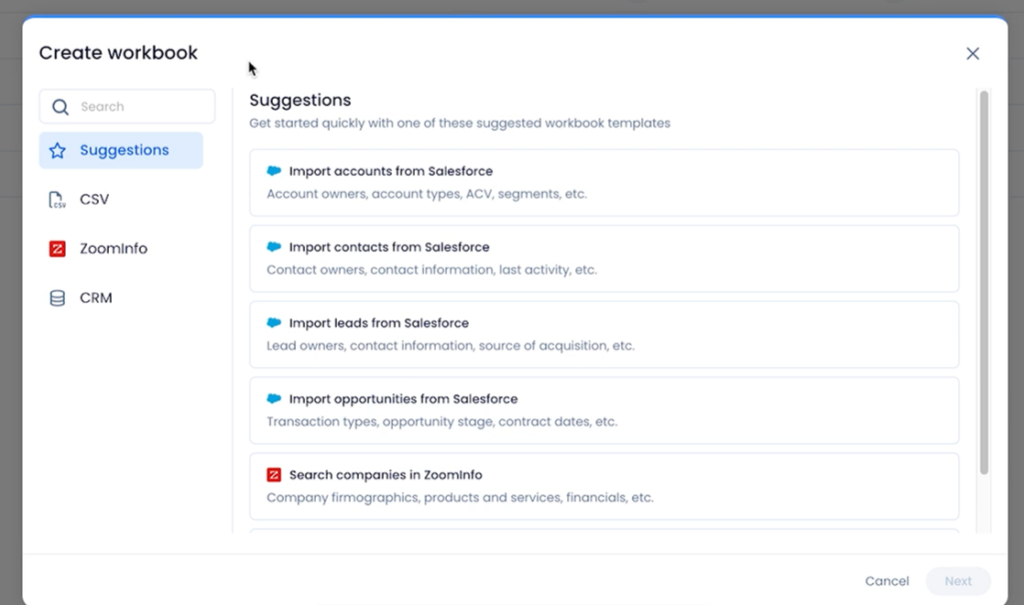
Since I wanted to take advantage of ZoomInfo’s powerful contact database, I tried creating a workbook with contacts that were VP of Finance in companies based in the US. ZoomInfo then created a workbook with all the basic fields of each contact such as their names, business email, contact accuracy score, job title, etc.
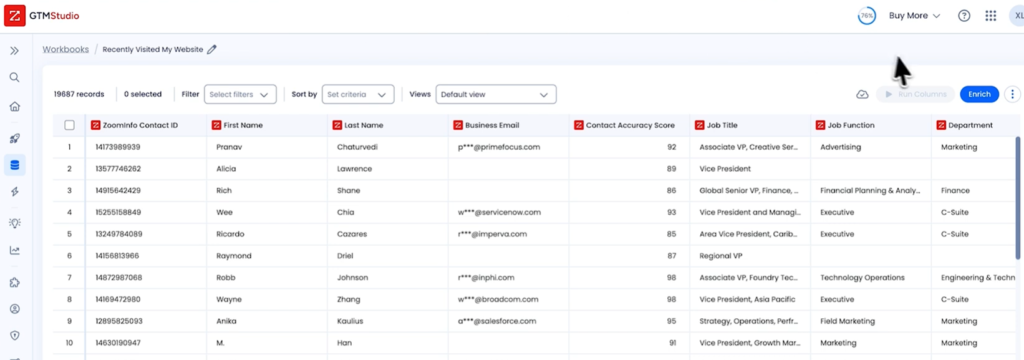
When I click on the “Enrich” button in the top right, it gave me a few options. When you click “Enrich” in GTM Studio, you get a sidebar with six options. Here’s what each one does.
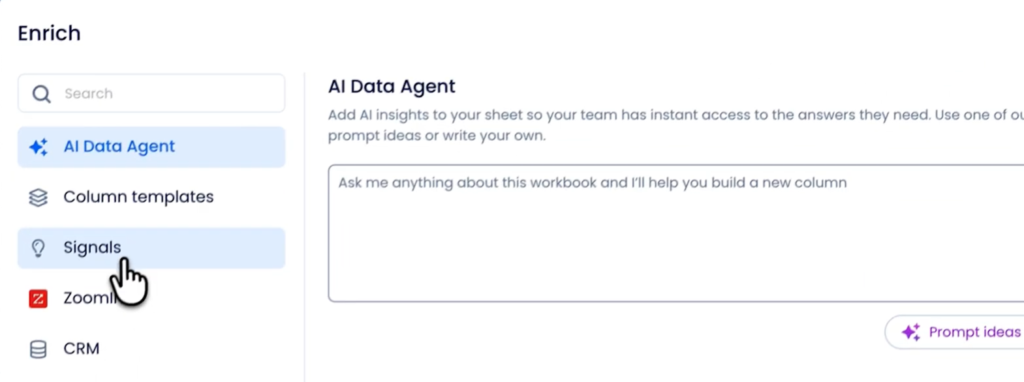
AI Data Agent is basically a chatbot for your spreadsheet. You type a question in plain English – something like “add a column showing which of these companies raised funding in the last 6 months” and it builds that column for you. It’s ZoomInfo’s answer to Clay’s AI features, where instead of manually configuring enrichment fields, you just describe what you want.
Column templates gives you pre-built enrichment columns you can add with one click. Instead of figuring out which fields you need, you pick from templates ZoomInfo has already set up – things like “basic contact info” or “company firmographics.”
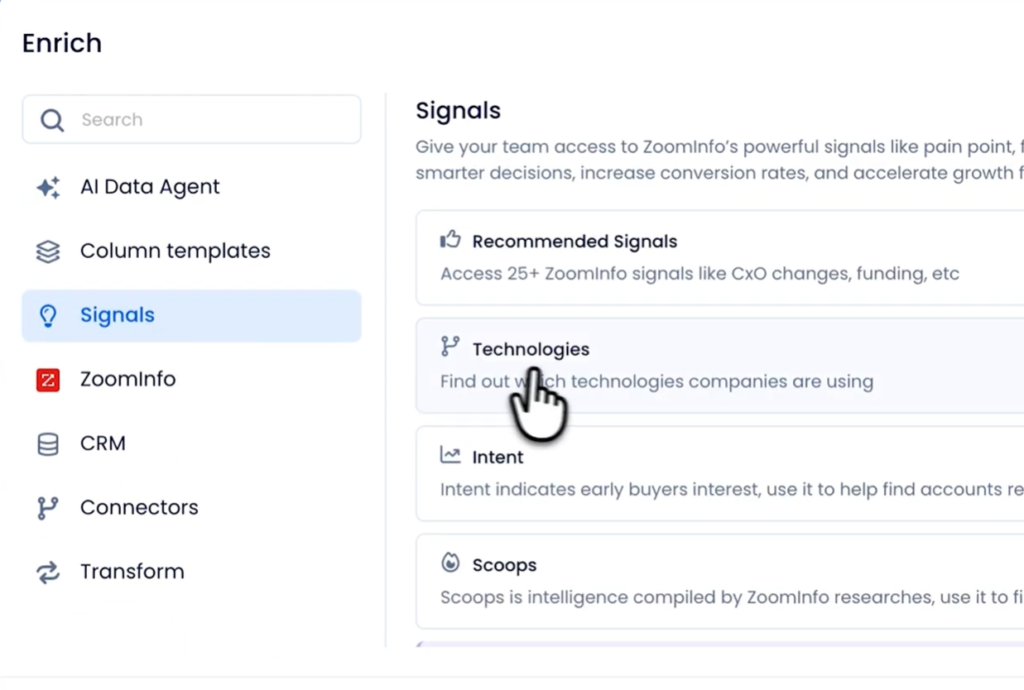
Signals is where things get interesting. This is ZoomInfo telling you what’s happening at a company right now, not just static data about them. You get four sub-options here.
Recommended Signals gives you access to 25+ ZoomInfo signals like CxO changes and funding rounds.
Technologies tells you what software stack a company is running (presumably powered by their Datanyze acquisition years ago)
Intent tracks whether a company is actively researching topics related to what you sell, collected from content consumption events across publishers, websites, and research platforms.
Scoops is intel gathered directly from humans, directly surveying knowledge workers to understand the projects and initiatives their companies are launching in the coming months.
Now, about outreach, and how GTM Studio connects to it.
GTM Studio itself doesn’t send emails. It’s the data layer – where you build lists, enrich them, and get them ready. To actually reach out to people, ZoomInfo has a separate product called Copilot.
Copilot is ZoomInfo’s AI assistant for salespeople. It lives in its own workspace and helps reps with account research, prioritization, and writing emails. The key feature is the AI Emailer – it drafts personalized outreach using all the signal data ZoomInfo has on a contact (intent, job changes, funding, scoops, etc.).
Here’s how the two products work together:
GTM Studio is for RevOps and marketing. This is where you build your lists, enrich them with signals and data, filter for your ICP, and score accounts. Once your list is ready, you “publish” it – which means you push that curated list to specific sales reps.
When RevOps publishes a list from GTM Studio, those contacts show up in the rep’s Copilot workspace. But they don’t just show up as a raw list. Copilot automatically drafts personalized emails for each contact using all the enrichment data that was added in GTM Studio. Intent signals, job changes, funding announcements, scoops, Copilot pulls all of that into the email draft.
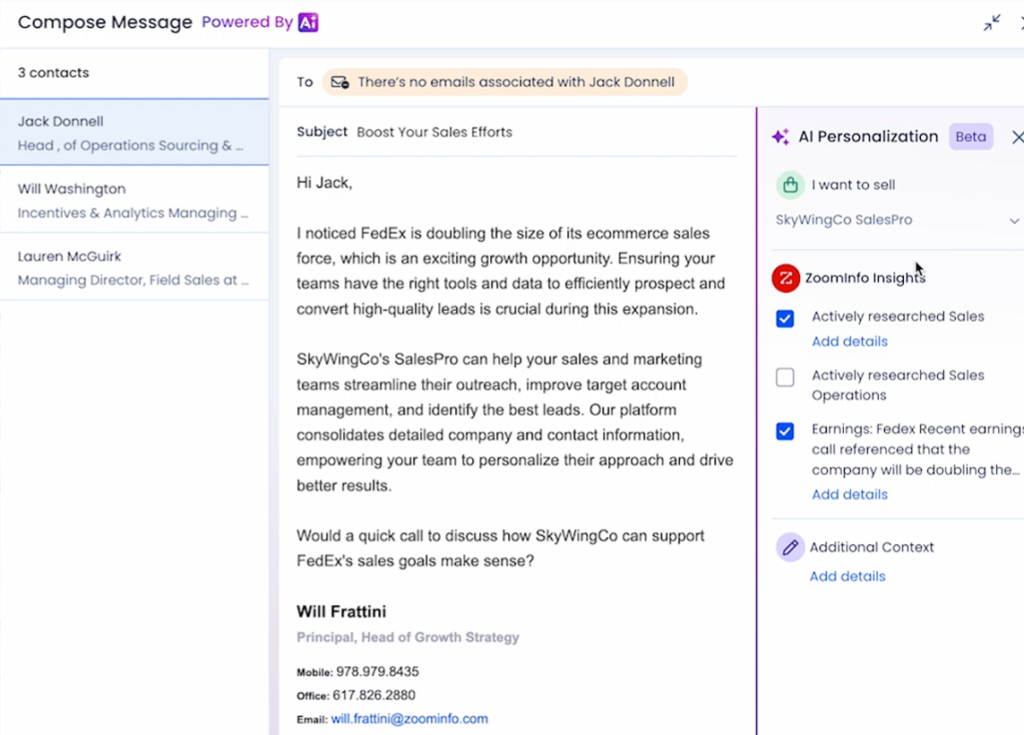
So the actual flow is:
- RevOps builds a workbook in GTM Studio (from CRM data, CSV, or ZoomInfo search)
- RevOps enriches that workbook with signals, intent, firmographics, whatever’s relevant
- RevOps filters and scores to get to the best-fit accounts
- RevOps publishes the list to specific sales reps
- Those contacts appear in each rep’s Copilot workspace with pre-drafted personalized emails already written
- Rep opens Copilot, sees their assigned accounts, reviews the email drafts, tweaks if needed, and sends
The rep isn’t starting from scratch. They’re not even doing the personalization work – Copilot already did it using the enrichment from GTM Studio. The rep just reviews and clicks send.
That said, there’s still a human in the loop. Copilot drafts the emails but doesn’t send them automatically. You review each one before it goes out. Whether that’s good or bad depends on your volume. If you need to blast thousands of emails a day, this won’t scale.
But if you believe in quality over quantity, having a human checkpoint before every send might actually get you better results – higher reply rates, fewer spam complaints, cleaner sender reputation.
Innovation Score: Very High
I’ve raised ZoomInfo from High. For a company this size, the velocity over the past year has been genuinely surprising – and they’ve made the single most strategically interesting move of anyone on this list.
GTM.AI reached general availability in June 2026. It’s a “headless GTM context layer” – essentially, ZoomInfo exposing its entire data graph (100M+ companies, 500M+ contacts, billions of signals) through an API and an MCP server so that agents can query it directly. In July 2026 they open-sourced a GTM.AI CLI under an MIT license.
The surface list is the part to pay attention to. GTM.AI now runs inside Claude, ChatGPT, Microsoft Copilot Studio, Salesforce Agentforce, HubSpot Breeze and, as of August 2026, Google Gemini Enterprise. That’s every major agent platform, all querying the same data graph under the same governance posture.
Their framing of the problem is the sharpest I’ve heard from any vendor in this space: about 70% of B2B contact data decays every year, so the constraint on agentic GTM isn’t model quality, it’s data quality. A natural-language question answered against stale data returns a fluent but wrong answer. Every record GTM.AI returns comes with provenance and freshness attached.
Other notable releases:
- OpenAI selected ZoomInfo as a launch partner in Codex for Work (June 2026) – you can run ZoomInfo skills directly inside Codex: find target accounts ranked by buying signals, build decision-maker lists, map buying committees, score accounts, size a TAM, then push to Outreach, Salesloft, Gong Engage or Instantly.
- GTM Studio went from roughly 5 native integrations to 386 in a year, with 2x month-over-month growth and 5x more teams building their first audience. That’s not the adoption curve of a checkbox feature.
- Powering HubSpot’s Breeze Prospecting Agent via GTM.AI, a native connector inside AWS Quick, continuous Copilot updates, and proprietary vertical datasets like franchise ownership across 600,000+ US locations.
- They also spent $200M rebuilding their own GTM motion for AI and have been unusually transparent about publishing the plays that came out of it.
The caveats still stand: GTM Studio lacks true multi-vendor waterfall enrichment (it’s primarily ZoomInfo’s own data), Copilot requires human review before sending, and their sequencer Engage feels dated next to dedicated tools.
And it’s worth being honest about the business context: despite the product velocity, GTM stock has had a brutal year, closing at $3.30 on July 31, 2026, down roughly 68% year-over-year, with a market cap under $1B. The product bet on being the context layer for agentic GTM is smart. Whether it converts a data advantage into workflow dominance before the startups close the data-quality gap is still an open question.
Limitations
The biggest limitation here is pricing and no self-serve option. The 2nd biggest limitation is that ZoomInfo doesn’t do multi-vendor waterfall enrichment – simply because it doesn’t use much 3rd party data. Most of the enrichment is centered around ZoomInfo’s own data in ZoomInfo’s own platform (their own technographics, their own contact data, their own intent data). But this is to be expected for an all-in-one platform.
Pricing
No public pricing (enterprise contracts only), running on a consumption-credit model with custom quotes. Buyers report contracts starting around $14,995/year with a 3-seat minimum, and my rep quoted “starting around $25K/year for GTM Studio add-on” on top of existing ZoomInfo contracts.
For a startup or SMB, that’s a non-starter. For an enterprise team already spending $40K+ on ZoomInfo annually, it might actually consolidate costs vs. running Clay + ZoomInfo separately.
There is a free “ZoomInfo Lite” entry point if you just want to see the interface, and the GTM.AI CLI is free to install (though enrichment through it burns paid credits).
Who it’s for:
- Teams already paying for ZoomInfo who want workflow orchestration without adding another vendor
- Enterprise orgs who value single-vendor consolidation over piecing together multiple tools
- Teams building agentic GTM workflows who need a verified data layer their agents can call
- RevOps teams who need governance, compliance, and accountability
- Teams who believe in quality-over-quantity outreach and want that human checkpoint before emails go out
Who should skip it:
- SMBs and startups (price is prohibitive)
- Anyone whose target market needs multi-source waterfall enrichment (niche ICPs, international, etc.)
- Teams who want fully automated outreach sequences at scale
- Anyone who wants to own their workflow logic outside a vendor’s walled garden
Bottom line: GTM Studio makes ZoomInfo a legit all-in-one alternative to Apollo, and GTM.AI makes it the most agent-ready data layer in the category. But it still doesn’t compete with Clay on the multi-source enrichment axis. If you’re choosing between Clay and ZoomInfo, you’re really choosing between “best data from everywhere” vs. “good-enough data from one place with less complexity.”
For enterprise teams already locked into ZoomInfo, GTM Studio is a meaningful upgrade. For everyone else, it’s probably not worth the sales call.
10. Airscale – Best value alternative
Pros: The best “bang for your buck” Clay alternative, robust list-building features, works natively in Claude and ChatGPT
Cons: Lacks GTM orchestration and email sequencing (by design), limited free trial
Now on to Airscale.
When I first signed up for an Airscale trial, I liked how simple and easy it was to navigate around. It wasn’t the prettiest UI by any means (definitely not as visually polished as Clay or Freckle), but I appreciate simple UIs.
Right away, after I signed up, I saw 3 tabs: Find people, Find Companies, and Monitor.
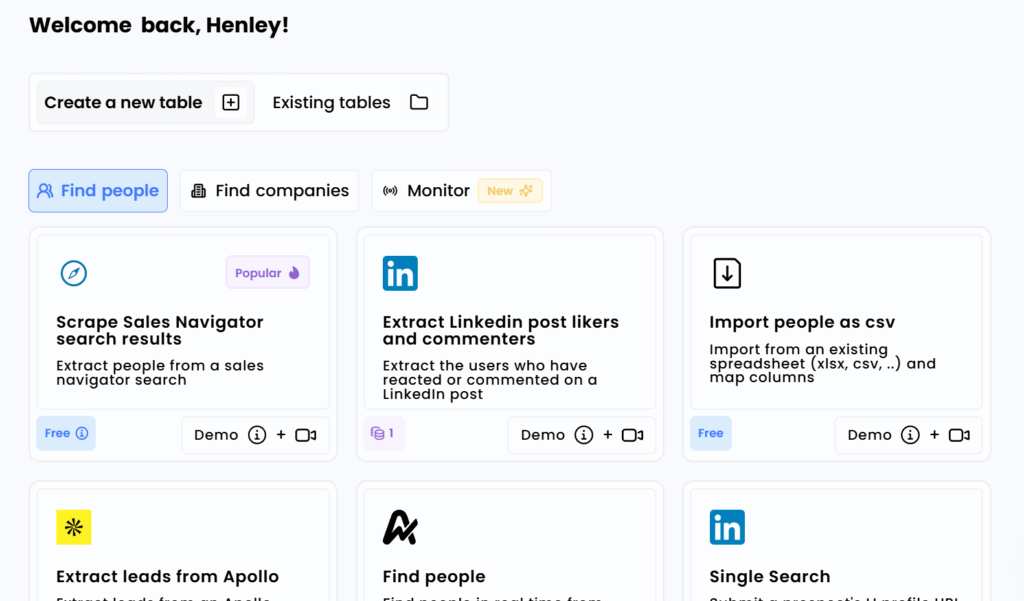
Airscale has more options than Freckle.io for sales prospecting and building your initial list of prospects, and almost as many as Clay. For instance, you can extract Sales Navigator search results directly, scrape LinkedIn post likers and commenters, or extract leads from Apollo.
I tried scraping all the people who liked one of my recent posts as a test, and Airscale handled it just fine. It returned the first and last name, the company they were from, and other details (though I had to pay to enrich all of their emails/phone numbers, as I couldn’t do so during the trial).
Airscale also has a Google Maps scraper that works well for finding local businesses. I searched for ‘financial advisors in the US’, and it returned a list of relevant companies back from Google Maps.
Overall, Airscale is particularly strong at helping you build your initial list.
What about Integrations?
When I first reviewed them, Airscale claimed 30 integrations. That’s now grown to 50+ premium data providers and 450+ data points, along with CRM and API integrations that didn’t exist at the time of my original test.
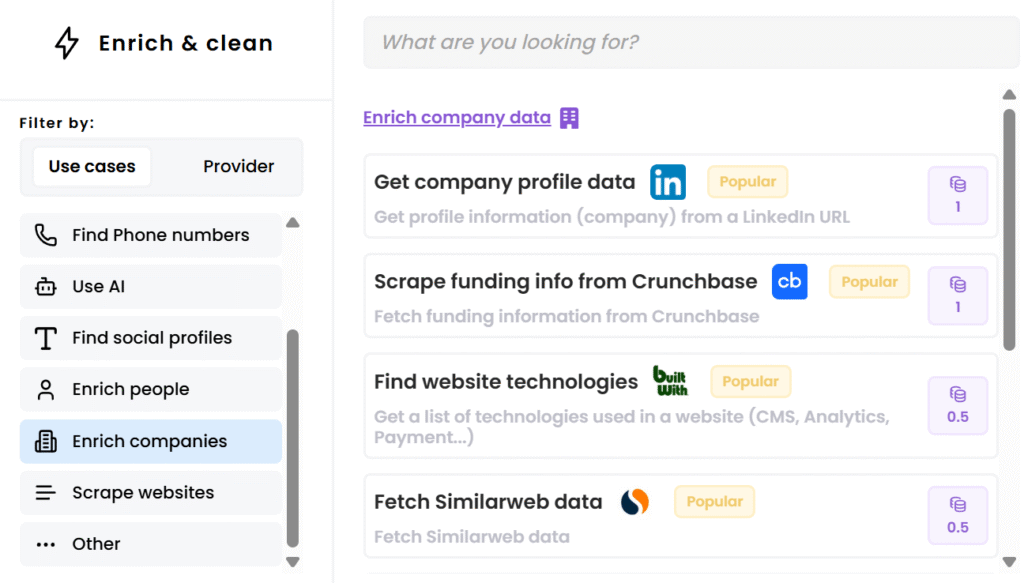
Innovation Score: High
I originally scored Airscale as Medium because their feature set looked static. That’s no longer a fair read – they’ve shipped consistently over the past year, and for a 7-person team serving 800+ companies the output is impressive.
- MCP integration with Claude and ChatGPT (mid-2026) – the release they say they’re most excited about. One connection plugs your LLM into 50+ providers, 450+ data points and 500M+ people. You can prompt something like “Find companies in the US using HubSpot with 11 to 50 employees, find their Head of RevOps and enrich their phone numbers” and it runs the entire sequence and hands back the file. Setup takes a few minutes.
- Major platform update (April 2026) – a new Leads Finder (520M profiles, 9 people filters and 10 company filters, up to 10k leads at once) and a Find Companies module (146M entities with intent-based filters covering tech stack, new hires, recently searched topics, funding rounds, partnerships, M&A and IPO).
- New enrichments – reverse email and reverse phone lookup to instant LinkedIn profile, a personal email finder from any LinkedIn URL (US-focused), and Ad Intelligence to see who’s actively running Meta, LinkedIn and Google Ads campaigns.
- 4 new data providers (Limadata, SalesQL, Explorium, Adyntel) and AirSchool, their learning hub.
I also respect two decisions they made publicly. The first: they deliberately chose not to build email sequencing. In 8 of 10 demos, prospects said their current platform was too complex to operate without a dedicated ops person – paying for 100% of the features and using 30%. So they kept the scope tight and spent the effort on coverage, accuracy and provider count instead.
The second: after Clay’s repricing they published a map of the whole alternatives market, sorting it into spreadsheet-style enrichment, API-first enrichment, agentic orchestration and signal/intent tools, and told readers when each was the right call. It listed their own direct competitors by name and pointed at Claude Code as the reasoning layer most Clay stacks are missing. Vendors almost never publish the version of this that includes “and here’s when you shouldn’t use us.”
Limitations
Not every list building feature worked perfectly when I tested it. For example, finding companies with a specific job posting did not seem to work at all.
When I tried to search for “GTM Engineer”, it showed results like “Market Place Manager” and other seemingly unrelated jobs. I don’t know exactly what Airscale was searching for, but it definitely wasn’t GTM Engineers in this test. (Their April 2026 update added a new Find Companies module with intent-based filters, so this may have improved since – I haven’t re-tested it. If you’re reading this Airscale team, Bloomberry has an API for job postings 🙂 )
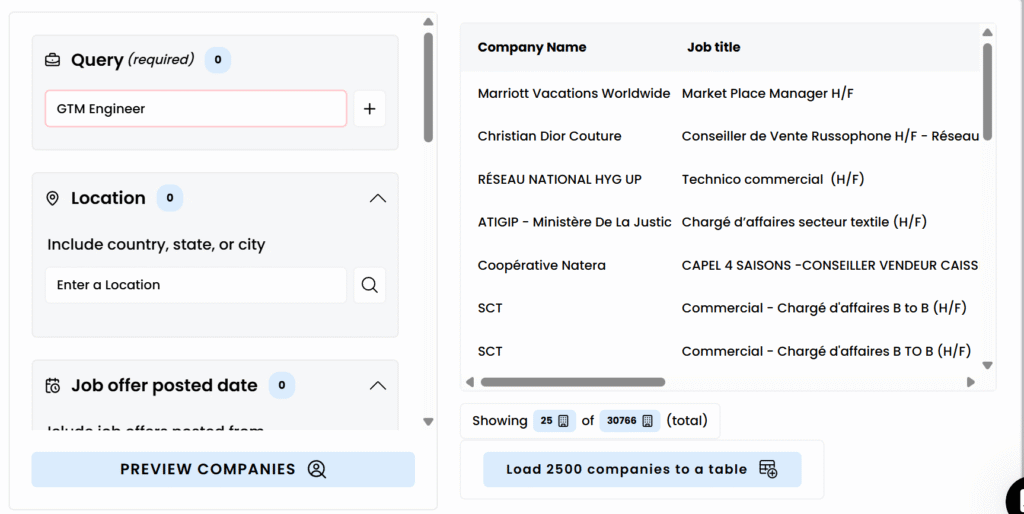
The free trial has since improved. When I tested it, enriching a single contact required a paid subscription and the Company Lookalike feature was locked too, which made the 14-day trial hard to evaluate anything with. They now advertise 4,000 free credits for new accounts, so treat my original complaint as out of date – I haven’t re-run the trial myself.
And by design, there’s no email sequencing and no signal orchestration. Airscale builds and enriches lists; you’ll need another tool to act on them.
Pricing (updated August 2026)
Let’s compare the pricing between Airscale and Clay – with the caveat that Clay’s March 2026 overhaul makes this comparison less clean than it used to be.
At $49 per month for 4,000 credits, Airscale’s cost per credit comes to just $0.01225. Clay’s new entry paid plan, Launch, is $185/month for 2,500 Data Credits – about $0.074 per credit. On raw credits-per-dollar, Airscale still delivers roughly six times more.
But that headline number now overstates the gap, for two reasons. First, Clay cut its data marketplace costs by 50-90% in the same overhaul, so each Clay Data Credit buys meaningfully more enrichment than it used to, and Clay no longer charges for failed lookups. Second, Clay’s Launch plan also includes 15,000 Actions, which is a separate currency Airscale doesn’t have an equivalent for.
The more useful way to think about it: Airscale is dramatically cheaper for straightforward list-building and contact enrichment at volume. Clay is better value if you’re running complex multi-step workflows with AI columns and conditional logic. They’re increasingly solving different problems.
With Airscale, when you use their contact enrichment, you only pay when they actually find valid contact information. Emails work out to roughly $0.0075 each and phone numbers run as low as $0.15-$0.20.
| Plan | Price | Credits/Month | Cost per Credit |
|---|---|---|---|
| Starter | $49/month | 4,000 | $0.01225 |
| Pro | $99/month | 12,000 | $0.00825 |
| Growth | $189/month | 25,000 | $0.00756 |
| Scale | Custom | Custom | From ~$0.0075 (best rates) |
Note: The Growth tier scales via a credit slider (25k, 50k, 75k, 100k, 150k credits/month). All plans include unlimited users, credits roll over while your subscription is active, access to 50+ data providers, no feature gating between tiers, and export to CRMs/sequencers. New accounts now get 4,000 free credits, up considerably from the trial I tested. MCP access included at no extra cost.
Airscale’s pricing page: https://airscale.io/pricing
11. DIY Approach with Google Sheets, N8N and Apify
What if all the other alternatives are too expensive for you?
If you prefer a DIY approach and aren’t afraid of some setup work, you can implement your own Clay-like system with inexpensive tools.
As an example, I decided to build my own lead gen system from scratch using N8N, Google Sheets, and various APIs. This isn’t some half-baked hack either. I built a fully automated system that scrapes leads, enriches data, finds emails, and even drafts personalized outreach – all on autopilot.
One note for 2026: this section is arguably less necessary than when I wrote it. Between Freckle’s CLI, Apollo’s CLI/MCP, Airscale’s MCP and FullEnrich’s Claude Skills, you can now get most of the “DIY control” benefit while still using a managed tool. If you’re comfortable in Claude Code, start there before building your own pipeline.
What This System Does
Here’s what I managed to automate:
- Scrapes 250+ leads/day from LinkedIn Sales Navigator
- Enriches every contact with AI-generated company descriptions and website URLs
- Validates emails using a two-layer waterfall (Prospeo → Scrap.io)
- Writes custom outreach using GPT based on enriched data
- Logs everything in Google Sheets with a clean, spreadsheet-style interface
The Tool Stack
Here’s what I used to build it:
- N8N – The automation brain (free, self-hosted)
- Google Sheets – My makeshift CRM
- Apify – For LinkedIn Sales Navigator scraping
- Perplexity AI – Generates company context and finds websites
- Prospeo + Scrap.io – Email waterfall enrichment
- OpenRouter – Auto-drafts personalized emails
Total cost? Primarily API credits. No large monthly SaaS subscriptions.
How It Works
Step 1: Scrape Targeted Leads From LinkedIn Sales Navigator
I use Apify’s LinkedIn Sales Navigator scraper to pull leads based on my ICP (job titles like CEO/Founder/CMO, company size 11-50, SaaS industry, etc.).
The scraper grabs:
- First and last name
- Job title
- Company name
- LinkedIn URL
This data flows directly into Google Sheets with a status of “Pending Enrichment.”
Step 2: Enrich Each Company With AI
Next, N8N triggers a daily workflow that:
- Pulls companies from Google Sheets where the description/website is empty
- Sends the company name to Perplexity AI with the prompt: “Find the official website and 1-sentence description for [company name] in [location]”
- Parses the AI response and updates the sheet automatically
Now I have context on every company without manually researching them.
Step 3: Email Enrichment Waterfall
Here’s where it gets good. I set up a two-layer email waterfall:
First layer: Prospeo
N8N calls Prospeo’s API with first name, last name, and domain. If Prospeo finds a verified email, it saves it to the sheet.
Second layer: Scrap.io (fallback)
If Prospeo fails, the workflow automatically falls back to Scrap.io with the same parameters. This significantly increases my match rate.
The sheet now shows:
- Email address
- Email status (Valid/Invalid/Not Found)
Step 4: Auto-Draft Emails Using GPT
For contacts where I found an email, N8N triggers an OpenRouter node with this prompt:
“Write a 2-line personalized cold email to {firstName} {jobTitle} at {companyName}. Use this company description: {description}. Keep it casual, no links, max 100 words.”
The model drafts the email and appends it to a new column in Google Sheets.
The Results
I now have a self-updating database that:
- Scrapes 250+ qualified leads daily
- Enriches company info automatically
- Finds verified emails via waterfall
- Drafts personalized outreach
All on autopilot.
Pricing (updated August 2026)
This is where the DIY approach shines:
- N8N: Free if self-hosted; paid cloud tiers available
- Apify: Free tier ($5 prepaid credit), then Starter $29/mo, Scale $199/mo, Business $999/mo. Compute units run $0.30/CU on Free and Starter down to $0.20/CU on Business; residential proxy $7-8/GB. Credits don’t roll over.
- Perplexity API: Sonar models are per-token; their Search API is $5 per 1,000 requests. Third-party models are offered at first-party rates with no Perplexity markup.
- Prospeo: roughly $0.02 per email found (check their current pricing page – this one moves)
- Scrap.io: roughly $0.01 per email lookup (same caveat)
- OpenRouter: pass-through per-model token pricing across 300+ models and 55+ providers, plus a small fee on credit purchases. No fixed monthly tiers.
For 5,000 leads/month enriched with emails and AI-drafted outreach, I’m spending roughly $150-200 in API costs.
One important update to my original math: I used to compare this against “Clay’s $800+/month for similar usage.” After Clay’s March 2026 repricing and 50-90% data cost cuts, that comparison is less lopsided – Clay’s Growth plan is now $495/month, and a lot of workflows fit inside Launch at $185. The DIY stack is still cheaper, but the gap has narrowed, and you’re paying for it in setup and maintenance time.
Limitations
To be transparent – this isn’t plug-and-play:
- Setup time: It took me about 4 hours to build and test all the workflows
- Technical skills needed: You need to understand APIs, N8N workflows, and basic scripting
- Maintenance: Occasionally APIs change or break, and you need to fix them yourself
- No fancy UI: Google Sheets works fine, but it’s not as slick as Clay’s interface
If you’re not comfortable with technical setup or don’t want to maintain your own system, sticking with one of the SaaS alternatives above will likely be a better experience.
But if you want maximum control, minimal ongoing SaaS costs, and don’t mind getting your hands dirty, building your own system can be very rewarding.
Which One Should You Choose?
- Need the best overall value all-in-one platform? Apollo.io
- Need an enterprise all-in-one platform? ZoomInfo
- Overall ease of use? Freckle.io and Exa Websets
- Need only company enrichment and use Hubspot? Hubspot Breeze Intelligence
- Want access to 100+ data providers without signing up for each one? Databar.ai
- Want to test a full platform properly before paying? SyncGTM
- Need just US contact data enrichment? FullEnrich
- Need European contact data enrichment? Cognism
- Best value Clay alternative? Airscale
- Want to run everything from Claude Code or Codex? Freckle.io CLI, Apollo’s CLI/MCP, or Databar or SyncGTM’s MCP
- Don’t mind a DIY Approach? Google Sheets + N8N + Apify
Two things that changed my thinking this year
1. MCP support is now a real buying criterion. A year ago, “can my AI agent query this tool?” was a novelty question. Now Apollo, Airscale, FullEnrich, ZoomInfo, Databar, SyncGTM and Freckle have all shipped an MCP server, CLI or agent integration – and the vendors that haven’t are starting to look behind. If you’re building GTM workflows in Claude Code, that support should be near the top of your evaluation list.
2. Pricing models fragmented. Clay split into Data Credits and Actions. HubSpot moved agents to outcome-based pricing. Exa charges per endpoint plus per agent-effort level. ZoomInfo runs consumption credits. Comparing monthly sticker prices across these tools is now close to meaningless – the honest comparison is cost per enriched contact and cost per workflow run, using your actual volumes.
Clay isn’t going anywhere, and their March 2026 repricing made them more competitive on data costs than they’ve been in years. But these alternatives show that there’s meaningful competition in the market, often at better price points or with more specialized features for specific use cases.
Testing a few of them with your actual workflow is usually the best way to see which one fits your team. And after what happened to Persana, I’d add one more piece of advice: keep your data exportable, and don’t let any single vendor become your only system of record.
📊 See which companies use these tools
Explore adoption data for the data enrichment and sales automation tools powering outbound: