


Welp, Drift is finally shutting down. On March 6, 2026, Salesloft officially announced they’re shutting down Drift.
First, I don’t think this was a major surprise to anyone paying attention. They’ve had recent security breaches, haven’t innovated much (that’s what happens to acquisitions, don’t ya know), and most of their users have migrated to other tools, as shown in the chart of Drift’s new user growth below.
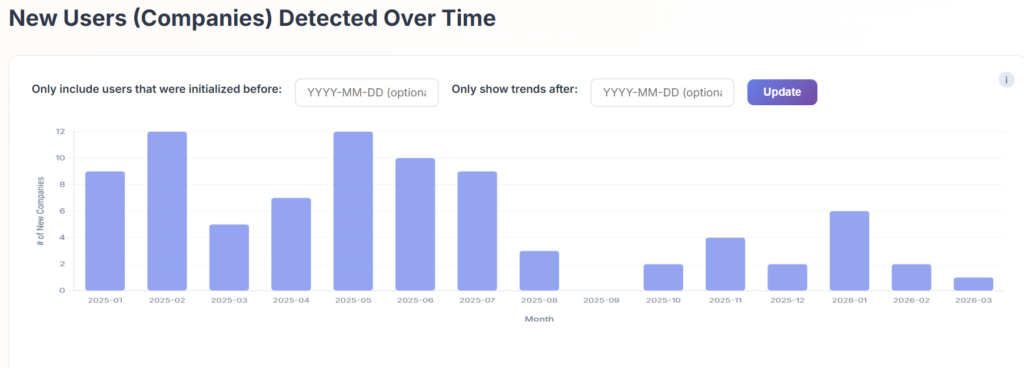
The good news is, if you are scrambling to replace it, there are many viable alternatives.
I’ll break down 8 alternatives. For each one, I’ll explain who each one is actually for, and what they have been shipping lately. There’s also a twist to how I evaluated each tool. Usually, you sign up, and install each tool one by one. For this article, I decided to find a few actual websites that used each tool (using data from Bloomberry), and tried to start a conversation with each, to see how well each of them responded.
- Warmly – best for signal-based inbound and outbound in one place
- Qualified – best for Salesforce-native pipeline generation at scale
- HubSpot Live Chat – best free Drift replacement for HubSpot shops
- Docket – best for accurate, knowledge-grounded AI conversations that convert
- Intercom – best for teams that need AI chat across both sales and support
- Pipedrive LeadBooster – best for Pipedrive users who want a lightweight lead capture bundle
- 1mind – if you want the “official” Salesloft recommended alternative
- Agentforce (Salesforce) – best for enterprise Salesforce teams that want AI-native pipeline generation
1. Warmly: Best for Signal-Based Inbound and Outbound in One Place
Who it’s really for: Best for mid-market B2B revenue teams of 10 to 200 people who are tired of stitching together separate tools for website intent, chat, and outbound sequences.
Here’s the thing about most chatbots. They open with “How can I help you?” and treat every visitor exactly the same, whether it’s a cold stranger who found you on Google or an active deal that just hit your pricing page for the third time this week. Warmly doesn’t do that.
Before it says anything, it already knows who’s on your site. That’s because it pulls in their CRM history, the pages they’ve visited, previous conversations, email engagement, their current deal stage, and intent signals from third-party sources. All of it, live, before the visitor types a single word.
So instead of starting from zero, the conversation starts from in-depth context. Because of this fundamental difference, Warmly claims a 35% chat-to-meeting conversion against an industry average of around 4%. Whether you take that number at face value or not, I don’t think anyone would argue conversion rates increase with more context about who is chatting with you.
What is Warmly’s AI trained on? Everything from your product, your pricing, your common objections, and how your best reps handle pushback. As a result, it’s not running generic scripts. It can handle tough follow-up questions, and admit when it doesn’t know something rather than making stuff up, and even getting a human to jump on board the chat when appropriate.
I decided to try Warmly’s AI bot on LeadIQ’s homepage (one of the customer’s I found for Warmly here).
When I asked the Warmly bot to explain what’s the #1 difference between LeadIQ and ZoomInfo it gave me this response, telling me LeadIQ focused more on a streamlined prospecting workflow, emphasizing “Fast prospect capture, real-time data enrichment and seamless integration into CRMs”. A bit of a mouthful, I must admit, but that seemed mostly correct.
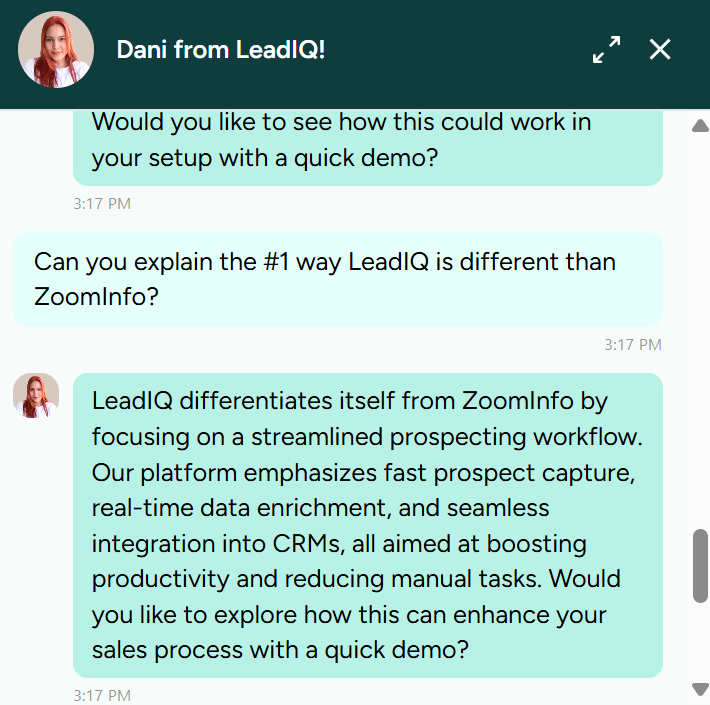
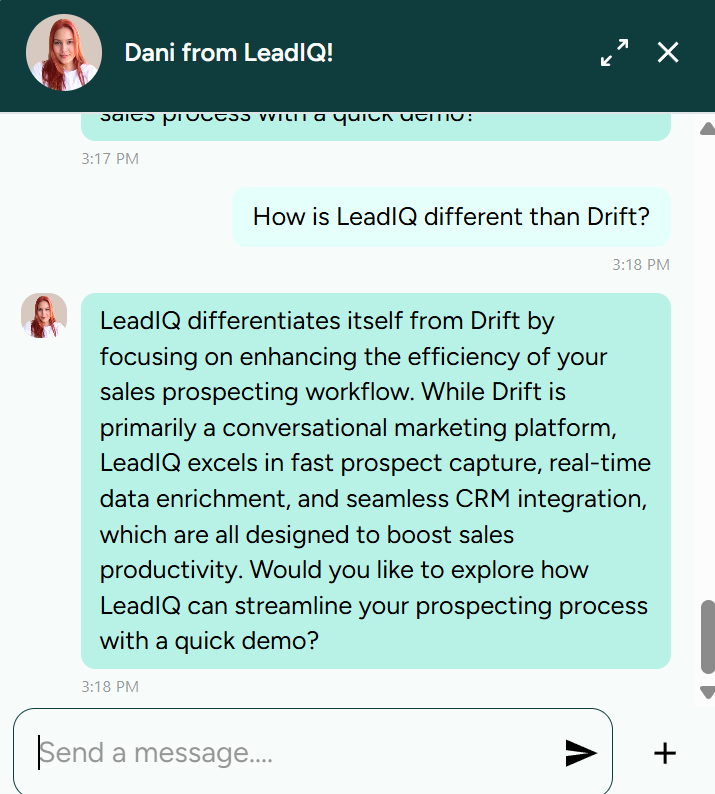
I then tried to trip it up, by asking it what’s the difference between LeadIQ and Drift, and it correctly told me that Drift was a conversational AI tool, and LeadIQ wasn’t. I tried 🙂
Booking is built straight into the chat, as there didn’t seem to be any no external form, or Calendly redirect. When I decided to book a meeting, everything happened directly in the chat, as you can see in the screenshot below.
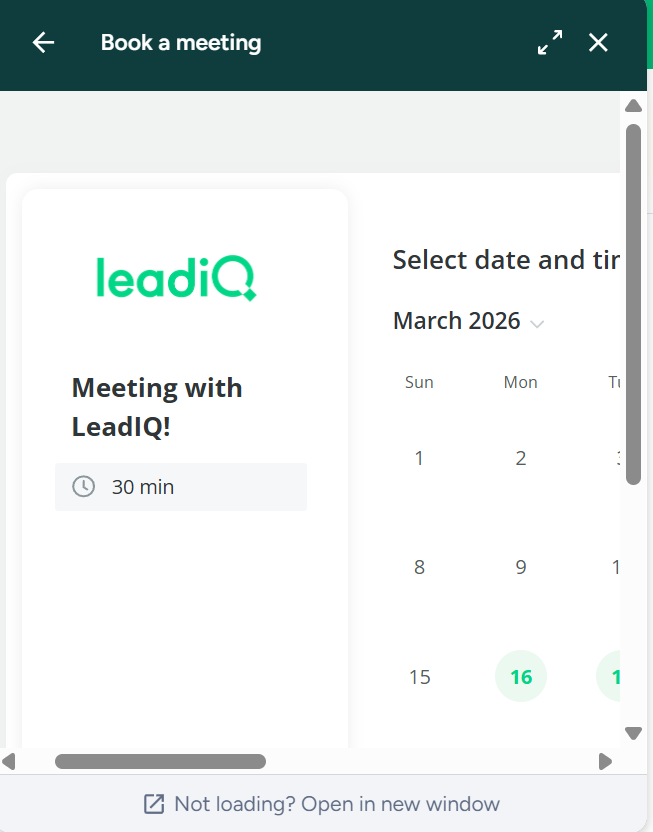
Warmly seems to checks availability, routes to the right rep based on territory and deal ownership, and fires the calendar invite on the spot. I’m not sure whether they use a 3rd party library underneath, but either way, it all happens inside the chat box. Which is important, because you don’t want prospects to drop off any stage.
Now here’s where Warmly gets interesting, in my opinion. The chatbot is the front door, but the platform behind it is doing a lot more. The same visitor identification that powers the chat also feeds automated email and LinkedIn sequences, buying committee mapping, and outbound plays that fire on intent signals.
A visitor who chats but doesn’t book doesn’t just disappear. They enter a nurture motion. Where Drift handled the chat layer and required separate tools for intent data and sequencing, Warmly collapses all three into one workflow. You identify the visitor, understand their intent, engage them in AI-led chat, and trigger follow-up sequences across email and LinkedIn, all from the same platform.
As a result, you don’t need a separate visitor identification tool, or a separate email sequencer.
What they’ve been shipping
Warmly launched AI Studio, which lets you spin up fully autonomous sales or meeting-booking agents trained on your brand voice in under 10 minutes. They also shipped a TAM Agent and MOPs Agent that keep your total addressable market continuously updated based on live intent signals rather than a spreadsheet someone refreshes once a quarter.
Pros
- Conversations start with full visitor context, not from zero
- AI trained on your actual product, pricing, and objections rather than generic scripts
- Meetings book directly in chat, no forms, no friction
- Visitors who don’t convert in chat still get pulled into an outbound motion automatically
- Buying committee identification is genuinely useful for enterprise deals
- Free tier lets you test de-anonymization before spending anything
Cons
- Built around HubSpot and Salesforce; other CRMs like Pipedrive and Dynamics may be a harder fit
- Data accuracy can be inconsistent, some users report wrong LinkedIn profiles or personal emails surfacing
- The more powerful features sit behind higher pricing tiers
- Takes real setup time to see results; not plug and play
- The product moves fast, which is great until it isn’t
Limitations
The Context Graph is only as good as what’s in your CRM. If your CRM is messy or incomplete, the AI’s context will be too.
Visitor identification accuracy also varies by traffic type, VPN usage, and network (don’t believe anyone claiming more than 50% accuracy). However, based on what I’ve heard, Warmly’s accuracy does seem to be in-line, if not above the average of its peers.
Pricing
Unfortunately, there’s no public pricing (Boo….). However, there’s a free tier for basic de-anonymization and visitor identification, which is a reasonable way to get a feel for the platform, but for the entire platform, you need a demo.
Paid plans scale by features and usage and require a conversation with their team. The heavier capabilities like TAM Agent, MOPs Agent, and full AI Studio are behind the higher tiers, so this skews enterprise in practice even if the pitch sounds accessible.
2. Qualified: Best for Salesforce-Native Pipeline Generation at Scale
Who it’s really for: Qualified is for enterprise B2B revenue teams that run on Salesforce, deal with high inbound volume, and need an AI agent that qualifies and books meetings 24/7 without waiting on a human SDR to be available.
Qualified, unlike Warmly is suited more towards more enterprise buyers.
The main reason why is because of the depth of its Salesforce integration. This is not an app that syncs data to Salesforce after the fact. It was built on top of Salesforce, meaning your routing logic, account ownership rules, territory assignments, and CRM data are all live inside the platform from day one. If your GTM motion is Salesforce-first, that matters enormously.
At the center of the product is Piper, their AI SDR Agent. I decided to give it a try by finding a customer of Qualified, MixPanel and asking it the question “What’s the #1 difference between Mixpanel and Posthog?” It gave a reasonable answer, along with a link to a comparison page.
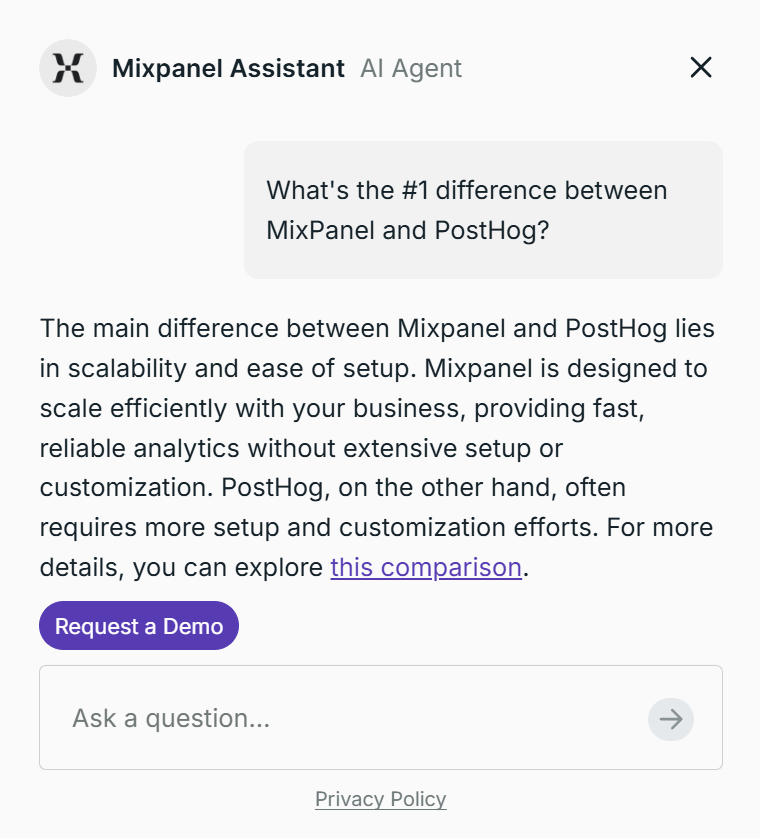
Like Warmly, Piper handles live chat, voice, and video conversations with website visitors around the clock, qualifies leads in real time, routes them to the right rep, and books meetings automatically.
When I decided to book a meeting, the bot asked me a few qualifying questions, and then I was redirected to a screen showing me the account executive I was going to meet with, and an option to choose a date/time. Again, fairly straightforward and similar to Warmly.
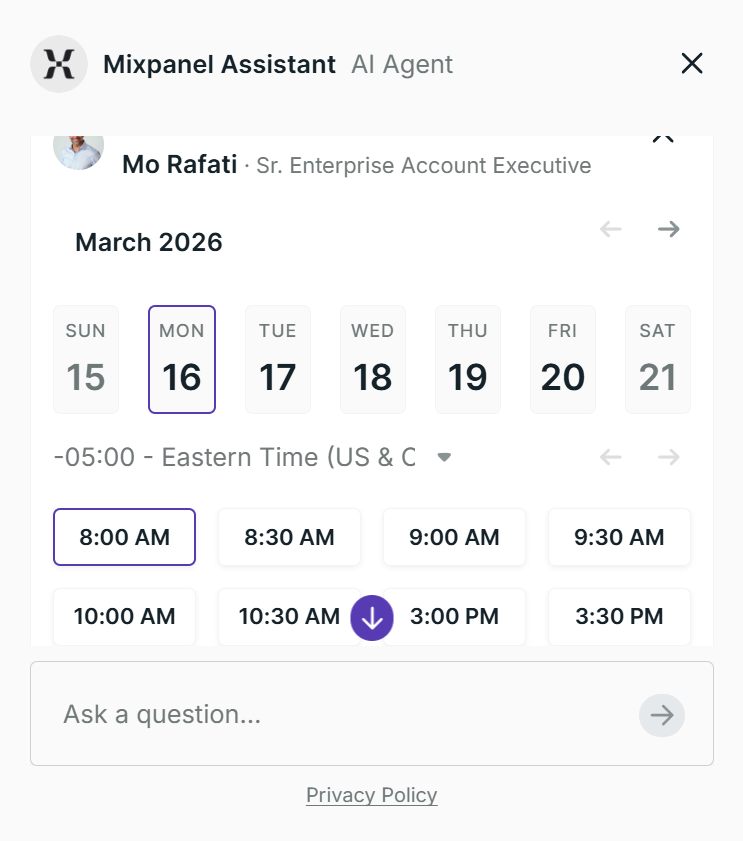
One thing that is different is the support of video. The video piece is something Drift never had, and neither does Warmly . Piper can actually appear on screen, have a face-to-face conversation, and walk a buyer through your product in real time.
Unfortunately, I wasn’t able to find any Qualified customers that had this, but for a high-intent prospect landing on your pricing page, that’s a much more concierge experience than a chat bubble.
The platform also integrates with account-based tooling. When a target account from 6sense or Demandbase lands on your site, Piper doesn’t just know the company name. It knows their ABM tier, where they are in the buying journey, and which topics they’ve been engaging with, then uses all of that to shape the conversation on the spot.
This part is similar to what Warmly does. What’s different is what happens inside Salesforce. Piper routes and engages using live CRM data, including deal stage, territory ownership, and account history, not just third-party signals layered on top.
For teams where every handoff has to log correctly and route to the right person automatically, that native Salesforce depth is hard to replicate with a tool that connects to Salesforce rather than living inside it.
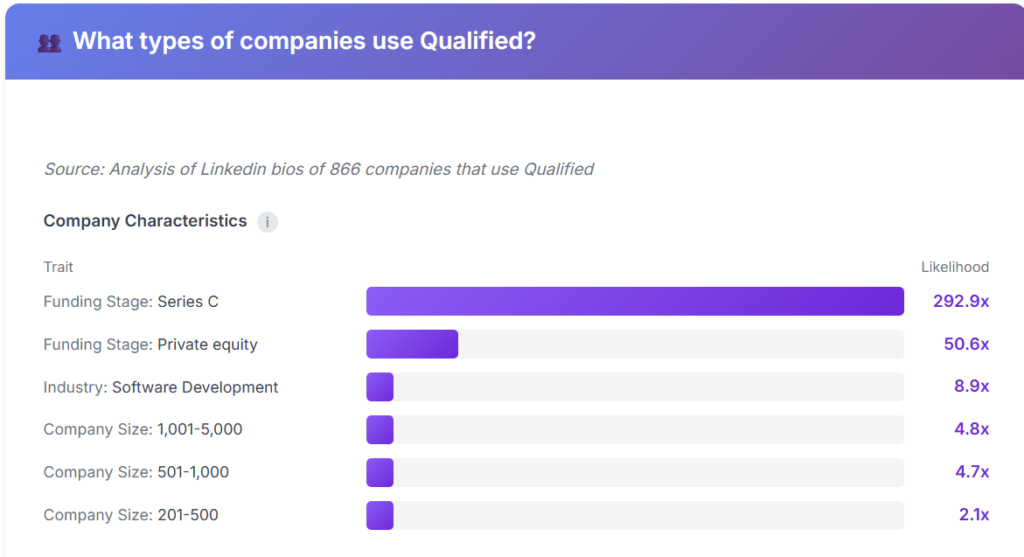
Because of their deep integration with Salesforce, and more interactive features in their AI chat, it’s no surprise that Qualified attracts more larger enterprises.
What they’ve been shipping
Qualified has been shipping fast. Piper recently became multi-modal, meaning buyers can now engage via text, voice, or video directly from the website, not just text chat. They launched Pinned Mode, which keeps Piper open and docked on the side of the browser rather than buried in a corner widget. The result on their own site was immediate: 2x conversations and 2x meetings booked in the first week.
They also unveiled Spotlight, described as the first observation layer for agentic marketing, which gives marketers a real-time view into how Piper thinks, reasons, and strategizes for each individual buyer. Agentic Nurture was another addition, extending Piper beyond live chat into top-of-funnel follow-up.
Pros
- The deepest Salesforce integration of any tool in this category, with routing logic that draws directly from CRM data rather than syncing after the fact
- Piper is genuinely capable, handling voice, video, and text conversations 24/7 and actively qualifying and booking without human involvement
- Strong customer success infrastructure with dedicated success architects
- Multi-modal engagement (text, voice, video) goes beyond what most conversational marketing tools offer
- Pending Salesforce acquisition could further deepen native functionality
Cons
- Requires a Salesforce commitment; teams on HubSpot or other CRMs will find limited value here
- Complex to configure initially; routing logic, segments, and ABM targeting require time and expertise to set up properly
- Pricing is at the high end of this category, making it hard to justify for smaller teams
- Reporting export limitations; some users note that slicing Qualified data alongside data from other platforms is harder than it should be
- Heavily inbound-focused; outbound capabilities, while growing, are not the core use case
Limitations
Qualified is built for companies with real inbound traffic and an existing Salesforce foundation. It is not a lightweight plug-and-play tool. Teams without dedicated RevOps or marketing operations resources will likely underutilize the platform. For companies not on Salesforce, there are better options on this list.
Pricing
Qualified does not publish pricing publicly. Based on third-party data, Premier plans list around $68,000 annually for 25 users, with negotiated pricing frequently landing 18 to 50% lower. Enterprise tiers add approximately $27,500 on top of that. This is firmly enterprise-tier pricing. Contact Qualified directly for a quote.
Best for: Enterprise B2B teams on Salesforce with strong inbound traffic who want an always-on AI SDR handling qualification and pipeline generation at scale.
3. HubSpot Live Chat: Best Free Drift Replacement for HubSpot Shops
Who it’s really for: B2B teams already using HubSpot as their CRM who need a working chat widget and basic bot on their website without paying for anything extra.
For anyone that’s on a strict budget, HubSpot’s live chat and chatbot builder are both genuinely free. No trial period, no credit card, no gotcha. You get a chat widget on your site, rule-based bot flows that qualify leads and book meetings, and every conversation automatically logged to HubSpot CRM.
For teams coming off Drift who were mainly using it for basic visitor engagement and lead capture, this covers a lot of ground at zero cost.
I tried interacting with Hubspot AI chat bot in Nooks.ai (who was using the free version), and as you can see in the screenshot below, I couldn’t ask any free-form questions to it. They just gave me several options to choose, and depending on what I chose, it would find the right person to direct me to.
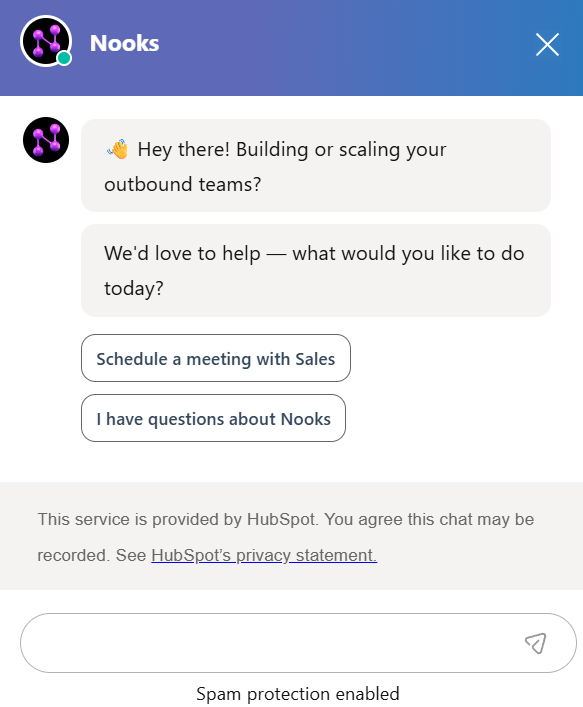
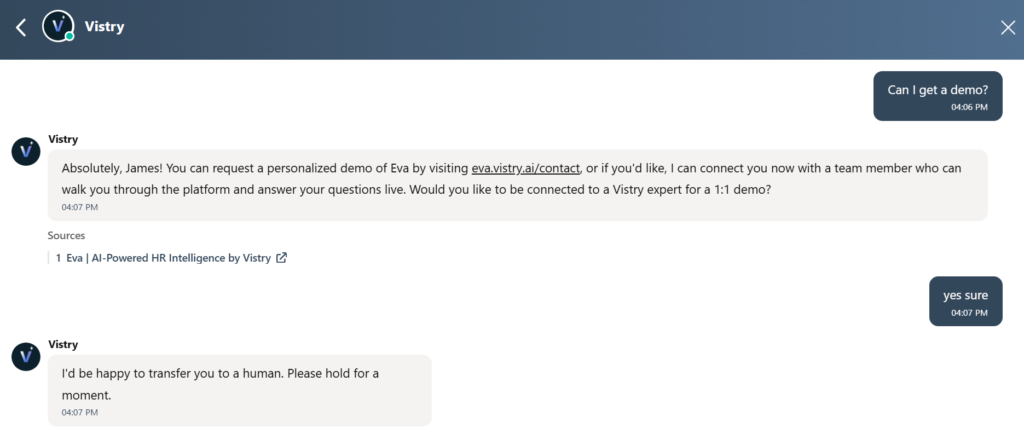
However, Hubspot Chat does have an AI mode, which is paid feature. I was able to test it by asking a bot in Vistry what the difference was between them and Moveworks, and it gave me a very detailed response, with a link for more details.
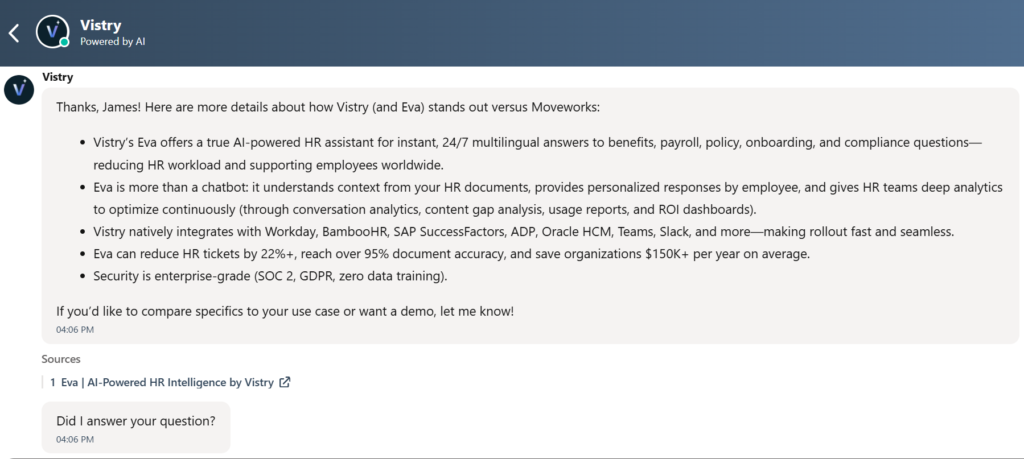
Afterwards, I could request a demo by visiting a form, or I could talk with a human by simple requesting so.
The core differentiator is the same as it has always been for HubSpot: zero integration friction. A visitor starts a chat, the bot qualifies them, a deal gets created, the right rep gets notified, and a follow-up sequence fires, all without a single Zapier connection or data export. If HubSpot is already your system of record, this just works.
The honest limitations: the free chatbot is rule-based, not AI. You build conversation trees and visitors click through them. If someone types a freeform question instead of clicking a button, the bot cannot handle it. Natural language AI that understands intent and pulls from a knowledge base is gated behind Professional tier.
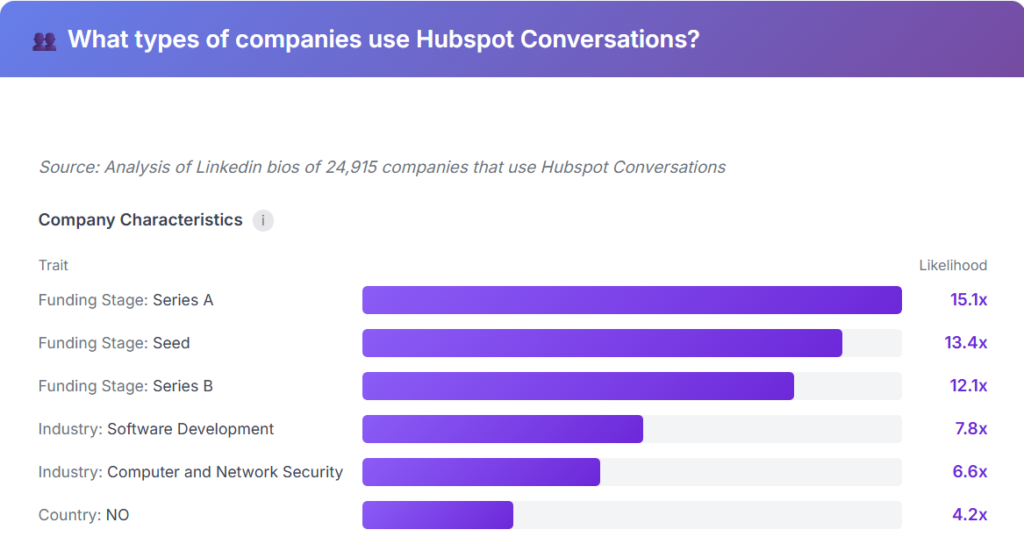
As expected, the types of companies that use Hubspot Chat are typically SMBs, and smaller startups, not enterprises.
What they’ve been shipping
HubSpot has been investing heavily in Breeze AI across the broader platform, including Breeze Copilot and several Breeze Agents for marketing and sales automation. The conversational AI layer within chat specifically draws from your HubSpot knowledge base, which means it works best for teams whose content and answers already live inside HubSpot.
Pros
- Live chat and rule-based chatbot are genuinely free, no time limit
- Every chat conversation syncs automatically to HubSpot CRM with zero setup
- Shared inbox consolidates all conversations across the team in one place
- Pre-built bot templates let non-technical users go live in under an hour
- Mobile app and Slack integration let reps respond from anywhere
Cons
- Rule-based bots cannot handle freeform text; visitors must click through preset options
- AI-powered natural language chat requires Professional tier ($500+ per month)
- HubSpot branding on the chat widget until you pay for a plan
- Routing logic is basic compared to dedicated tools
- Only worth considering if HubSpot is already your CRM
Limitations
HubSpot Live Chat is tightly coupled to the HubSpot ecosystem, which is either its biggest strength or a total non-starter depending on your stack. Teams that want sophisticated AI qualification, ABM-based routing, or intent signal integration should look at Qualified, Warmly, or Docket instead. But for teams already in HubSpot who want Drift’s basic chat functionality replaced for free, this is the obvious answer.
Pricing
Live chat and the rule-based chatbot are included in HubSpot’s free plan with no expiration. HubSpot branding is removed starting at Starter tier. Natural language AI chat requires Professional, which starts around $500 per month depending on which Hub you are on.
Best for: B2B teams already on HubSpot who want to replace Drift’s basic chat and lead capture for free, without adding another tool.
4. Docket: Best for Accurate, Knowledge-Grounded AI Conversations That Convert
Who it’s really for: B2B marketing and revenue teams that tried chatbots, got burned by hallucinations or scripted dead ends, and want an AI agent that can handle genuinely complex product questions
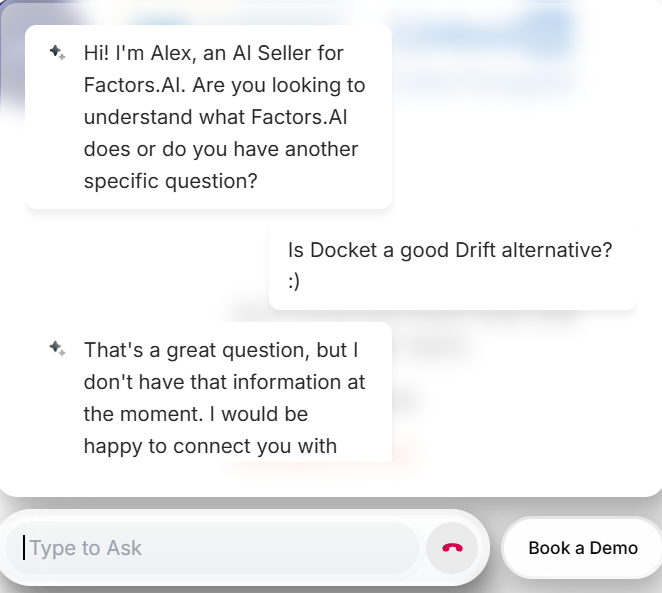
Docket‘s core differentiator is accuracy grounded in a proprietary architecture they call the Sales Knowledge Lake. Instead of connecting a generic LLM to your website and hoping for the best, Docket unifies your GTM data, sales call recordings, objection handling, product documentation, and rep knowledge into a structured knowledge base that powers the agent.
Every answer is grounded in approved content with guardrails around what can and cannot be said. The hallucination rate is cited at under 2.7%, which matters considerably when your agent is answering pricing, integration, and fit questions on your behalf 24/7.
The platform ships two agents: an AI Marketing Agent for website engagement, qualification, and meeting booking, and an AI Sales Agent that sits alongside reps during calls to surface product knowledge and answers in real time. Most Drift replacements only cover the website layer. Docket covers both sides of the conversation.
The below is an example of what the AI Sales Agent looks like. It’s rather straightforward, as you can ask any questions you want to it, and it’ll give you an answer based on all the context it has. You can directly just book a meeting by clicking on the “Book Meeting” link and it directs you to a Revenue Hero form (My sense is they integrate with Revenue Hero for booking meetings)
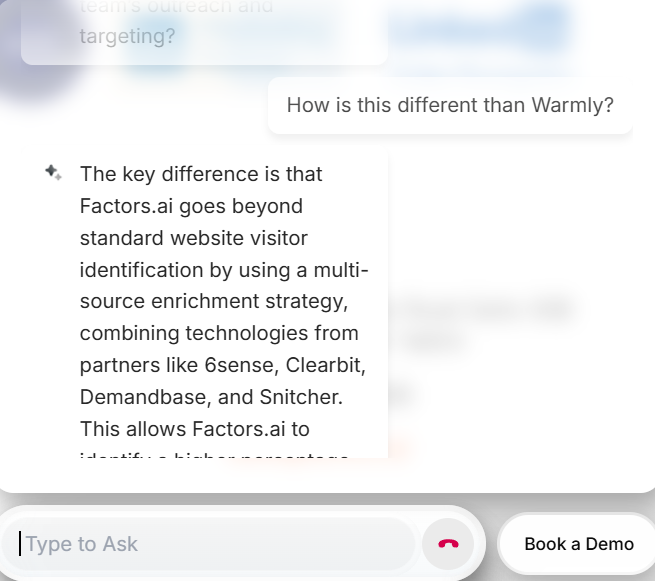
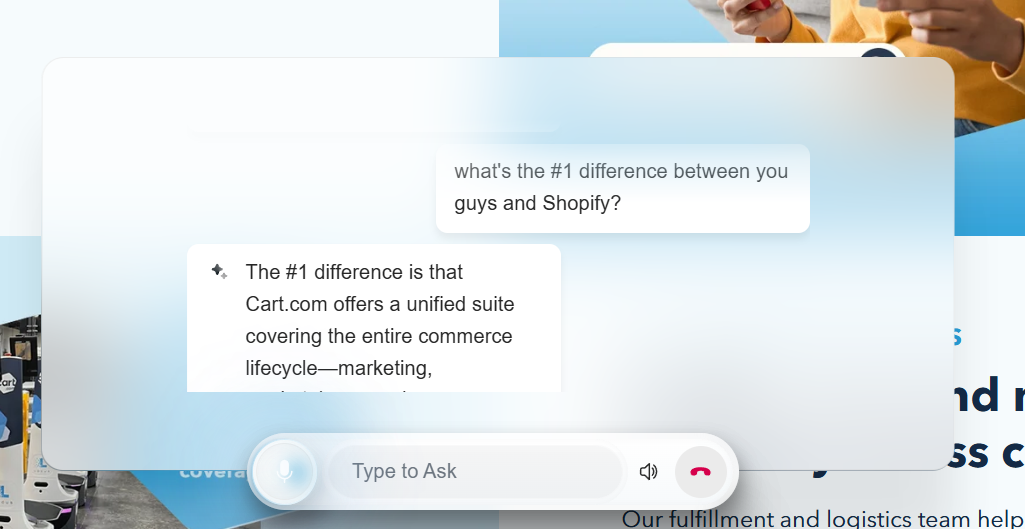
If you don’t need prospects to book meetings, you can just use the marketing agent, and I was able to find a good example at Cart.com. You can type to ask questions, or use your voice if you want.
What they’ve been shipping
Docket launched text and voice mode in the same conversation, letting buyers switch between typing and speaking without losing context. They shipped a ChatGPT app on MCP and published a detailed build playbook around it.
Their AQL (Agent-Qualified Lead) concept replaces the MQL with a buyer who has had a real, discovery-grade conversation with an AI agent and self-qualified before ever reaching a rep. They also crossed 10 billion OpenAI tokens processed across their customer base, a useful signal of actual usage scale for an early-stage company.
Pros
- Sales Knowledge Lake architecture grounds every response in verified, approved content, which dramatically reduces hallucination risk compared to generic AI chat tools
- Two-agent approach covers both top-of-funnel website engagement and in-call sales assistance in one platform
- Fast time to live, typically under 10 days for standard deployments, with minimal internal lift
- Handles genuinely complex multi-product and multi-persona conversations without breaking or routing to a dead end
- Strong enterprise security posture for an early-stage company: SOC 2 Type I and II, ISO 27001, GDPR
Cons
- Newer company with a shorter track record than Qualified or HubSpot; customer base is still growing
- Some reviewers note inaccuracy issues in edge cases, particularly for companies with highly specialized or fast-changing product terminology
- Initial knowledge setup requires real investment; the better your GTM content going in, the better the agent performs
- Pricing is custom and not publicly available, making budget planning harder without a sales call
- The Sales Agent and Marketing Agent are separate surfaces; teams wanting a fully unified platform may feel the seams
Limitations
Docket’s quality ceiling is directly tied to the quality of the knowledge you feed it. Teams with well-written documentation, and an excellent sales enablement library will obviously get stronger results than teams with scattered or outdated GTM content.
This is not a plug-and-play tool for underprepared teams.
Pricing
Docket does not publish pricing publicly. Based on available third-party data, plans run approximately $2,000 to $3,000 per month, which does seem rather pricey for what it does. It doesn’t have as robust intent data unlike Warmly, or Qualified and it isn’t as tightly integrated to Salesforce or Hubspot as Qualified or Hubspot’s Live Chat, so to me it seems to sit in the awkward middle.
5. Intercom: Best for Teams That Need AI Chat Across Both Sales and Support
Who it’s really for: B2B SaaS companies that want an AI-powered chat layer handling both pre-sale visitor engagement and post-sale customer support from a single platform, and are willing to pay for a mature, well-built product to do it.
Intercom is the most established name on this list and the one most people reach for first when Drift comes up in conversation. The comparison makes sense on the surface: both put a chat widget on your website, both use AI to handle conversations, and both connect to your CRM.
But the products come from different directions. Drift was built for pipeline generation. Intercom was built for customer communication across the full lifecycle, from first website visit through onboarding, support, and retention.
If you need a pure Drift replacement focused on sales qualification, Intercom is a broader tool than you need. However, if you want to consolidate your sales chat, support inbox, and AI agent into one platform, it earns serious consideration.
The center of the product today is Fin, their AI agent. Fin handles inbound conversations autonomously across chat, email, WhatsApp, SMS, and voice, resolving queries end-to-end without a human in the loop.
When I gave it a try on one of Intercom’s customer’s RivalIQ, and asked it a question on how it was different than Klue, it gave me a very well detailed response.
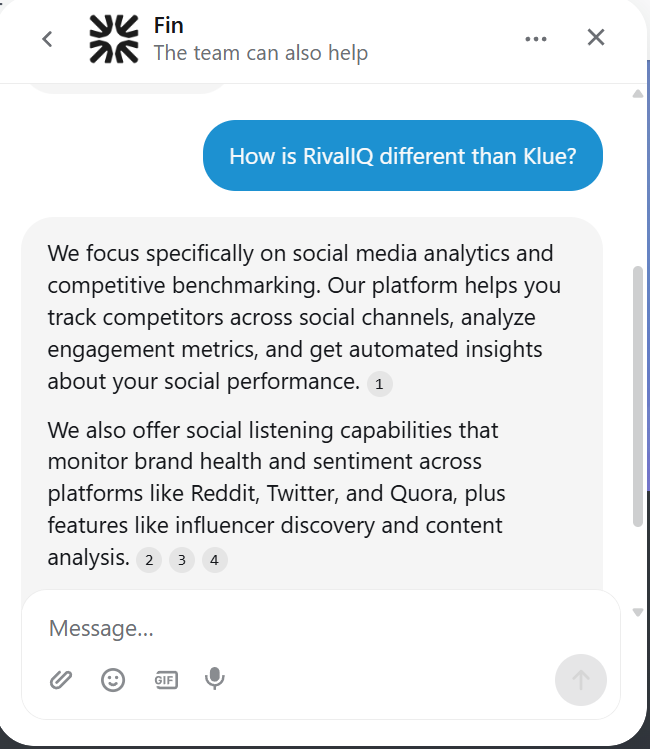
Some small things I liked was that 1) I could send an attachment. This seemed like a small thing, but I didn’t seen such an option on the other alternatives in this article. And it’s useful too because there’s many times I want to send a screenshot to someone.
The citations/links in the response was also nice. You could see where the AI took its answers from, and this is where the whole Intercom ecosystem comes into play. With Intercom, you could build a knowledge base for your customers, and use this same knowledge base to feed your AI bot as well.
Intercom reports a 67% resolution rate across their customer base as of late 2025, with over 40 million conversations resolved by Fin. For a Drift replacement use case, Fin can qualify inbound visitors, answer product questions, and hand off to a human rep when the conversation is ready.
What they’ve been shipping
Intercom has been on a significant product push with Fin. Fin 3, announced at their Pioneer Summit 2025, introduced Procedures, which lets teams teach Fin to follow complex, multi-step workflows rather than just answering questions from a knowledge base, and Simulations, which lets teams test how Fin would handle specific queries before going live.
Fin is now fully omnichannel, handling email, WhatsApp, and voice in addition to chat. In 2026, Intercom has shipped 19 helpdesk improvements and added scheduled report sharing, expanded data connector controls, and automatic public holiday handling for office hours, the most upvoted community request.
Pros
- Fin is a mature, capable AI agent with a genuine 67% resolution rate and 40 million conversations of real-world training behind it
- Truly omnichannel: chat, email, WhatsApp, SMS, and voice from a single platform
- Procedures allow complex multi-step workflows, going well beyond FAQ-style automation
- Consolidates sales chat and customer support in one inbox, reducing vendor count
- Startup program offers up to 90% off in year one, including one year of Fin free
Cons
- Core product orientation is customer support, not pipeline generation; sales qualification is possible but not the primary design intent
- Pricing is genuinely complex: seat fees plus $0.99 per Fin resolution plus channel fees for WhatsApp, SMS, and voice add up fast
- No visitor de-anonymization or intent data; you cannot see who is on your site before they start a conversation
- The $0.99 per resolution model works well for support deflection but can become counterproductive for longer consultative sales conversations
- No free plan; Essential plan starts around $39 per seat per month
Limitations
Intercom’s resolution-based pricing is designed around support ticket deflection, where short, decisive answers are the goal. Drift-style sales conversations tend to be longer, more consultative, and less cleanly resolved, which means costs can scale in ways that do not map to the value delivered.
Pricing
Essential plan starts at approximately $39 per seat per month. Advanced starts at approximately $85 per seat per month and is required for EU data hosting and advanced automation workflows.
Fin AI is $0.99 per resolution, where a resolution is counted when Fin responds and the conversation does not escalate to a human within 24 hours. Channel fees apply separately for WhatsApp, SMS, and voice. No free tier, but a 14-day trial is available. Eligible startups get up to 90% off year one including Fin free.
Best for: B2B SaaS teams that want a single AI-powered platform handling both pre-sale chat engagement and post-sale customer support, and are comfortable with usage-based pricing that scales with conversation volume.
6. Pipedrive LeadBooster: Best for Pipedrive Users Who Want a Lightweight Lead Capture Bundle
Who it’s really for: SMBs and mid-market sales teams running Pipedrive as their CRM who want chatbot, live chat, web forms, and outbound prospecting in one add-on without paying for a separate platform.
For starters, LeadBooster is not a standalone product. It is a lead generation layer bolted directly onto Pipedrive CRM, which means every conversation, form fill, and qualified lead flows straight into your pipeline with zero integration overhead. For teams already on Pipedrive, this is the path of least resistance to getting a chatbot and lead capture working on their website.
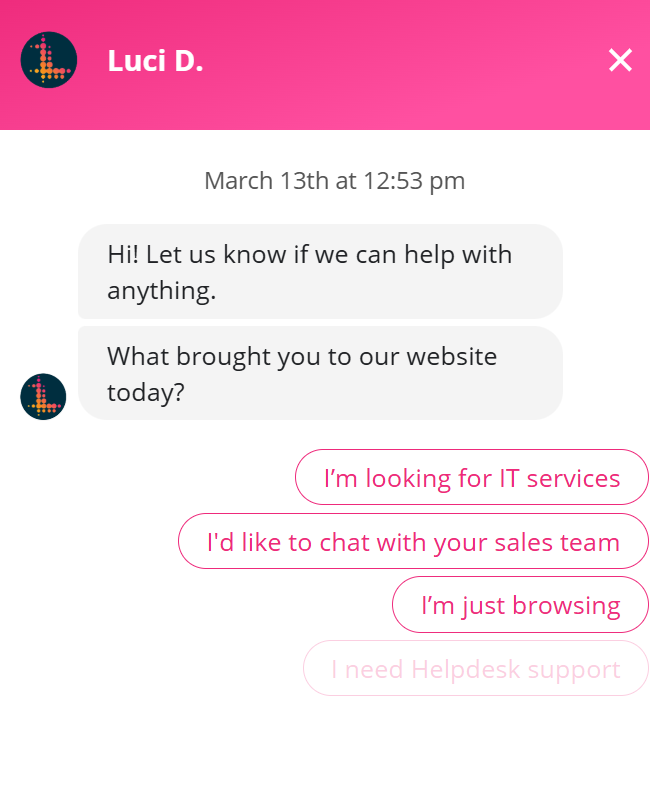
The add-on bundles four tools: a rule-based Chatbot for 24/7 visitor qualification, Live Chat for rep handoffs, Web Forms for structured lead capture, and Prospector for outbound lead sourcing from a database of 400 million profiles and 10 million companies.
The Chatbot uses playbook-based conversation trees rather than NLP AI, meaning you configure branching question paths rather than training a language model. This makes setup straightforward but of course means, prospects can’t have free form conversations with the bot.
Where LeadBooster pulls ahead is the tight CRM loop. A visitor qualifies through the chatbot, books a meeting via Pipedrive’s Scheduler, and lands in the pipeline as a deal automatically, assigned to the right rep.
The Prospector database is also an underrated part of the package. Teams can build ICP filters by job title, industry, and location, then reveal verified emails and direct-dial numbers using credits. It updates and verifies up to 800,000 profiles daily.
What they’ve been shipping
Pipedrive has been focused on AI quality and CRM intelligence across the broader platform. Their engineers are active contributors to open-source AI tooling, and the company launched a ChatGPT integration that lets sales teams query their pipeline data and draft emails directly from OpenAI’s interface. A Customer Advisory Board was expanded to ensure product direction stays aligned with practitioner needs.
Pros
- Lowest friction option for existing Pipedrive users; everything syncs natively
- Four tools in one add-on at $32.50 per company per month, highly cost-effective
- Prospector database gives outbound capability alongside inbound chat
- Chatbot, live chat, forms, and scheduling all connect to the same CRM record
- 14-day free trial available
- No per-seat pricing, flat company fee
Cons
- Chatbot is rule-based, not NLP AI; cannot handle freeform conversations
- Useless as a standalone product; requires an active Pipedrive subscription
- No de-anonymization or intent data for unknown visitors
- Prospector credits are separate from the base add-on fee
- Routing logic is basic compared to dedicated tools like RevenueHero or Default
Limitations
LeadBooster is only worth considering if Pipedrive is already your CRM. Outside of that context, there are better purpose-built tools for every individual component it offers.
The chatbot is strictly flow-based, which means it will struggle with complex or unexpected visitor questions compared to the AI-native chat tools on this list.
Pricing
$32.50 per company per month billed annually, or $39 per month billed monthly. Each plan includes 10 Prospector credits monthly; additional credits are purchased in batches. Requires an active Pipedrive CRM subscription.
Best for: Small to mid-market B2B teams running Pipedrive who want a quick, affordable way to add chatbot, live chat, and outbound prospecting without adding another vendor to their stack.
7. This is actually a really interesting find. 1mind is more significant than just “another alternative.” Here’s a draft section:
7. 1mind: The Official Drift Successor
Who it’s really for: Teams already on Salesloft who want to know what Clari + Salesloft is actually pointing Drift customers toward.
Let’s start with the headline. On March 6, 2026, the same day Drift was officially sunset, Clari + Salesloft named 1mind its exclusive AI successor to Drift. That sounds significant, and it is worth paying attention to. But it’s also worth reading carefully. “Exclusive AI successor” is partnership language, not a product endorsement. Clari + Salesloft needed somewhere to send their Drift customers, and 1mind is where they landed.
So what is 1mind, actually? According to them, the product is built around what they call Superhumans, AI agents with a photorealistic face and voice, trained on your sales materials and playbooks. They engage visitors on your website, can join video calls as a live participant, run demos, handle objections, and book meetings. The pitch is that they go further than a chatbot by showing up on screen like a real person.
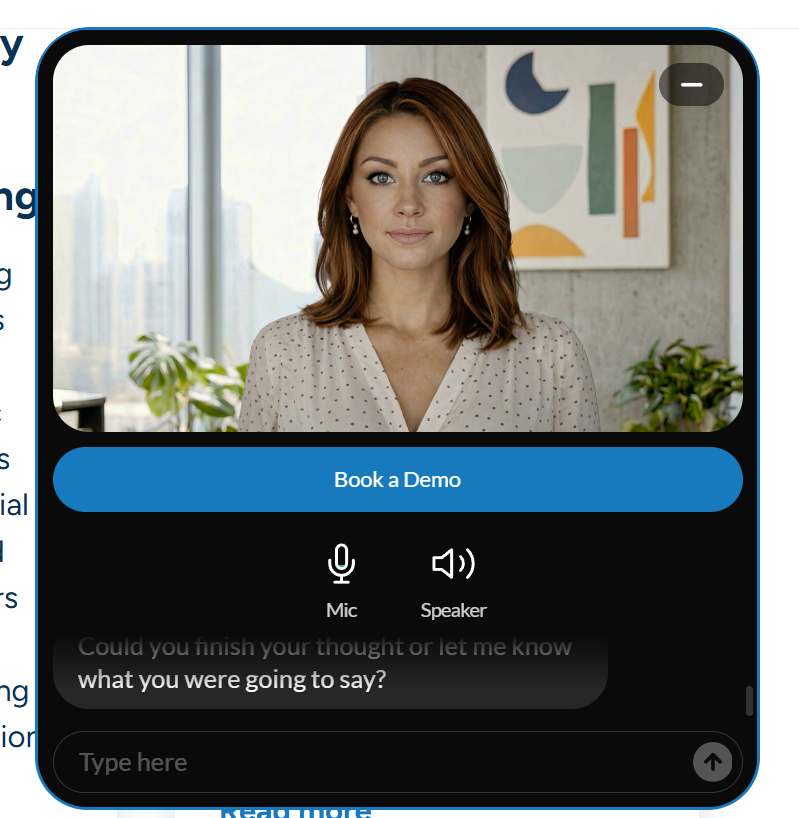
If you want to see what it looks like, head over to https://www.relexsolutions.com/. In the bottom right, you’ll see a woman avatar who will speak with you, and answer any questions you have. It seemed to respond well to all of my questions, and I only had to repeat myself once.
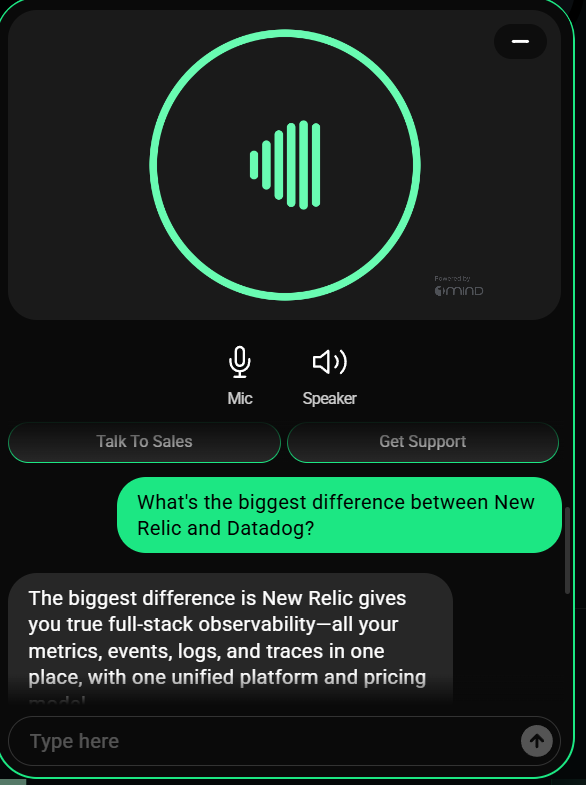
You don’t have to enable the avatar of course. I tried the 1Mind chat got over at New Relic (one of their early customers), it used a voice only, and no human avatar.
The video avatar is the differentiator they lean hardest on, and Qualified’s Piper already does face-to-face video conversations on the website. Whether a photorealistic AI face actually converts better than a text chat interface is a real question, and one that probably depends a lot on your buyer.
The Salesloft integration also gets a lot of airtime in their marketing. The claim is that every buyer signal flows directly into Salesloft Cadences and Clari forecasts with no manual handoff. That sounds powerful, but the details of what that integration actually entails aren’t publicly documented yet, so it’s hard to really pin a decision on that.
With pricing reportedly at 6 figures annually, 1Mind unfortunately is near the bottom of my list. I can’t claim it’s not a viable alternative, but based on the enormous price tag, and the lack of any “wow” features (other than a human-like avatar) that support that price tag, it’s probably not something I would risk my career buying (but again, that’s just me).
Pros
- Named official Drift successor by Clari + Salesloft, so there’s a clear migration path for existing customers
- Video avatar capability is a genuine differentiator from pure chat tools
- Strong founder pedigree with Amanda Kahlow’s 6sense background
- Enterprise customer names carry real weight
Cons
- Core functionality is not clearly differentiated from Warmly, Qualified, or Docket
- Salesloft integration details are vague; what it actually does beyond passing signals is unclear
- Very limited independent review data
- Six-figure average contract value with no public pricing
- The AI avatar approach may not suit every buyer or brand
Limitations
Still very early stage with a small customer base and almost no third-party validation.
Pricing
No public pricing. Reportedly six figures annually on average. Contact their team.
Best for: Existing Drift customers already on Salesloft who want a direct migration path and are curious whether AI avatars convert better than text chat for their buyers.
8. Agentforce: Best for Enterprise Salesforce Teams That Want AI-Native Pipeline Generation
Who it’s really for: Enterprise B2B teams running Salesforce who want AI-powered lead engagement and pipeline generation built into their existing stack rather than bolted on from outside.
First off, Agentforce is not a chatbot you add to your website. It is Salesforce’s agentic AI platform, and for sales teams, it means autonomous agents operating as digital team members inside Sales Cloud with full access to your CRM data, calendar integrations, email infrastructure, and the Atlas reasoning engine. Where most tools on this list sit on top of Salesforce, Agentforce lives inside it.
The Lead Nurturing agent handles the full top-of-funnel motion: personalized outreach to new and updated leads, follow-ups, answering product questions using approved company content, and booking meetings on a rep’s calendar. It operates across email, web chat, Slack, SMS, and WhatsApp without switching context, and hands off to the right human rep when the lead is ready.
The deeper advantage is data. Every agent action is grounded in Salesforce’s Customer 360 and Data Cloud, which means the agent knows a lead’s full interaction history, account ownership, territory, and CRM context before it sends a single word. This is what separates Agentforce from purpose-built chat tools that start from scratch with each visitor.
The acquisition of Qualified (announced December 2025, expected to close early 2026) adds inbound conversational marketing to the platform, bringing visitor de-anonymization, intent-based engagement, and website chat directly into the Agentforce ecosystem.
What they’ve been shipping
Agentforce 360 launched at Dreamforce 2025, introducing Agentforce Voice for inbound and outbound phone conversations, an Agent Builder redesign, multi-agent orchestration via MuleSoft Agent Fabric, and Agentforce Grid for bulk testing and prototyping agents at scale.
Two-way email became generally available in February 2026. Sales coaching in 16 languages shipped in late 2025. Salesforce internally reported a 19% surge in delivery output and 95% AI adoption across their own engineering teams after integrating Agentforce into their workflows. Over 1.2 billion agentic workflows have been processed by Agentforce customers.
Pros
- Native Salesforce integration means agents have full CRM context from day one
- Atlas reasoning engine enables genuinely autonomous multi-step decisions, not scripted flows
- Pre-built SDR and Lead Nurturing agents deployable with low-code setup
- Omnichannel: email, chat, Slack, SMS, WhatsApp, and voice in one platform
- Acquisition of Qualified adds inbound conversational marketing to the mix
- Enterprise-grade security via the Einstein Trust Layer
- Named Fortune’s World’s Most Admired Companies 2026
Cons
- Requires Salesforce Sales Cloud Enterprise edition or higher as a prerequisite
- Per-conversation pricing at $2 per conversation adds up quickly at scale
- Implementation complexity is significant; not a tool a small team deploys in a week
- Overkill for companies not running Salesforce as their CRM
Limitations
Agentforce is enterprise software built for enterprise budgets and enterprise Salesforce orgs. Teams not on Salesforce have no path in. Smaller teams on Salesforce may find the setup overhead and conversation-based pricing model challenging to justify compared to lighter tools on this list. The Qualified acquisition also means the inbound website engagement layer is still in transition, with full productization expected through 2026.
Pricing
SDR and Sales Coaching skills start at $2 per conversation, where a conversation is triggered when the agent sends its first outreach to a lead. Enterprise licensing and pre-commit options are available for high-volume teams through Salesforce’s Digital Wallet model. Requires active Salesforce Sales Cloud Enterprise, Performance, or Unlimited edition with Einstein for Sales.
Best for: Enterprise B2B organizations running Salesforce who want a single agentic platform to handle lead nurturing, inbound qualification, outbound engagement, and meeting scheduling without adding a separate vendor, and who have the Salesforce infrastructure and implementation resources to deploy it properly.
How to Choose
After trying all of these tools, I have to admit: most of these tools do the same core things. They identify visitors, start conversations, qualify leads, and book meetings. The features blur together fast.
The cleaner way to think about it is CRM first.
If your team runs on Salesforce, start with Qualified or Agentforce. Qualified is the better fit for marketing-led inbound at scale. Agentforce makes more sense if you want AI agents woven into your broader Salesforce workflow rather than a standalone chat layer on top of it.
If you’re on HubSpot, HubSpot Live Chat is the obvious answer. No new vendor, no integration headaches, and it’s free to start.
If you’re on Pipedrive, LeadBooster is right there and purpose-built for it.
If CRM fit isn’t your primary concern and you want a single platform that combines intent data, AI chat, and an outbound motion without stitching three tools together, Warmly is the strongest all-in-one option on this list.
Docket is the hardest to place. It does one thing genuinely well, which is accurate, knowledge-grounded AI conversations that don’t hallucinate. If that’s your specific pain point and you’re willing to pay for a point solution, it earns its spot. But for most teams, it will feel like it sits awkwardly between the CRM-native options and Warmly’s broader platform play.
Intercom belongs here too, but with a caveat. If you need pre-sale chat and post-sale support in one place, it’s the only tool on this list built for both. If you only need pipeline generation, it’s more than you need.