

Last Updated: May 13, 2026
How can you tell whether a company pays for HubSpot or is just a free user? Or to go a step further: how can you build your own list of paying HubSpot companies?
HubSpot has around 6 different paid SKUs across all their hubs, but almost every one of them has at least one public signal that tells you if a company is using it. And once you know what to look for, you can basically compile a long list of paying customers.
I’ll walk you through how to do exactly that.
Warning: This article will get a bit technical/geeky, but I provided some code samples in Python to help. And while you may not be able to run it, as is, hopefully you can use it a starting point to “vibe code” a scraper yourself.
Step 0: You need a long list of websites to scrape
First, you obviously need to start with a universe of websites to run against. There’s a really useful list of top 1 million domains provided by Cloudflare Radar that should be good enough for our case. But if you search hard enough, there’s also bigger lists in places like Github too.
Step 1: Are they even on the free Hubspot plan?
Two cheap checks catches nearly every active HubSpot customer, free or paid.
The first is the main Hubspot tracking script, which has the URL format: js.hs-scripts.com/<PORTALID>.js, with regional variants like js-<REGION>.hs-scripts.com. A lot of HubSpot users embed it on every page of their website, and you’ll see it embedded as a script tag in the <HEAD> section of a webpage.
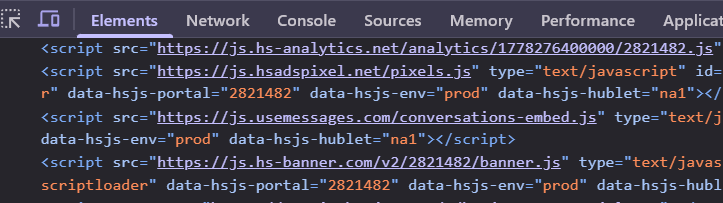
To find out if a website has that script, simply fetch the homepage of each domain, search for the script tag using a simple regex, and if it’s present: it means they use HubSpot in some capacity.
import re

def get_portal_id_from_html(html):
    match = re.search(r'js[\w\-]*\.hs-scripts\.com/(\d+)\.js', html)
    return match.group(1) if match else None
Some sites may load this script dynamically, so you might need to use a headless browser instead of just regular CURL. This is above the pay grade of this article, but there’s loads of resources that can help you set up a fleet of headless browsers(ie. go ask Claude, ChatGPT, Gemini, etc.)
The second way to determine if a company is using HubSpot for free is by analyzing their SPF record. An SPF record is basically a DNS record that lists every external service authorized to send email on the domain’s behalf. You can use a tool like DNSChecker to find this manually. But of course, you want to automate this at scale.
When a HubSpot customer sets up email sending (usually for marketing emails), HubSpot’s onboarding walks them through adding “include:_spf.hubspotemail.net” to their SPF Record, so your detection script needs to look for “hubspotemail” to detect HubSpot users.
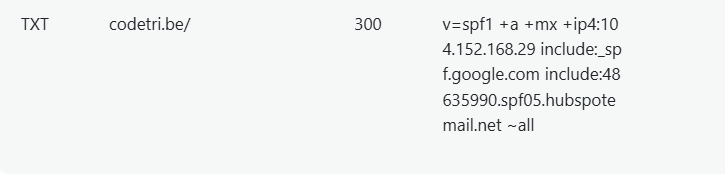
If you run both of these tactics – the check to detect a Hubspot Analytics script or a SPF record, and combine the results, you should have a huge list of companies that use HubSpot in some capacity, free or paying.
When I ran this against the websites of 3 million companies, more than 113,000 companies were using HubSpot, in some capacity.
But what about *paid* HubSpot customers? How can we detect companies actually paying HubSpot, and not just the freeloaders?
This is where the fun begins 🙂
Signal #1: Content Hub Pro+ customers
First, let’s start with the Content Hub Pro customers. The free HubSpot plan gives you a subdomain on hs-sites.com to publish basic landing pages. Hosting your real website (ie. domain.com, www.domain.com, blog.domain.com) on HubSpot’s CMS requires Content Hub Starter at minimum, and in practice almost everyone running a serious site is on Pro.
So for each website on your list, you basically need to check if domain.com, www.domain.com, or blog.domain.com points to a HubSpot IP. And if so, it means they’re a Content Hub Pro+ customer.
But how the heck do you know if a website has their IP pointing to HubSpot?
While HubSpot doesn’t publish their IP ranges on their website, HubSpot publishes their IP allocations through ARIN under the org handle HUBSP-8. And ARIN has a nice API, where you can pull the full list of IP ranges belonging to any handle. Code below:
def get_hubspot_ip_ranges():
    org = requests.get(
        "https://whois.arin.net/rest/org/HUBSP-8/nets",
        headers={"Accept": "application/json"}
    ).json()

    nets = org.get("nets", {}).get("netRef", [])
    if isinstance(nets, dict):
        nets = [nets]

    ranges = []
    for net in nets:
        handle = net.get("@handle")
        net_data = requests.get(
            f"https://whois.arin.net/rest/net/{handle}",
            headers={"Accept": "application/json"}
        ).json()

        blocks = net_data.get("net", {}).get("netBlocks", {}).get("netBlock", [])
        if isinstance(blocks, dict):
            blocks = [blocks]

        for block in blocks:
            start = block.get("startAddress", {}).get("$")
            cidr = block.get("cidrLength", {}).get("$")
            if start and cidr:
                ranges.append(f"{start}/{cidr}")
    return ranges
For each domain in your list, you want to do 2 things:
1) check if any of the the A records (the IP associated with the website) for any of domain.com, www.domain.com or blog.domain.com belong to an HubSpot IP range.
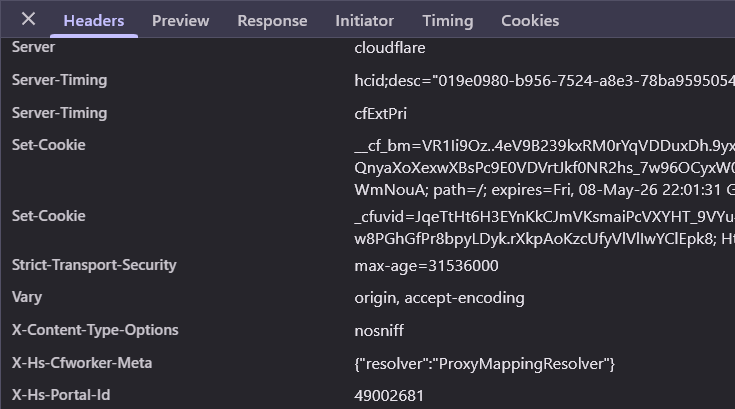
2) And for any domain that does hit, fetch /_hcms/diagnostics , grab the Portal ID from the response headers (see below to see what I mean), and store it in some database. We’ll need it for the next signal.
def on_content_hub(domain, hubspot_ranges):
    for prefix in ["", "www.", "blog."]:
        a_records = dns_lookup_a(f"{prefix}{domain}")
        for ip in a_records:
            if ip_in_ranges(ip, hubspot_ranges):
                portal_id = get_hub_id(f"{prefix}{domain}")
                return True, portal_id
    return False, None
One important caveat: a lot of companies put Cloudflare, Akamai, Fastly, or Imperva in front of their HubSpot-hosted site. In that case the A record points to those IPs, not to HubSpot, and you can’t tell from DNS alone what’s behind it. When you see a CDN in front, mark that domain as “unknown” rather than “not on HubSpot”.
Signal #2: Content Hub Enterprise customers
Content Hub Pro is capped at one brand domain per portal. You can have unlimited subdomains under it (ie blog.domain.com, lp.domain.com, etc), but you cannot host a second root domain on the same portal (ie domain.com AND domain2.com). Hosting two or more different domains requires Content Hub Enterprise.
So to find Content Hub Enterprise customers, just look through the (Portal ID → list of domains) dictionary you built in Signal #1 and pick out the portals with two or more distinct root domains attached.
def find_content_hub_enterprise(portal_to_domains):
    enterprise = {}
    for portal_id, domains in portal_to_domains.items():
        roots = {extract_root(d) for d in domains if is_serving_content(d)}
        if len(roots) >= 2:
            enterprise[portal_id] = roots
    return enterprise
Before counting, filter out any domain that returns a 301 from its root URL. Only domains serving real content (200 status, real HTML body) count toward the Enterprise threshold.
def is_serving_content(domain):
    resp = requests.get(f"https://{domain}/", allow_redirects=False, timeout=5)
    return resp.status_code == 200
This signal is really elegant because it’s pure aggregation. The only data you need is the (domain, Portal ID) pairs you already collected in Step 2.
Signal #3: Marketing Hub Pro customers
This is the one I’m most proud of because there is no clean technical fingerprint for Marketing Hub Pro on a company’s website. The tracking script looks identical across tiers. Pop-ups exist on free. Forms exist on free. There’s almost no clear signal that tells you who is paying for Marketing Hub Pro.
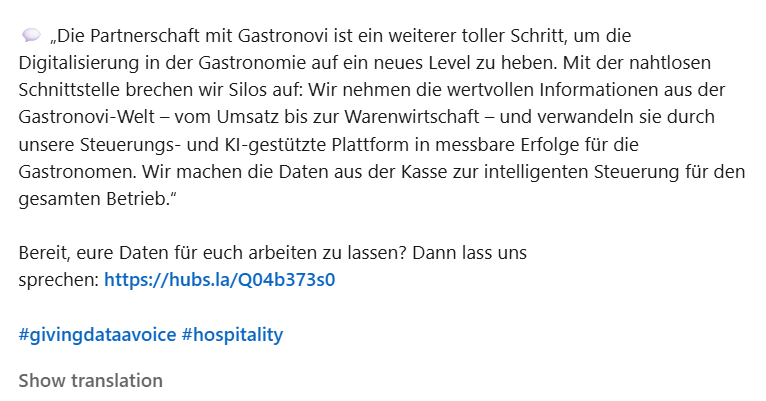
Except 1 detail.. Marketing Hub Pro and Enterprise both unlock the social media publishing tool, and when a customer publishes a social post through HubSpot, HubSpot wraps every outbound link in one of three URL shorteners they own: hubs.ly, hubs.li and hubs.la.
Here’s an example of a likely Marketing Pro customer with a shortened Hubspot URL on one of their Linkedin posts:
So our detection logic consists of:
- For each company in your portal list, scrape their LinkedIn company-page posts.
- Scan the outbound links in those posts for those Hubspot shortened URLs (using regex)
- Resolve each shortened URL to its destination and check that the destination is on the company’s own domain. This rules out the case where the company is just resharing a partner’s post or industry article that happened to be published via HubSpot.
def is_marketing_hub_pro(company_domain, linkedin_posts):
    shortener_domains = {"hubs.ly", "hubs.li", "hubs.la"}

    for post in linkedin_posts:
        for link in extract_links(post):
            if any(s in link for s in shortener_domains):
                final_url = resolve_redirects(link)
                if company_domain in final_url:
                    return True
    return False
This method has a few limitations worth being upfront about. It misses Pro customers who pay for Pro to get marketing automation, smart content, or campaign reporting but don’t actually use the social tool. It also misses Pro customers who only schedule X (Twitter) or Facebook posts and skip LinkedIn.
But for finding currently-active Marketing Hub Pro customers, though, the false positive rate is essentially zero, which is what you want when you’re building a customer list.
Signal #4: Marketing Hub Pro+ via form configs
Analyzing the embedded forms of HubSpot customers is also a sneaky way to find out whether they use Marketing Hub Pro. By embedded forms, I mean any form whether it’s to capture emails for mailing lists, like the below or for demo requests.
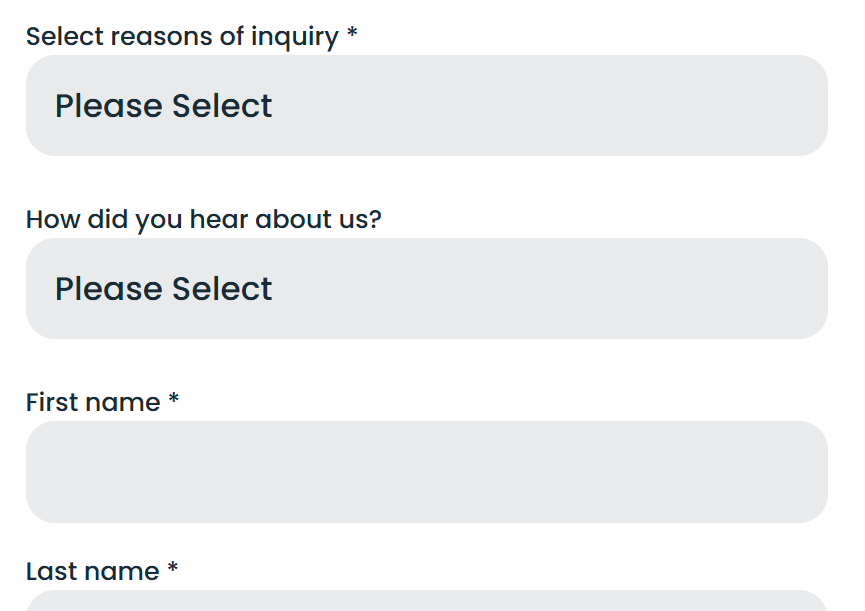
HubSpot embedded forms are exposed via a public JSON endpoint that requires no authentication.
https://forms.hsforms.com/embed/v3/form/<portalId>/<formId>/json
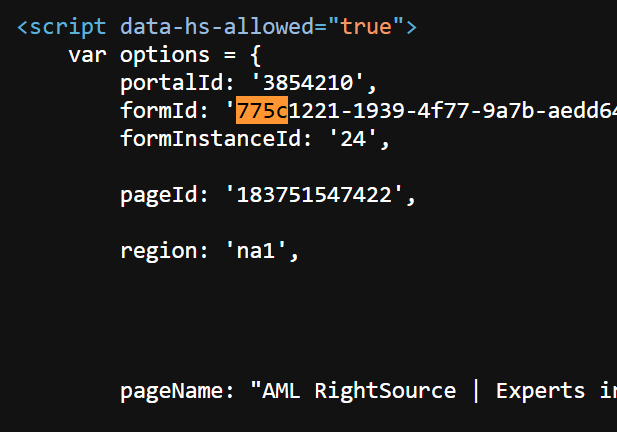
You need a Portal ID (already collected) and a Form ID. You can find the form ID in the HTML source of the website you’re scraping. It’ll look similar to the below. A simple regex will extract both the formId and portalId.
I do recommend crawling a handful of pages per portal (homepage, contact, demo request, resources) to harvest a few form IDs.
Once you have a form JSON, the strongest tier signals are:
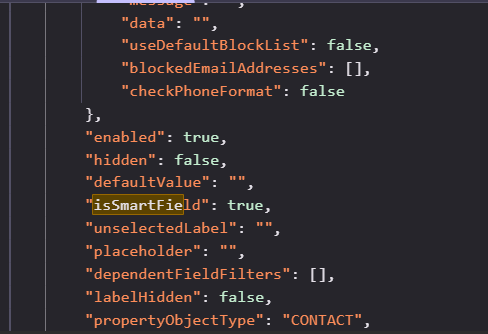
- isSmartField or isSmartGroup set to true on any field. Smart fields, which dynamically show different content to different visitors based on CRM properties, are a featured present in Marketing Hub Pro and above.
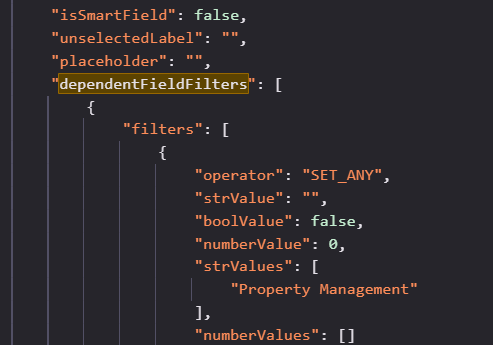
- dependentFieldFilters populated on any field. Conditional form logic (show field B only if field A has value X) requires Pro.
The code to check both of these signals:
def is_pro_from_form(portal_id, form_id):
    resp = requests.get(
        f"https://forms.hsforms.com/embed/v3/form/{portal_id}/{form_id}/json"
    ).json()

    fields = [
        f
        for group in resp["form"]["formFieldGroups"]
        for f in group["fields"]
    ]

    has_smart = any(f.get("isSmartField") or f.get("isSmartGroup") for f in fields)
    has_conditional = any(f.get("dependentFieldFilters") for f in fields)

    return has_smart or has_conditional
A weaker but still useful signal in the same JSON is noBranding set to true in the form’s scopes. That removes the “Powered by HubSpot” branding from the rendered form and is gated to Marketing Hub Starter or higher. So noBranding being true rules out free, but doesn’t pin to Pro specifically.
This signal scales well as long as you can harvest Form IDs efficiently. One approach is to crawl maybe 5-10 candidate pages per portal looking for the embed pattern, queue up all the discovered (portal, form) pairs, and batch-fetch the JSONs.
Signal #5: Marketing Hub Pro+ via pop-up audience configs
We uncovered 2 signals to find paying Marketing Hub Pro customers, but there’s a 3rd, albeit not as effective as the other two.
First, when a HubSpot customer has pop-ups, slide-ins, modals, or banners configured (HubSpot calls these “web interactives”), the page fetches a portal-specific config blob from:
https://api.hubspot.com/web-interactives/v1/public/audiences/<portalId>If the response has a populated sortedAudienceConfigs array, the customer is running pop-ups. Within each config, look for a populated campaignGuid. The Campaigns tool, which is the higher-level construct that ties together pop-ups, emails, landing pages, and ads under one campaign, requires Marketing Hub Pro+.
So, a non-null campaignGuid is another Marketing Hub Pro+ signal. Here’s some code to detect this, given a Hubspot Portal ID.
def is_pro_from_popups(portal_id):
    resp = requests.get(
        f"https://api.hubspot.com/web-interactives/v1/public/audiences/{portal_id}"
    ).json()

    for config in resp.get("sortedAudienceConfigs", []):
        if config.get("campaignGuid"):
            return True
    return False
The honest caveat here is the hit rate. Across a random sample of paying HubSpot portals I tested this on, roughly 98% returned an empty sortedAudienceConfigs array. Empty doesn’t mean they’re not on Pro. It just means they’re not currently running pop-ups, which is most companies. So this signal has low recall but very high precision when it does fire.
What that means at scale: don’t use this as a primary discovery method. Use it as enrichment on a portal list you’ve already built through other means. The 2% that do hit are reliably Pro+, which is useful for tier classification.
Signal #6: Service Hub Pro customers
We now have signals to find paying Content Hub and Marketing Hub customers. Now what about Service Hub?
The key is to find features that are gated only to Service Hub Pro/Enterprise customer and a way to detect that feature. And the best feature is the Knowledge Base feature, which lets you publish a customer-facing help center.
Most customers have this in fairly predictable subdomains such as help.domain.com, support.domain.com, or knowledge.domain.com. So all you you need to do is probe the obvious candidates and check whether any of them resolve to HubSpot’s IP ranges:
def has_service_hub_pro(domain, hubspot_ranges):
    candidates = ["support", "help", "docs", "kb", "knowledge"]
    for sub in candidates:
        host = f"{sub}.{domain}"
        a_records = dns_lookup_a(host)
        if any(ip_in_ranges(ip, hubspot_ranges) for ip in a_records):
            return True
    return False
This is a cheap check (just DNS lookups) and runs naturally over your full portal list. False positive rate is essentially zero, since you can’t accidentally point a subdomain at HubSpot’s IPs without also having a Service Hub Pro account configured to receive it.
The cases we miss are Service Hub Pro customers who use the default <portal_id>-hs-sites.com/knowledge URL instead of connecting a custom domain. Those won’t show up in the subdomain probe but in reality, not a lot of customers actually use this, as it looks very unprofessional.
Signal #7: Sales Hub Starter+ via the meetings widget
Sales Hub is the trickiest tier to detect because most of its features (sequences, deal stages, pipelines, forecasting) are internal to the CRM and never surface on the public internet. But the meetings scheduling widget is one feature that does surface, and it has a useful tier tell.
The free version of HubSpot Meetings forces a “Powered by HubSpot” badge at the bottom of the booking widget. To remove that branding, you need Sales Hub Starter or higher.
The catch is that most companies don’t embed the meetings widget on their main marketing pages. The best places to find one are pages with anchor text like “Talk to sales,” “Book a demo,” “Contact sales,” or any URL with sales/demo in the slug.
So our detection logic is:
- For each portal in your list, pull the homepage and find anchor links containing “sales” or “demo” in the text or href.
- Crawl those linked pages and check for the HubSpot meetings widget embed (look for meetings.hubspot.com or meetings-na1.hubspot.com in the iframe src or script).
- If a widget is present, render it (or fetch the underlying meetings page) and check for the absence of the “Powered by HubSpot” branding.
def find_meetings_widget(domain):
    homepage = http_get(f"https://{domain}/")
    sales_links = extract_links_matching(homepage, r"(sales|demo|contact)")

    for link in sales_links:
        page_html = http_get(link)
        if "meetings.hubspot.com" in page_html or "meetings-na1.hubspot.com" in page_html:
            return page_html, link
    return None, None
This is the lowest-yield signal in the post because it requires multi-page crawling per portal and only catches Sales Hub customers who actually expose the meetings widget. Plenty of paying Sales Hub customers handle scheduling internally and never put a public widget on their site. But when you do find one without HubSpot branding, it’s a hard Sales Hub Starter+ confirmation.
Signal #8: Marketing Hub Enterprise via custom events
The strongest single Enterprise signal lives in the HubSpot tracking script itself (the hs-analytics script).
Marketing Hub Enterprise customers get access to a feature called Custom Events (formerly Custom Behavioral Events), which lets them track arbitrary user actions like clicks on specific elements, form submissions, or downloads, and feed those events into HubSpot’s attribution and reporting pipeline.
When a customer configures one of these events through the codeless Event Visualizer (an Enterprise-only feature), HubSpot injects calls into the tracking script that look like this:
_hsq.push(["trackClick", "form[id*=\"hsForm_abc123\"][class*=\"hs-form\"] > div.hs_submit > input.hs-button", "pe46724421_download_whitepaper", {
    "url": "https://example.com/resources/*",
    "trackingConfigId": 16366634
}]);
So to detect Enterprise customers, you’re basically looking for both of the following:
- A trackClick call with a trackingConfigId parameter.
- An event name with the pe<portalId>_ prefix. The
pestands for “portal event,” which is HubSpot’s internal naming convention for portal-defined custom behavioral events.
def is_marketing_hub_enterprise(tracking_script):
    has_track_config = re.search(r'trackingConfigId":\s*\d+', tracking_script)
    has_pe_event = re.search(r'"pe\d+_\w+"', tracking_script)
    return bool(has_track_config and has_pe_event)
To pull the tracking script for analysis at scale, fetch it directly from the HubSpot CDN using each Portal ID:
def fetch_tracking_script(portal_id, region="na1"):
    url = f"https://js-{region}.hs-analytics.net/analytics/0/{portal_id}.js"
    return requests.get(url).text
Here’s a real live example at Cotality.com:
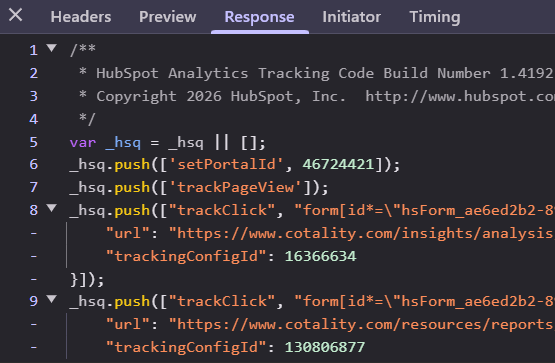
A note on false positives: the tracking script always includes a call to initEventVisualizerScript , regardless of tier. That alone is not a tier signal, and I almost burned a lot of time chasing it before realizing. The actual hard signal is the presence of trackClick calls with trackingConfigId values, which only appear when an Enterprise customer has actively wired up at least one custom event.
Signal #9: Sales Hub Enterprise via Salesforce sync
Going back to the form JSON endpoint, there’s one field worth calling out specifically as an Enterprise tell. If any form in the portal returns a populated sdfcCampaignId, the customer has the Salesforce integration enabled, which requires Sales Hub Pro at minimum and is most commonly seen on Sales Hub Enterprise.
def has_salesforce_sync(portal_id, form_id):
    resp = requests.get(
        f"https://forms.hsforms.com/embed/v3/form/{portal_id}/{form_id}/json"
    ).json()
    return bool(resp["form"].get("sfdcCampaignId"))
The reason this is a useful signal is that the Salesforce integration is genuinely expensive and is almost never set up by accident. If a company has gone through the work of connecting their HubSpot portal to Salesforce, mapping fields, configuring campaign sync, and pushing form submissions into SFDC campaigns, they are very much a paying enterprise customer. The base rate of “has Salesforce sync configured AND is on a free plan” is essentially zero.
This is enrichment on top of the form JSON pull from Signal #4: same fetch, additional check, near-zero marginal cost.
Signal 10: Finding companies that use Hubspot Breeze (Customer Agent)
The signals above tell you which HubSpot hubs a company is paying for. But you can go one level deeper and detect whether a company has turned on specific AI features – like Breeze Customer Agent, HubSpot’s AI that handles inbound chat on behalf of support teams.
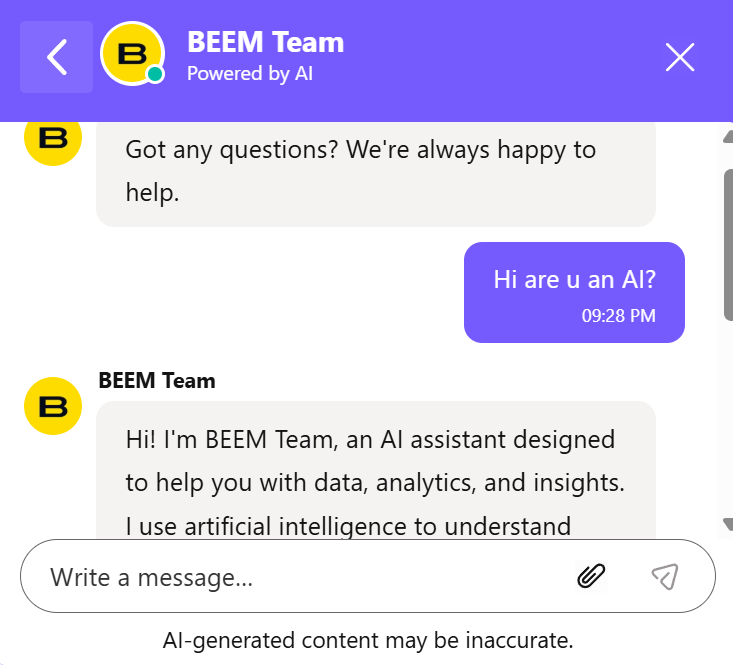
The method: find HubSpot’s chat widget in the page HTML (it’s always an <iframe> with the ID hubspot-conversations-iframe), extract the portal ID and session token from the iframe’s source URL, then query HubSpot’s public chatflow config endpoint with them: https://api-[region].hubspot.com/livechat-public/v1/message/public?portalId=[id]&messagesUtk=[token]
The response is a full JSON blob describing how the chat is configured. When Breeze Customer Agent is active, three fields appear that are absent on standard chatflows:
routingRuleDefinitionAI: true— conversations are being routed through HubSpot’s AI enginerecommendedQuestionsForAgentpopulated — non-empty array of AI-suggested questions, exclusive to BreezeisResponderAI: trueon any agent in thesendFromarray — AI is responding on a human agent’s behalf
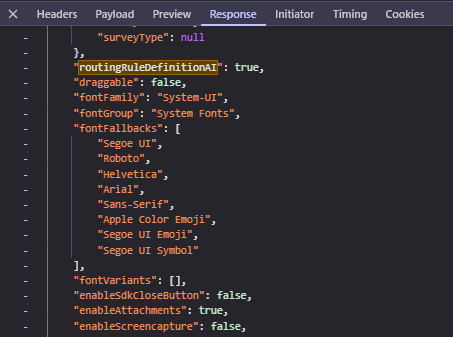
Any one of these is sufficient. The false positive rate is effectively zero – these fields only appear when Breeze is genuinely deployed, not just when a portal has purchased Service Hub.
Conclusion
So to wrap it up.. ah who cares? I explained everything above. You don’t need a freaking conclusion!