


You’ve built a Slack integration and plan to sell into companies that run on Slack. Or maybe you just want a list of Slack shops without paying $10k/year (or more!) for a ZoomInfo license.
Good news: Slack users leave footprints everywhere. From job postings, to GitHub repos, to DNS records, to security trust pages.
I’ll give you 8 ways to find companies that use Slack, and unlike some people (*coughs* most B2B blogers*), I’ll go through the last freaking mile on how to get all the data you need (which means actually giving you some code you can run!)
- 1. Use a backlink tool to find sites linking to join.slack.com
- 2. Search Google for public Slack join links
- 3. Search documentation sites for “Slack integration” pages
- 4. Search GitHub for join.slack.com links
- 5. Search job postings for “Slack” on ATS sites
- 6. Download Cisco Umbrella logs and search for slack.com
- 7. Search company trust centers for Slack
- 8. Find companies that use Slack-centric products (ie Pylon, Pagerduty)
1) Use a backlink tool to find sites linking to join.slack.com
This technique is rather useful for finding companies that have a *public* Slack community. That’s because when a company runs a public Slack community, they often share an invite link on their own website, so people can join. That link always starts with join.slack.com.
A backlink tool lets you reverse-engineer that. In this case, you’re asking: what websites link to join.slack.com? Every result is a site that’s publicly pointing people to a Slack community, almost always their own.
Sounds confusing? Bare with me, and I’ll show you what I mean.
First, you need to actually sign up for one of these backlink tools. These tools are extremely valuable for search engine marketers, but fortunately there’s 1 tool that’s free to use for a limited time: BuzzSumo.
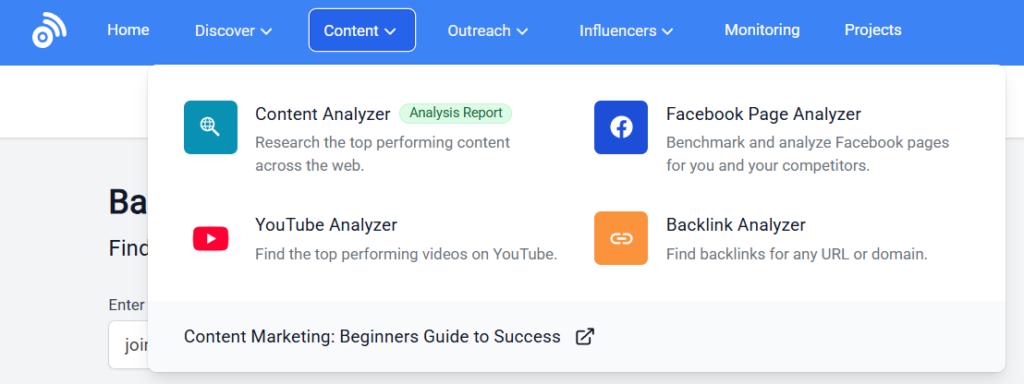
After you sign up, open their Backlink Analyzer through “Content” > “Backlink Analyzer”.
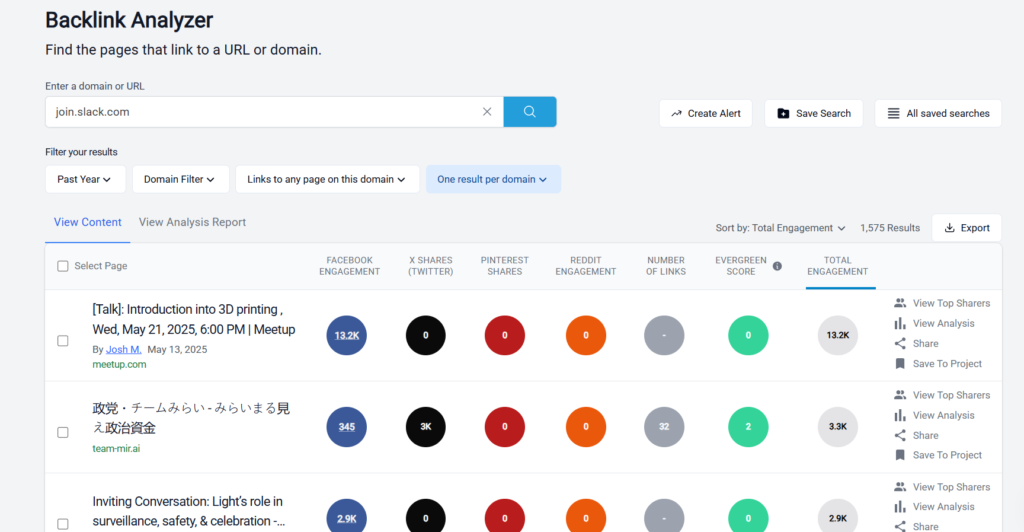
Now in the search bar, type in: join.slack.com
Set the filter to “one result per domain” (so you don’t get the same company ten times) and hit the blue search button. Now click “Export: to export all the results. You now have a spreadsheet of websites that use Slack (for the most part, there’s inevitably false positives)
Clean the list a bit before using it. Some results will be websites that just mention Slack invite links in passing, like forum posts or event listings. Filter those out domains like:
- github.com
- meetup.com
- reddit.com
- medium.com
What’s left is a clean list of companies with active Slack communities.
Want more coverage? Ahrefs and SEMrush have deeper backlink databases and will return more results (I’d estimate maybe 2-3 times more), but both require paid plans. BuzzSumo’s free trial gets you pretty far, and plus, it’s free. That said, if you have the $$$ to blow, go ahead and use the former two tools.
2) Search Google for public Slack links
This probably should’ve been #1, but since it does involve some more manual work, and even some $$$ if you want to automate it, I decided to put it second.
You can use Google to find public Slack urls by simply doing a simple site: search
site:*.slack.com -www -api
The site: part is a Google trick that limits results to a specific website. So this search says: “show me every page on slack.com that Google has indexed that doesn’t belong to www.slack.com or api.slack.com.” Each result is a public Slack workspace invite as shown below.
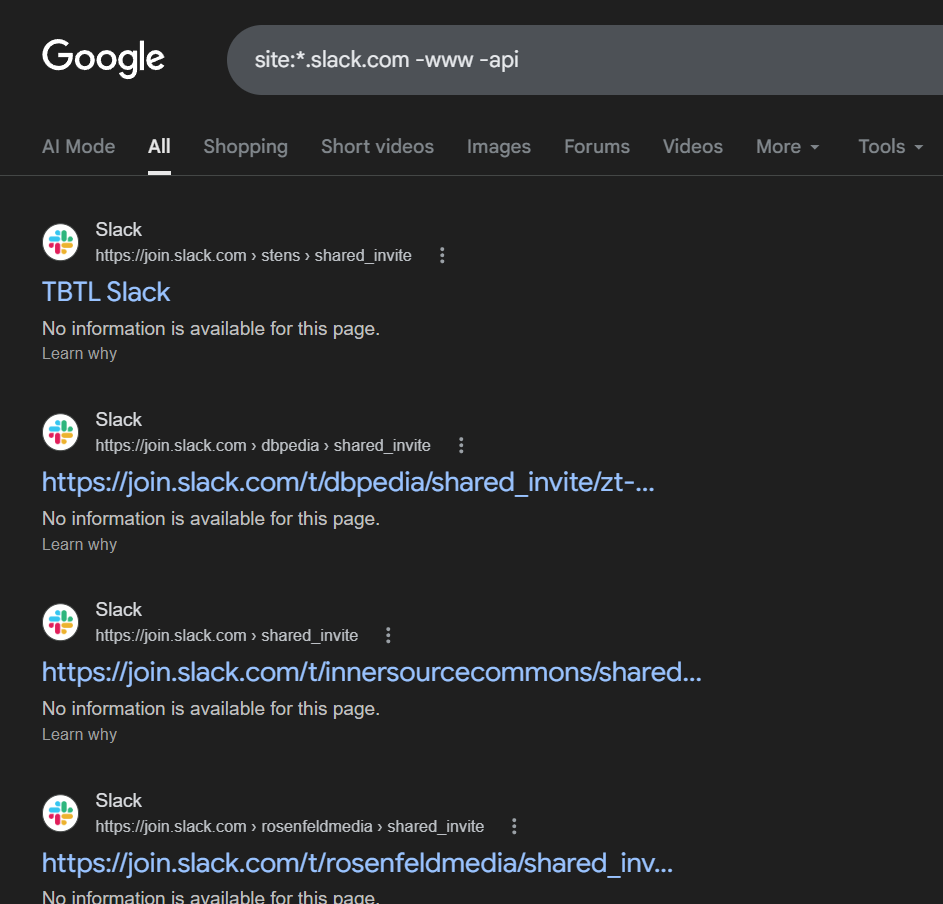
Now the format for each link is usually join.slack.com/t/<NAME OF COMPANY>/ or <COMPANYNAME>.slack.com/invite. For the vast majority, it’s the first, but either way it’s pretty easy to extract the company name visually.
Depending on how small the list is, you can go through results manually and note down each company. But if you want to do this at scale, you’ll need to automate it. That requires two things:
- A SERPs API (short for Search Engine Results Pages API). This is a paid service that lets you programmatically pull thousands of Google search results without hitting Google’s limits. OxyLabs is one popular option and costs ~$150/month for ~150,000 search results or so (more than enough for our needs)
- A large list of company domains to cross-reference against. Cloudflare Radar publishes a free list of the top 1 million most-visited domains on the internet. You can download it for free here.
If you’re comfortable with manually extracting the company names yourself, feel free to skip this section, but this code will also come in handy in future sections.
Here are the steps:
- Using the OxyLabs SERPS API, paginate through all the results to retrieve all the Slack join URLs from Google.
- Pull out the workspace name from each URL using regex.
- For each workspace, check if that name matches any domain in the Cloudflare list. First find if a .com exists, if no try.net, .org, .io, .ai. For instance, if stytch shows up in the Slack URL and stytch.com is on the domain list, you’ve got a match. For some, you might get no match, but that’s OK, our purpose is to automate it, not get everything correct.
- The end result is a list of domains in a text file that have Slack channels.
Here’s the code to do all this in Github in Ruby: https://github.com/HenleyChiu/SlackCrawler/blob/main/slack_serps_crawler.rb
A few notes before you can run this:
- You need to substitute your OxyLabs API username and password first: OXYLABS_USER = ‘your_oxylabs_username’
OXYLABS_PASS = ‘your_oxylabs_password’ - Make sure ‘cloudflare_list.txt’ is the name of the file you downloaded from Cloudflare Radar. You’ll need to rename it after downloading it from Cloudflare.
Feel free to ask ChatGPT or Claude to convert this to your favorite programming language 🙂
3) Search documentation sites for “Slack integration” pages
This method is extremely valuable for finding tech/developer-minded companies that use Slack.
If a company has built a Slack integration into their product, they’ve almost certainly written documentation for it. And that documentation typically lives on a subdomain like docs.company.com
Which means… you can search across all documentation subdomains at once using a Google wildcard search:
docs.*.com “Slack integration”
The * is a wildcard that matches anything. So this search finds every page matching docs.[anything].com that mentions “Slack integration.” This cuts out blog posts, Reddit threads, and marketing pages. As a result, you get real companies with real Slack integrations.
You can get more targeted by adding extra keywords:
docs.*.com “Slack integration” “webhook”
docs.*.com “Slack integration” “alert”
docs.*.com “Slack integration” “notification”
Each variant surfaces a different type of Slack user: companies using it for engineering alerts vs. customer notifications vs. team workflows. But honestly, I would just search for “Slack integrations” alone.
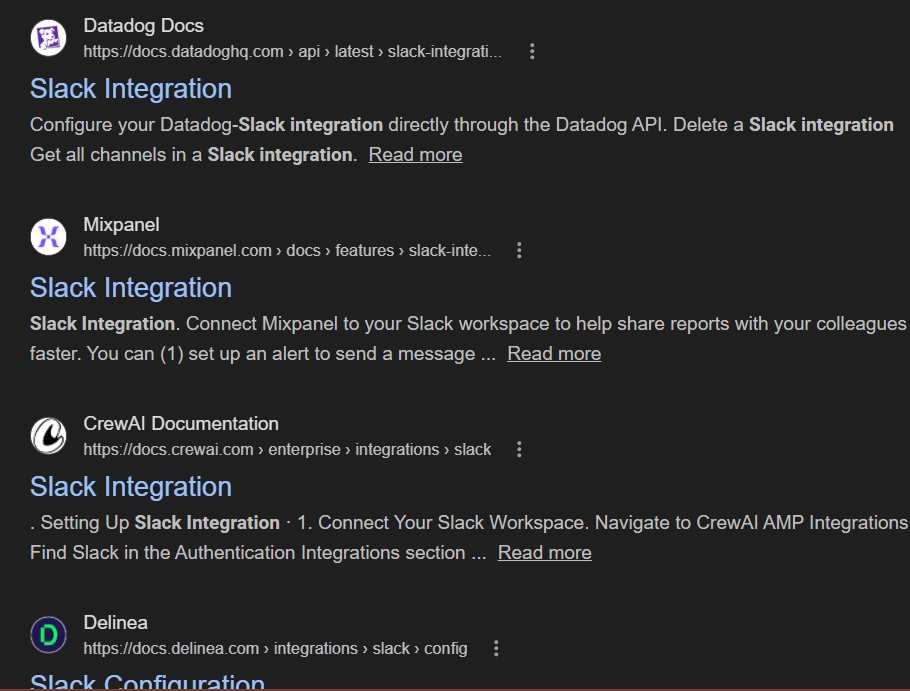
The beauty of this method is that you don’t have to do any weird extracting of company names. That’s because the part after the “docs.” is already the company domain that most likely has a Slack channel. As you can see from the screenshot above, we can see that companies like MixPanel, Delinea and DataDog all have Slack integrations and are likely using Slack themselves.
Now, remember that code I gave you in step 3? You can reuse parts of it for this method as well. But the extraction part is different, since you’re simply just getting the domain name for each result.
Here’s the code to use OxyLabs SERPs API to get all the domains that mention a Slack integration in their docs.
4) Search GitHub for join.slack.com links
GitHub is where developers store and share code. But it’s also where open source projects and developer-focused companies run their communities.
When those companies set up a Slack workspace, someone inevitably posts the invite link in the project’s GitHub repository, usually in a README file (the front page of a repo), an issue thread, or a community discussion.
Thus, you can search GitHub the same way you search any website with Google:
site:github.com “join.slack.com”
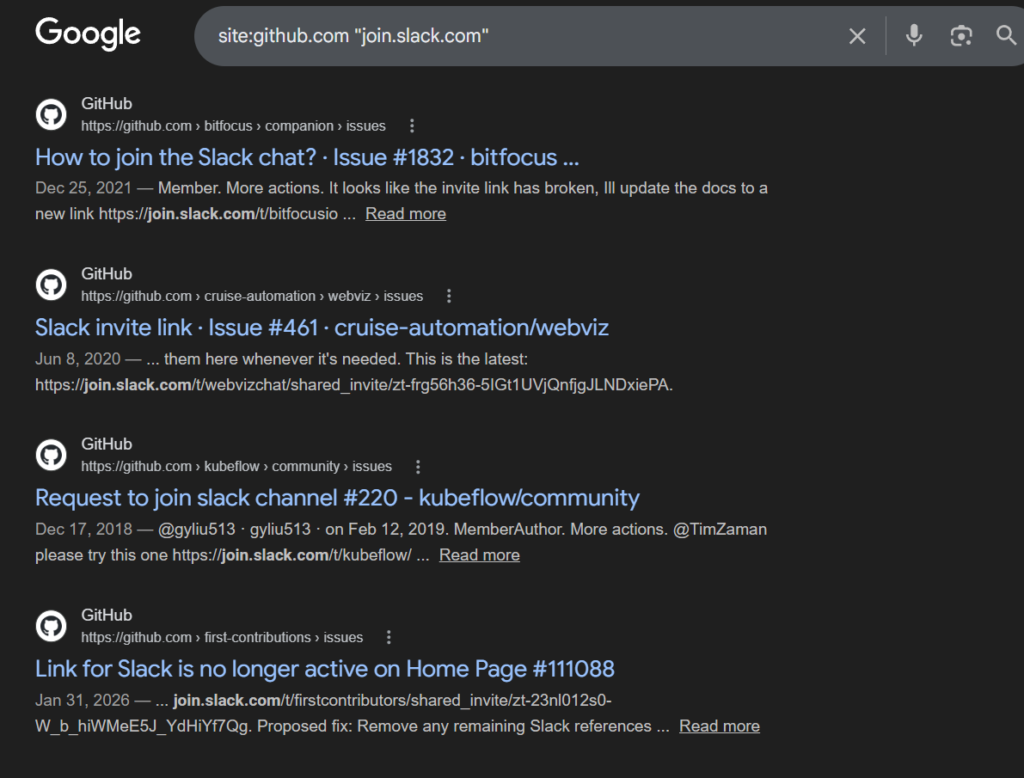
You’ll find threads like “Where can I join the Slack channel?” where a maintainer drops the invite link. For instance, one of the first results I see is someone asking why they get an error when they try to join the Slack channel.
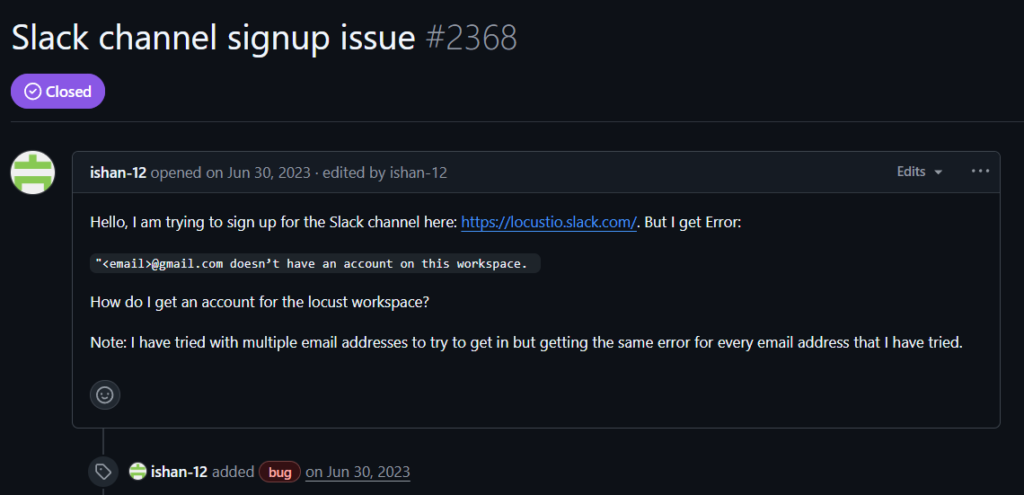
Each GitHub organization usually has a website listed in their profile, which makes identifying the company a one-click job. You can usually get their Github profile URL by going to github.com/COMPANYNAME. For instance, the URL for the thread above was: https://github.com/locustio/locust/issues/2368, so their profile URL is https://github.com/locustio.
And when I go there, I can clearly see their website URL:

Now, Github does have a public API, and if you combine OxyLabs’ SERPS API with Github API, you could possibly automate this as well. In fact, here’s the code to do so 🙂
One important note on Github rate limits: without a token you’re capped at 60 GitHub API requests per hour, which means you need to sleep ~61 seconds between calls. That makes it slow for large lists. The fix is a free GitHub personal access token (no special permissions needed, just public data access) which bumps you to 5,000 requests per hour and drops the sleep to 0.1 seconds.
You can generate one at github.com/settings/tokens and drop it into GITHUB_TOKEN at the top of the file.
This method skews toward developer tools and open source projects, which tend to be exactly the kinds of companies that live inside Slack all day.
5) Search job postings for “Slack” on ATS sites
Job postings are one of the most reliable signals out there. If a company is hiring someone who needs to know Slack, or if Slack shows up in the “tools we use” section of a job description, that company is using it.
But how do you search for it? One option is using Indeed/Linkedin, but let’s not go there (there’s way too much recruiter spam)… there’s actually a better way: searching within ATS’s.
An ATS (Applicant Tracking System) is the software companies use to manage job applications. Most companies post their jobs directly to their ATS, which gives it its own URL. That means you can use Google to search job postings on specific ATS platforms.
For enterprise companies (they use Workday):
site:myworkdayjobs.com “Slack” integration -Teams
For tech companies and startups (that use Ashby and Greenhouse):
site:job-boards.greenhouse.io “Slack” -Teams
site:jobs.ashbyhq.com “Slack” -Teams
site:lever.co “Slack” -Teams
For small and medium businesses (that use BambooHR):
site:bamboohr.com “Slack” -Teams
site:workable.com “Slack” -Teams
The -Teams part tells Google to exclude results that mention Microsoft Teams. This filters out job postings that just list every tool imaginable. What’s left are companies that specifically call out Slack, usually because it’s genuinely central to how they work.
The great thing about this method is that you’re finding companies that most likely are actively using Slack for some critical workflow job. Not just as a simple workplace chat tool.
6) Download Cisco Umbrella logs and search for slack.com
This one requires a bit more explanation, but stick with me because the payoff is really good.
Every time you visit a website, your computer does something called a DNS lookup. Think of DNS (Domain Name System) as the internet’s phone book. When you type “slack.com” into your browser, your computer asks DNS: “what’s the address for slack.com?” DNS looks it up and sends your browser to the right place.
Cisco Umbrella is a security product that monitors DNS traffic for large organizations. As a side effect, Cisco ends up seeing an enormous amount of internet DNS activity. They publish a portion of that data publicly as a free download, essentially a record of which domains were actively being visited on a given day.
Download the Cisco Umbrella top 1 million domain list and search it for Slack:
grep “slack.com” umbrella-top-1m.csv
(grep is a command-line tool for searching text files. If you’re not technical, just open the CSV in Excel or Google Sheets and use Ctrl+F to search for “slack.com”)
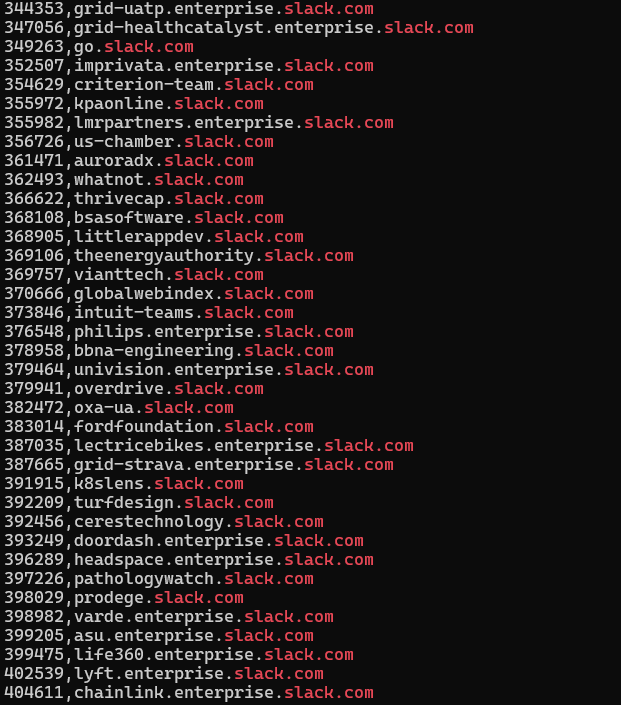
As you can see above, you’ll find two types of entries:
- Generic slack.com entries: companies using standard Slack
- Subdomain entries like companyname.enterprise.slack.com: companies on Slack Enterprise Grid, Slack’s premium tier for large organizations
The Enterprise Grid entries are the real prize. philips.enterprise.slack.com, doordash.enterprise.slack.com, lyft.enterprise.slack.com. These are large companies that have committed to Slack at the organizational level, paying significant annual contracts. The company name is right there in the subdomain.
Download logs from as many days as possible (the filename is http://s3-us-west-1.amazonaws.com/umbrella-static/top-1m-<YYYY-MM-DD>.csv.zip). The list changes day to day, so you’ll surface more companies the more days you pull.
But wait, hold up, how do I convert all these Slack domains to actual company names? Here’s the code for everything from downloading the file to reading it and generating a list of company domains.
Remember: This is live DNS traffic, not a self-reported survey or a stale database. If a domain shows up here, actual employees are actively using Slack. Doesn’t get more real than that.
7) Search company trust centers for Slack
Many software companies, especially ones that sell to other businesses, publish a “trust center” or “security page” on their website. This is usually at trust.company.com and hosted by tools like Vanta and Safebase. The purpose is to show customers and prospects that they take security seriously.
One thing these trust centers are legally required to list is their subprocessors. A subprocessor is any third-party company that processes data on their behalf. If a company uses Slack and shares any customer data through it (like piping support tickets into a Slack channel), they have to disclose that. Slack shows up on a lot of these lists.
You can search across all trust center subdomains at once:
site:trust.*.com “Slack”
You’ll find entries like “Slack: desktop application for internal communications” or “Slack: customer communication. USA.” Either way, it’s a confirmed Slack user.
To go through these results at scale, you’d again need a SERPs API like OxyLabs to paginate through all the results automatically. Here’s the code for that.
For a manual pass, just go through Google’s results page by page.
Remember: Subprocessor lists are legal disclosures. Companies don’t add tools to this list unless they’re genuinely using them. This is about as reliable a confirmation as you can get without asking the company directly.
8) Find companies that use Slack-centric products (ie Pylon, Pagerduty)
Here’s a method most people overlook. Some products are so deeply tied to Slack that if a company is using the product, they’re almost certainly using Slack too. They’re what you might call Slack-centric products – tools where Slack isn’t just a nice integration, it’s load-bearing infrastructure.
Two great examples are Pylon and PagerDuty.
Pylon is a B2B customer support platform that was built from the ground up around Slack. It turns your Slack channels into a ticketing system. There is no Pylon without Slack. If a company is using Pylon, they are using Slack. Full stop.
PagerDuty is an incident management tool used by engineering teams to get alerted when something breaks in production. Its Slack integration is so deeply embedded into how teams actually use it – spinning up incident channels, posting alerts, running the entire incident response flow inside Slack – that in practice, PagerDuty and Slack are inseparable for most of its customers.
So instead of looking for Slack directly, you look for these products. Their customers are your Slack users list by proxy.
Finding Pylon customers
Pylon hosts its customer portal at a predictable URL:
portal.usepylon.com/[companyname]/loginEvery company that uses Pylon has a page at that URL, with their name embedded in the path. So a simple Google search surfaces all of them at once:
site:portal.usepylon.comEvery result is a confirmed Pylon customer. And since Pylon literally cannot function without Slack, every result is also a confirmed Slack user. This is about as clean a signal as you’ll find anywhere in this guide.
Finding PagerDuty customers
PagerDuty doesn’t have a public customer portal you can search, but you can find its customers through the Cisco Umbrella data from Method 6. When engineering teams use PagerDuty, their browsers are hitting pagerduty.com constantly — checking dashboards, acknowledging alerts, reviewing incident timelines. That shows up in the DNS traffic.
Download the Umbrella files and grep for PagerDuty the same way you did for Slack:
grep "pagerduty.com" umbrella-top-1m.csvThis won’t give you company names directly the way Slack Enterprise Grid does, but you can combine it with the Cloudflare domain list approach from Method 2 to cross-reference and identify companies. It’s a fuzzier signal than the Pylon method, but PagerDuty’s customer base is large and the overlap with Slack is extremely high.
Why this approach works
The logic here is simple: if you can’t find the Slack signal directly, find it indirectly through the products that depend on Slack to function. Pylon and PagerDuty are two of the clearest examples, but the same logic applies to anything in this category — Donut, Geekbot, Polly, Standuply. None of these products make sense without Slack. Their customer lists are Slack customer lists.
Bonus: Find Google Workspace companies
This last method is the laziest of the bunch and comes with a big asterisk, but it’s worth knowing about.
Slack and Microsoft Teams are the two dominant workplace chat platforms. There’s a strong correlation between which email provider a company uses and which chat tool they use. Companies running Microsoft 365 (Outlook, Word, Excel) tend to also use Teams, since it comes bundled in. Companies running Google Workspace (Gmail, Google Docs, Google Meet) tend to use Slack instead, since they’re already buying their tools à la carte.
So: if you can find companies using Google Workspace, you have a reasonable proxy for “probably uses Slack.”
You can detect Google Workspace by checking a company’s MX records. MX records (Mail Exchange records) are a piece of a company’s internet configuration that tells the world where to deliver their email. Companies using Google Workspace will have MX records pointing to Google’s mail servers.
Here’s a Ruby script that checks all the domains in Cloudflare Radar’s top domains list on whether they use Google Workspace.
Why this works (sort of): It’s a correlation, not a confirmation. There are plenty of Google Workspace companies that use Teams, and vice versa. But if you’re building a large cold outreach list and need a quick way to prioritize, this is a reasonable starting heuristic.
The Bottom Line
You don’t need a $10k/year database to find Slack users. Backlink tools, Google search tricks, GitHub, job postings, DNS logs, and trust center pages all give you the same signal, often better, because they’re live.
The real advantage isn’t just that these methods are cheap. It’s that they surface companies with active usage. A company showing up in DNS logs, or hiring for a role that requires Slack, isn’t a passive name in a database. They’re using it today, with real workflows and real budget.