


Last Updated: November 11, 2026
LinkedIn Sales Navigator has one thing no other tool can beat: the data is LinkedIn. When someone gets promoted or switches companies, they update their own profile, and Sales Navigator knows right away.
But it costs $119.99 a month, it doesn’t give you a single email or phone number, and you can’t export your search as a CSV. So most people end up paying for Sales Navigator and an email tool on top.
So I wanted to know: can a cheaper B2B database replace it? The big worry with databases is stale data, so I tested that directly. I took 7 people who changed jobs in the last 3 months (according to Sales Navigator itself) and checked whether 11 tools knew about it. Then I ran the same list-building search in each one, and tested their emails on 20 people. All with real accounts, and screenshots as PROOF!
- Apollo.io: best all-around replacement, with fresh titles and a list almost double Sales Navigator’s (Free To Try)
- AI Ark: best free plan for up-to-date data, and it caught a promotion most tools missed (Free To Try)
- lemlist: best to pair with Sales Navigator, and it never showed me an outdated title (Free Trial)
- Seamless.AI: fresh titles and accurate emails, but weak list building (Free To Try)
- Lusha: good at catching people who switched companies, bad at promotions (Free To Try)
- BlitzAPI: found exactly as many people as Sales Navigator, but missed most job changes (Free To Try)
- Snov.io: some of the most accurate emails, but mostly old job titles (Free To Try)
- Lead411: big list and dated emails, but missed most job changes (Free Trial)
- MoltSets: by far the biggest list (via Claude or ChatGPT), but mostly old titles (Free To Try)
- FullEnrich: great for bulk emails, but didn’t catch a single job change (Free To Try)
- Prospeo: great free plan for emails, but didn’t catch a single job change (Free To Try)
How I tested them
I used Sales Navigator as the answer key. Then I ran 3 tests on every tool.
Test 1: Job changers. In Sales Navigator, I searched for VP or Head of Sales at software companies with 51–200 employees in Canada. That gave me 141 people. Then I turned on the “Changed jobs” filter (people who started a new role in the last 90 days), and 8 of them showed up.
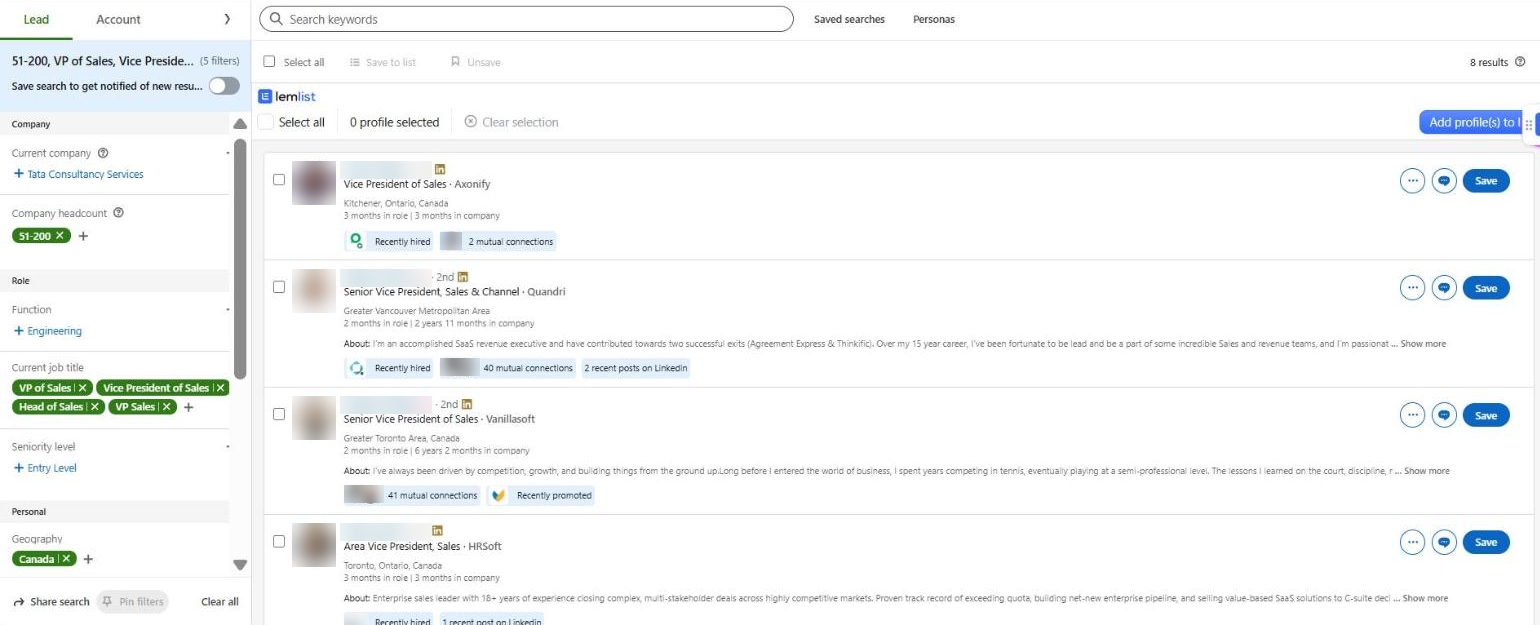
I used 7 of them. They started their new role 2 to 3 months before my test:
- 3 switched companies (for example, a VP of Sales who moved to a new startup)
- 4 got promoted at the same company (for example, VP of Sales to SVP, or Manager of Account Executives to Head of Sales)
In every tool, I searched for each person by name (and company when the name was common), and wrote down whether the tool showed their current job, their old job, or nothing.
Test 2: Building a list. I ran the exact same search (VP or Head of Sales, software, 51–200 employees, Canada) in every tool and compared the number of results with Sales Navigator’s 141.
Test 3: Finding emails. This is the thing Sales Navigator can’t do at all. I ran 20 real people whose emails I already know are correct (because I emailed them recently) through every tool. The list is deliberately hard: about 10 countries, small businesses, non-tech industries and a few unusual email formats.
(Names and emails are blurred in the screenshots. These are after all real people, and they didn’t sign up to be in this article)
1. Apollo.io – The best all-around replacement
Pros: Caught 5 of my 7 job changers, including 3 of the 4 promotions. Found 273 people, almost double Sales Navigator, with clean titles. And unlike Sales Navigator, it gives you emails, sequences and a CSV export.
Cons: Middle of the pack on emails, especially outside the US, UK and Australia. And you pay per credit to reveal anyone.
Apollo is the tool most people already use alongside Sales Navigator. It’s a people database, a Chrome extension and an email sequencer in one, so it can genuinely replace Sales Navigator for most outbound teams.
Test 1: Job changers
5 of 7 current. It had 2 of the 3 people who switched companies, and 3 of the 4 promotions, including one from VP of Sales to SVP that most tools missed.
It missed 2. One promotion (VP of Business Development to SVP of Sales) was still under the old title. To be fair, no tool in this test had that one. And it didn’t have the person who moved to a 2-month-old job at a small startup at all.
Test 2: Building a list
I used 4 job titles (“VP of Sales”, “Vice President of Sales”, “Head of Sales” and “VP Sales”), Canada as the person’s location, 51–200 employees, and “Computer Software” for industry.
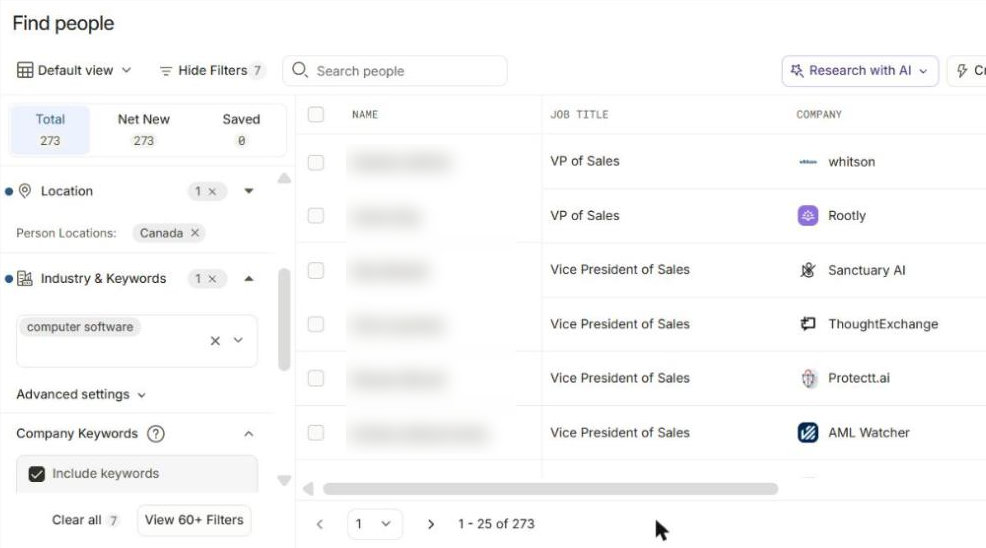
273 people. That’s almost double Sales Navigator. And the titles on the first page were all clean: “VP of Sales”, “Vice President of Sales”, “VP Sales”. No Directors or random titles mixed in.
Why more than LinkedIn? Part of it is probably that each tool defines “software company” a little differently. Just keep in mind that a bigger list isn’t automatically a fresher one.
Test 3: Finding emails
I uploaded the 20 names and company domains as a CSV with email enrichment turned on. It used 13 credits.
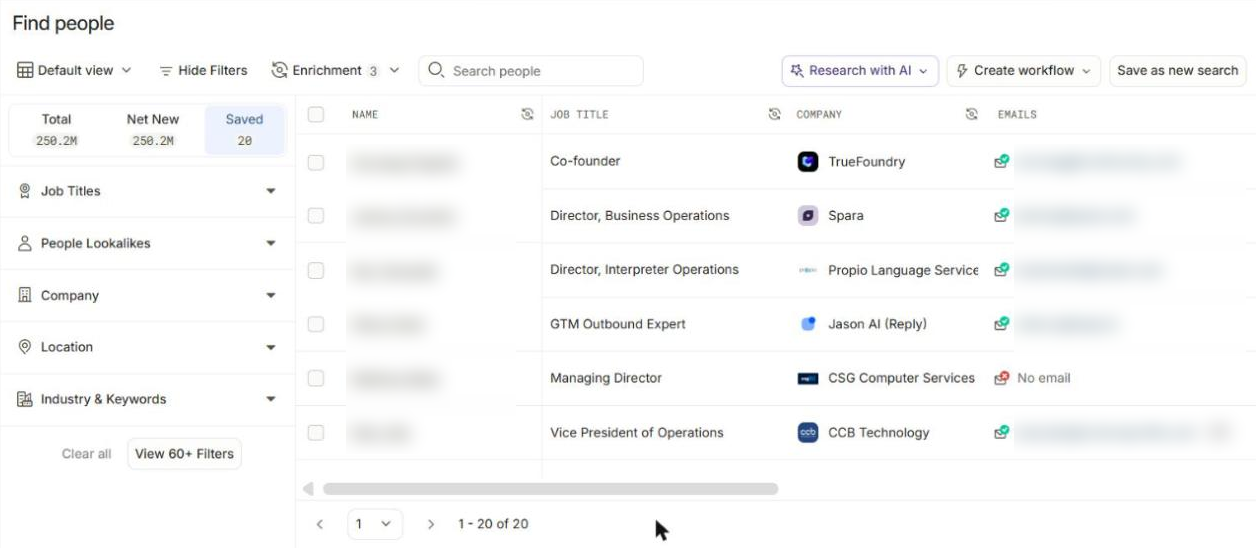
12 of 20 were correct. Another 2 were marked “verified” by Apollo but weren’t the addresses I have (one was a different company domain, one a nickname like damo@). I couldn’t confirm those either way. The 6 it missed were mostly outside North America: Norway, Serbia, New Zealand and the UK.
Pricing (updated November 2026)
- Free: $0, with a limited number of credits each month
- Basic: $49/user/month billed yearly (about $65 monthly)
- Professional: $79/user/month billed yearly ($99 monthly)
- Organization: $119/user/month billed yearly, 3-seat minimum
Even the Basic plan is less than half the price of Sales Navigator Core. See Apollo’s pricing page for the latest.
2. AI Ark – The best free plan for fresh data
Pros: Tied for the best job-changer score (5 of 7), and caught a VP-to-SVP promotion most tools missed. Precise filters, and a free plan that refills every month.
Cons: The free plan only shows the first page of search results. And to find emails in bulk, you need LinkedIn URLs, not just names.
AI Ark is a newer people and company database with a Sales Navigator-style search app. Its home screen says it refreshes its data every 30 days, and in my test, that seemed to hold up.
Test 1: Job changers
5 of 7 current, tied with Apollo and Seamless for the best score. The standout was a promotion from VP of Sales to SVP, Sales & Channel, just 2 months before my test. Most of the other tools still had him as VP of Sales.
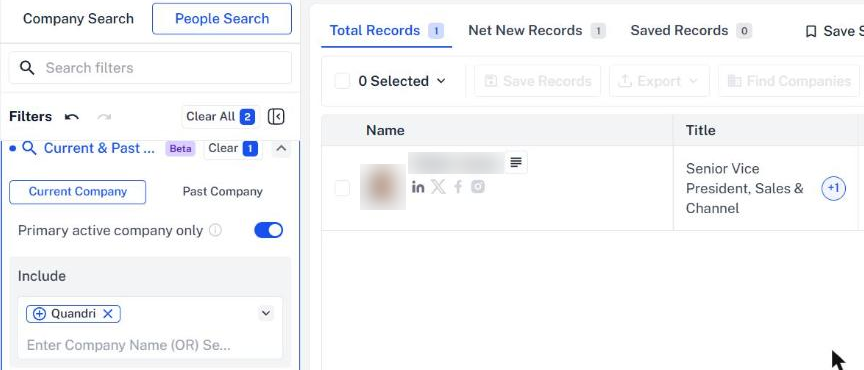
It also had the other 2 promotions and 2 of the 3 people who switched companies. Like everyone else, it still had the VP of Business Development under his old title. And it didn’t have the person who moved to a small startup.
A handy trick here: AI Ark lets you filter by company and see everyone there. For small companies like these, the person I was looking for was usually right on the first page.
Test 2: Building a list
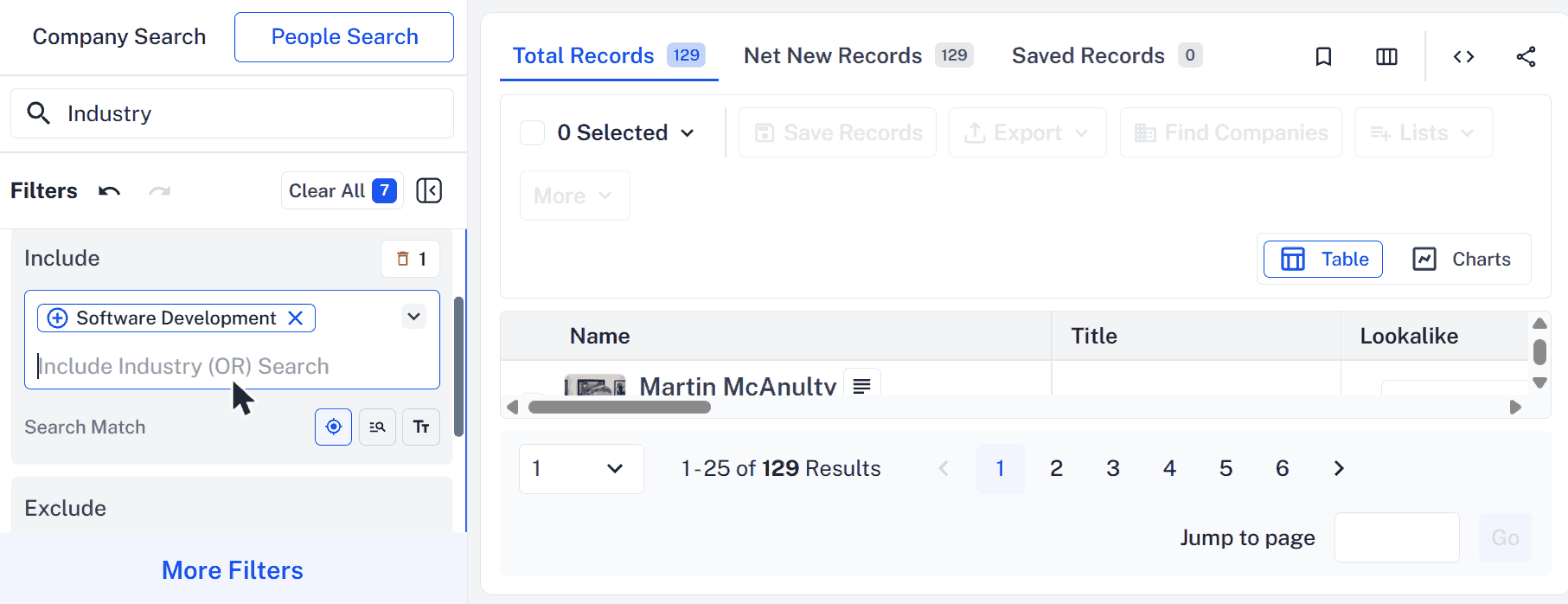
129 people, the closest to Sales Navigator’s 141 after BlitzAPI. The one catch: on the free plan, pages 2 and beyond say “Requires a paid plan”, so you only see the first 25.
Test 3: Finding emails
AI Ark’s bulk enrichment matches people by LinkedIn URL, so I could only run the 17 people I had URLs for. It found 12, and none were wrong. If you’re coming from Sales Navigator, you already have the LinkedIn URLs, so this works out nicely.
Pricing (updated November 2026)
- Free: $0, 100 credits/month, no credit card
- Usage-Based: from $49/month for 5,000 credits (20% off billed annually)
- Agency & Enterprise: custom pricing
A verified email costs 0.5 credits and a mobile number costs 5. See AI Ark’s pricing page for the latest.
3. lemlist – The best to pair with Sales Navigator
Pros: Never showed me an outdated title. When it had someone, they were current. Tied for the most accurate emails, and its Chrome extension adds a button right inside Sales Navigator.
Cons: Couldn’t find 3 of my 7 job changers at all. Free credits are locked until you connect LinkedIn, and enrichment is slow and pricey per email.
lemlist started as a cold email tool, and now has a 650M+ contact database plus multichannel sequences. It’s also the tool that fits most naturally next to Sales Navigator, if you want to keep it.
Test 1: Job changers
4 of 7 current, and 0 outdated. That second number is what stood out. Every other tool showed at least one person under their old job. lemlist either had the current job or didn’t have the person at all. For cold email, that’s the safer kind of miss: you won’t send a “congrats on the VP role” email to someone who’s now an SVP.
One thing to know: on the trial, lemlist’s name filter is a paid feature. So I used its AI search instead (lemAgent), and asked for the people at those 7 companies. It worked fine, it just replied in French at first for some reason 🙂
Test 2: Building a list
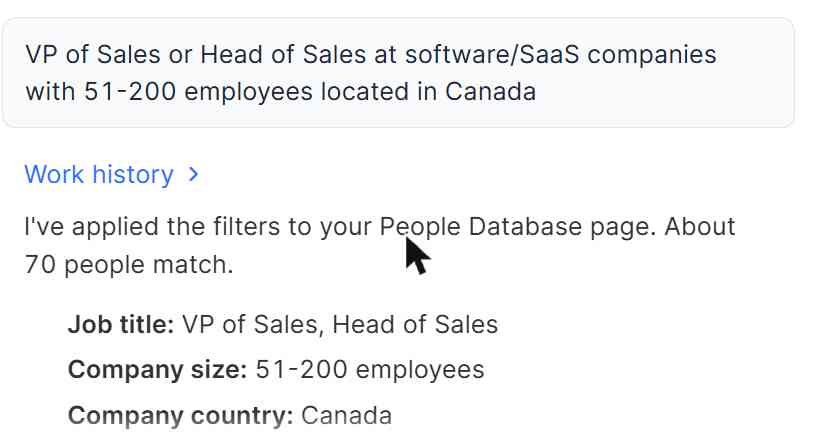
70 people, about half of Sales Navigator’s 141. Smaller, but the people it did return were on point.
And if you keep Sales Navigator, the lemlist Chrome extension adds an “Add profile(s) to lemlist” button right on top of your Sales Navigator results. So you can build the list in LinkedIn and get the emails in lemlist, without exporting anything.
Test 3: Finding emails
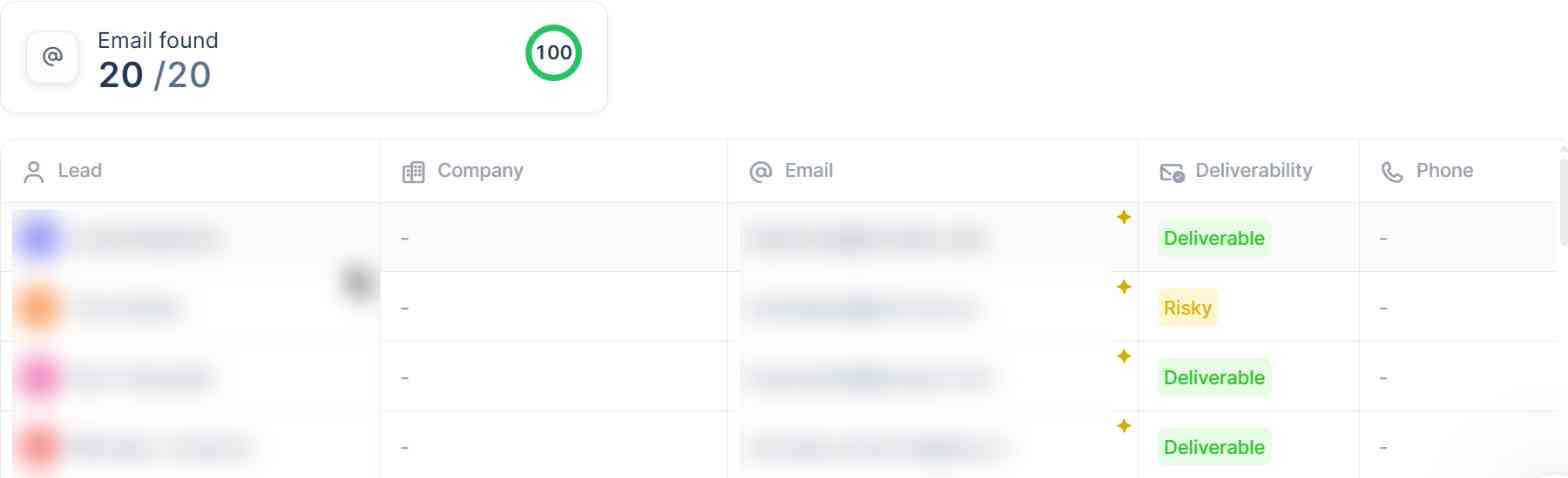
16 of 20 correct, tied for the best result, and every email it marked “Deliverable” was right. It checks 25+ data providers one after another for each person, which is why it took close to 6 minutes for 20 people.
Pricing (updated November 2026)
- Free trial: 14 days, no credit card, 200 credits (after you connect LinkedIn)
- Email plan: from about $69/month
- Multichannel plan: from about $109/user/month (adds LinkedIn, calls and more)
- Data: credits for email and phone finding are sold as monthly add-on plans on top
Finding an email costs 5 credits, and a phone number costs 20. See lemlist’s pricing page for the latest.
4. Seamless.AI – Fresh titles and accurate emails, weak list building
Pros: Tied for the best job-changer score (5 of 7), and found someone for all 7. Surprisingly accurate emails too.
Cons: The weakest list building of any tool I tested. And the free plan is only 50 credits, total.
Seamless.AI is a big B2B contact database with a Chrome extension and a search app. It did a lot better on job changers than I expected.
Test 1: Job changers
5 of 7 current, and it was the only tool besides Lusha that returned something for every single person. The 2 it got wrong: the VP of Business Development promotion nobody caught, and the person who moved to a startup, who it still had at his previous company.
Test 2: Building a list
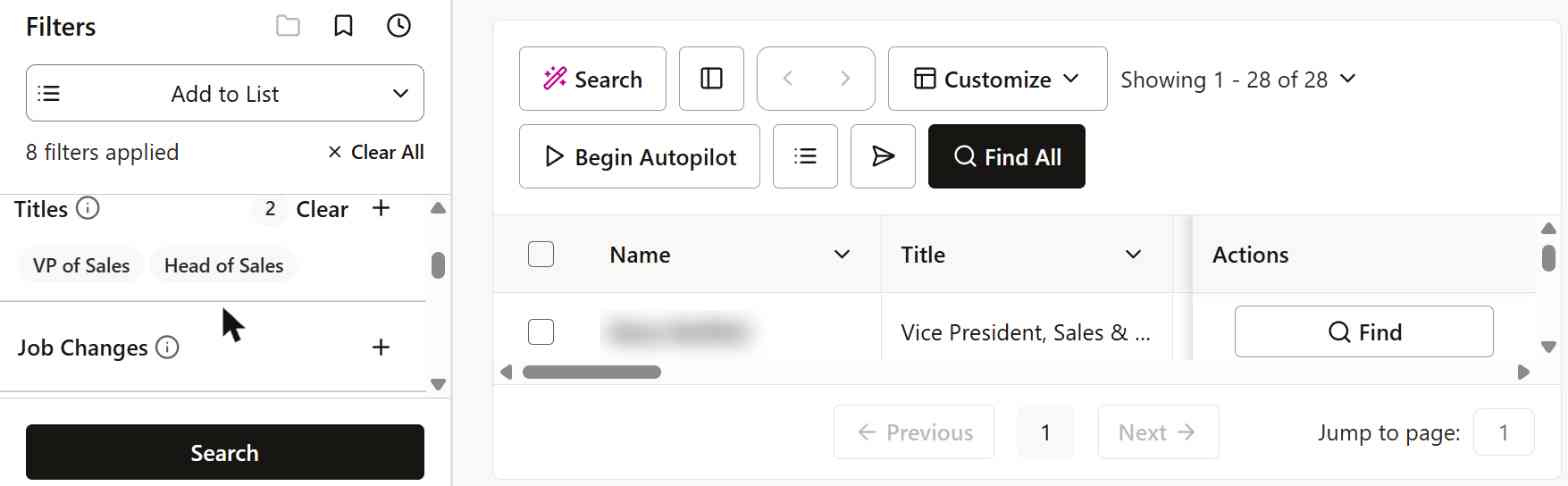
Only 28 people, the smallest list of any tool, and some of them were Directors rather than VPs. If building lists is the main thing you use Sales Navigator for, Seamless isn’t a replacement.
Test 3: Finding emails
16 of 20 correct, tied for the best. But 1 of the emails it gave me bounced.
Pricing (updated November 2026)
- Free: $0, 50 credits total (not monthly), 1 user
- Basic: reported at around $147/user/month, billed annually
- Pro and Enterprise: custom pricing, talk to sales
One credit gets you one researched contact. Note that Basic is actually more expensive than Sales Navigator Core. See Seamless.AI’s pricing page for the latest.
5. Lusha – Catches company switches, misses promotions
Pros: The only tool that caught all 3 people who switched companies, including one nobody else had. Bigger list than Sales Navigator, and it never gave me a wrong email.
Cons: Missed 3 of the 4 promotions, and keeps old records around as duplicates. Found the fewest emails of any tool.
Lusha is best known for its Chrome extension that shows contact info right on LinkedIn profiles, which makes it a common Sales Navigator sidekick.
Test 1: Job changers
4 of 7 current, but with a pattern. It had all 3 people who switched companies, including a VP of Sales at a 2-month-old job that no other tool had. But it only caught 1 of the 4 promotions. The other 3 still had their old titles.
Also, for 2 of the people who switched companies, Lusha had two records: the new job and the old one. So if you search by name, you might pick the stale one without realizing it.
Test 2: Building a list
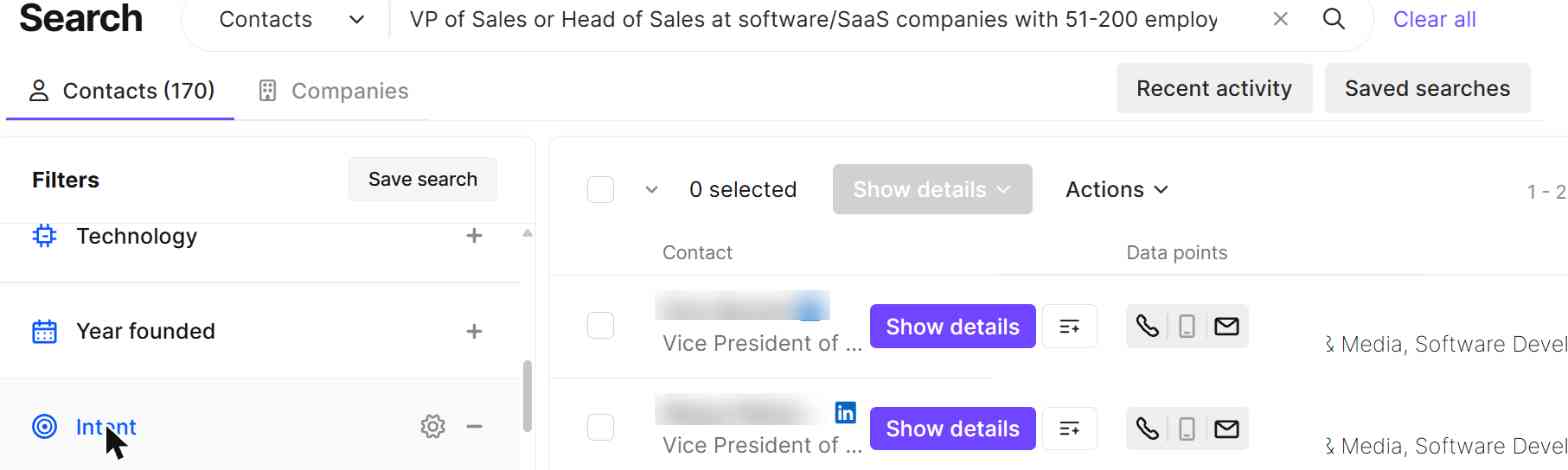
170 people, a bit more than Sales Navigator. You can type the search in plain English, which is nice.
Test 3: Finding emails
Only 5 of 20, the lowest of any tool. But all 5 were correct. On the free plan, some contacts also show “Unavailable details” because of privacy restrictions in certain countries and US states.
Pricing (updated November 2026)
- Free: $0, 40 credits/month, 1 user
- Starter: $49.90/month, 400 credits
- Pro: $69.90/month, 600 credits
- Premium: $399.90/month, 3,400 credits
An email costs 1 credit and a phone number costs 5. Paying yearly is about 25% cheaper. See Lusha’s pricing page for the latest.
6. BlitzAPI – Same list as Sales Navigator, but missed most job changes
Pros: Found exactly 141 people, the same as Sales Navigator. Zero wrong emails, and a generous free plan.
Cons: Only 2 of 7 job changers were current. No app: you use it through Claude, code or its API.
BlitzAPI is a data API built on LinkedIn data. I used it by connecting it to Claude and asking for things in plain English.
Test 1: Job changers
2 of 7 current (one company switch and one promotion). 3 others still had their old titles, and 2 weren’t found. So even though its list matches LinkedIn’s, its profiles don’t seem to be refreshed as often.
One warning: BlitzAPI’s rate limit is 5 requests per second. When I fired off 7 lookups at once, I got “Too Many Requests” errors and a long cooldown. One at a time worked fine.
Test 2: Building a list
141 people, exactly the same number as Sales Navigator. That makes sense, since its data comes from LinkedIn.
Test 3: Finding emails
Like AI Ark, it needs LinkedIn URLs. It found 10 of the 17 I had URLs for, and none were wrong.
Pricing (updated November 2026)
- Free trial: $0, 1,000 records a month, no card (no phone numbers)
- Start: $99/month, 200,000 records/month
- Scale: $499/month, 5,000,000 records/month
See BlitzAPI’s pricing page for the latest.
7. Snov.io – Accurate emails, but mostly old job titles
Pros: Tied for the most accurate emails, and every email it returned worked.
Cons: Only 1 of 7 job changers was current, and 5 showed their old job. Small list, and the free plan only shows 20 results.
Snov.io is an all-in-one sales tool: email finder, verifier, sequences and a small CRM.
Test 1: Job changers
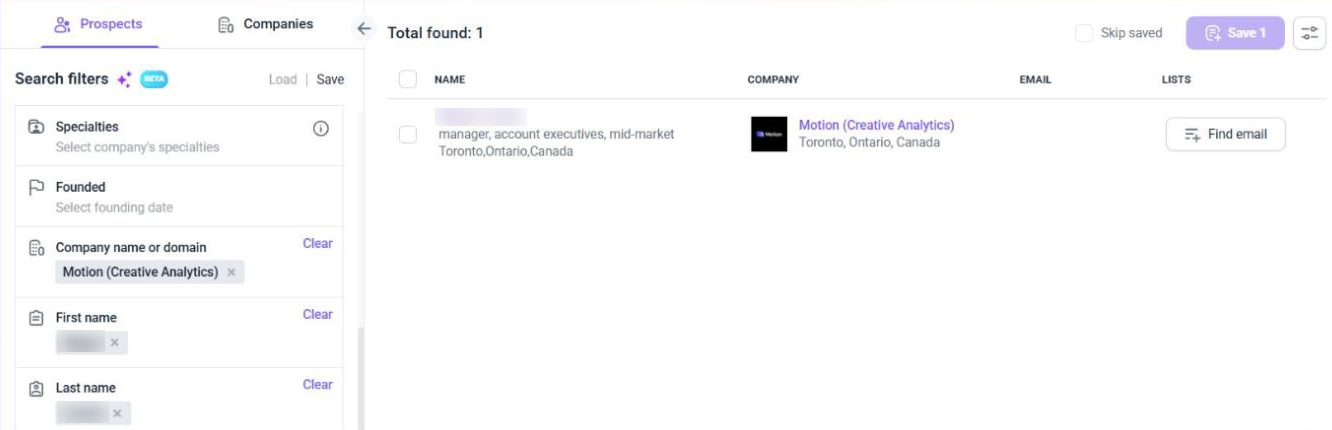
1 of 7 current. 5 people still showed their old job, and 1 wasn’t there at all. Here’s one: this person became Head of Sales 2 months before my test, and Snov.io still has him as a Manager of Account Executives.
Test 2: Building a list
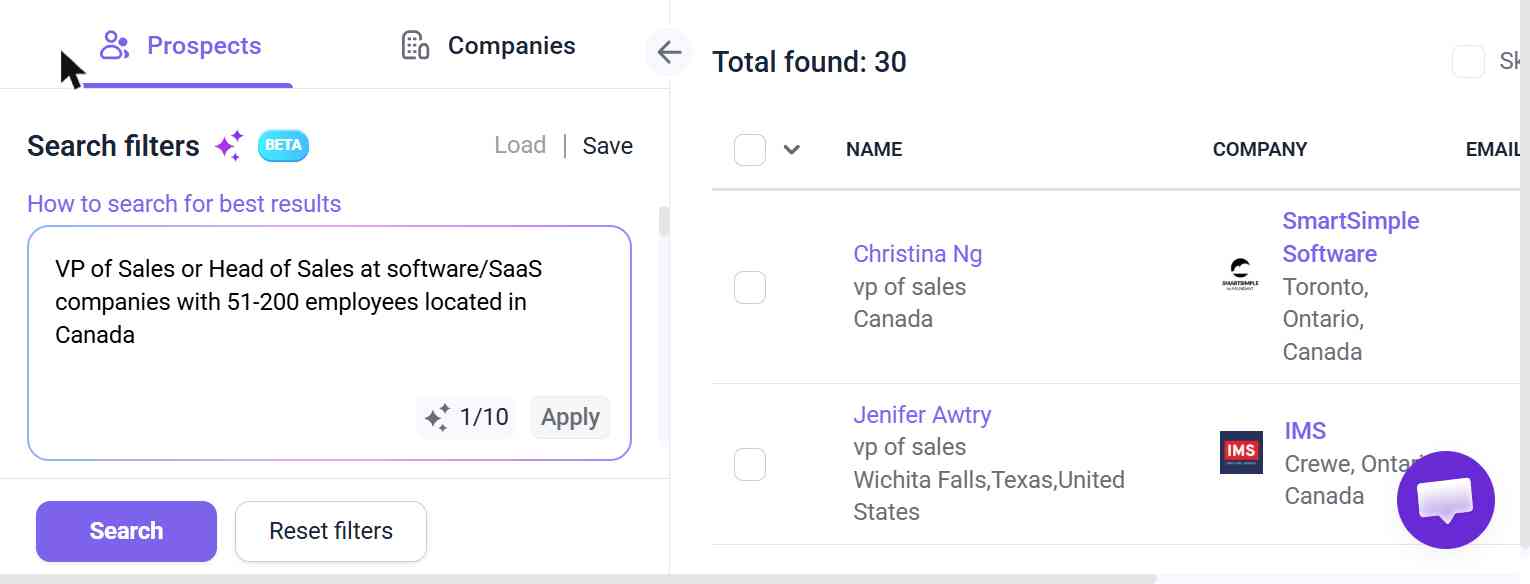
30 people, and the free plan only lets you see 20 of them.
Test 3: Finding emails
16 of 20 correct, tied for the best, and every email it returned worked. So Snov.io is a great email finder, just not a Sales Navigator replacement.
Pricing (updated November 2026)
- Trial: $0, 50 credits/month
- Starter: $39/month ($29.25/month billed annually), 1,000 credits
- Pro S: $99/month ($74.25/month billed annually), 5,000 credits
See Snov.io’s pricing page for the latest.
8. Lead411 – Big list and dated emails, but missed most job changes
Pros: One of the biggest lists (285), and every email shows the date it was last verified.
Cons: Only 1 of 7 job changers was current. Thin coverage outside North America.
Lead411 has been around for a long time, and works a lot like Apollo: a people database, a Chrome extension and “exports” you spend to unlock contacts.
Test 1: Job changers
1 of 7 current. 3 had old titles and 3 weren’t found.
Test 2: Building a list
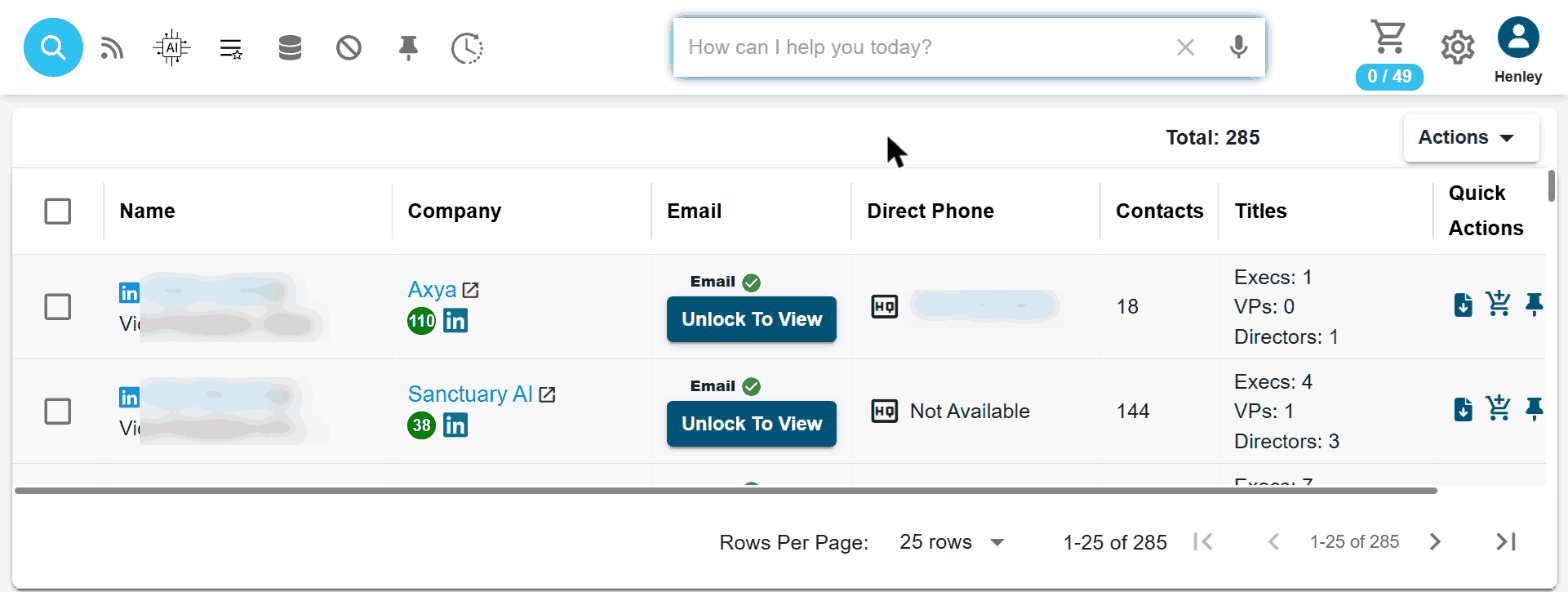
285 people. But its company size filter only goes in a 20–249 range, so it’s not a perfect apples-to-apples comparison with the others.
Test 3: Finding emails
6 of 20 correct, and none were wrong. Most of the misses were outside North America.
Pricing (updated November 2026)
- Free trial: 7 days, 50 exports, no credit card
- Spark: $49/month per seat, 1,000 exports/month
- Ignite: $150/month per seat, 1,000 exports/month, with direct dials included
See Lead411’s pricing page for the latest.
9. MoltSets – By far the biggest list, but mostly old titles
Pros: Found 1,001 people for my search, about 7 times Sales Navigator, and they really were in Canada. Every record comes with a graded email.
Cons: Only 1 of 7 job changers was current. No app: you use it through Claude or ChatGPT.
MoltSets doesn’t have a search screen at all. You connect it to Claude or ChatGPT and ask for what you want in plain English.
Test 1: Job changers
1 of 7 current (a company switch). 3 had their old titles, and 3 weren’t found.
Test 2: Building a list
1,001 people, by far the most of any tool. If you want a big list and can live with some stale titles, nothing else came close.
Test 3: Finding emails
8 of 20 correct, and one email was outdated.
Pricing (updated November 2026)
- Free: $0, 1,000 enrichments (lifetime) and 100 search results
- Solo: $27/month, “unlimited” data (500 search records per 5 hours)
- Pro: $97/month, 15,000 enrichments and 7,500 search records per 5 hours
See MoltSets’ website for the latest.
10. FullEnrich – Great for bulk emails, but no job changes
Pros: CSV upload works on the free trial, and every email it returned worked.
Cons: Didn’t catch a single one of my 7 job changers. 5 still had their old jobs.
FullEnrich checks multiple data providers one after another to find emails and phone numbers. It also has a people search, which is what I used for Tests 1 and 2.
Test 1: Job changers
0 of 7 current. 5 had their previous job or title, and 2 weren’t found. Its search database seems to be a lot staler than its email waterfall.
Test 2: Building a list
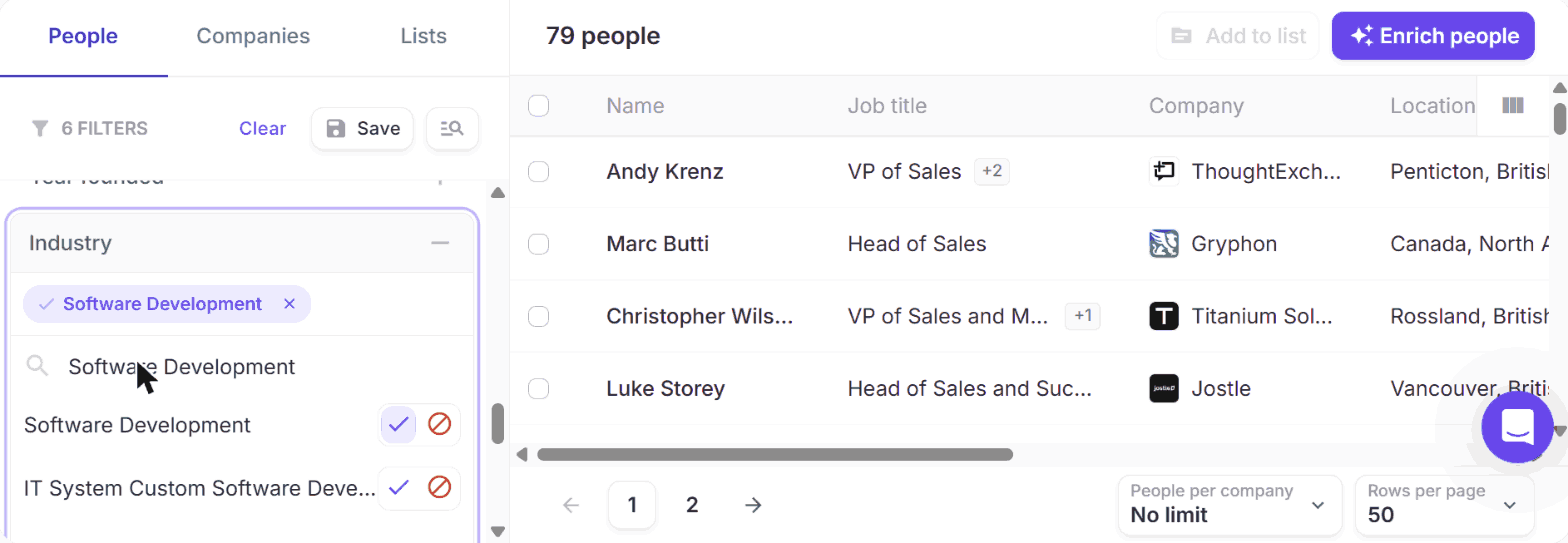
79 people, a bit more than half of Sales Navigator.
Test 3: Finding emails
14 of 20 correct in about 4 minutes, and every email it returned worked.
Pricing (updated November 2026)
- Free trial: $0, 50 credits (one-time), no credit card
- Pro: from about $55/month for 1,000 credits
- Enterprise: custom pricing
A work email costs 1 credit, and a mobile number 10. See FullEnrich’s pricing page for the latest.
11. Prospeo – Great free plan for emails, but no job changes
Pros: The best free plan for finding emails: 100 credits a month, and every email it gave me worked.
Cons: Didn’t catch a single one of my 7 job changers. Small list.
Prospeo is mainly an email finder, with a people search on top.
Test 1: Job changers
0 of 7 current. Exactly the same result as FullEnrich: 5 old jobs, and the same 2 people not found. Funny enough, Prospeo’s paid Growth plan includes “job change tracking”. It just didn’t show up in the search.
Test 2: Building a list
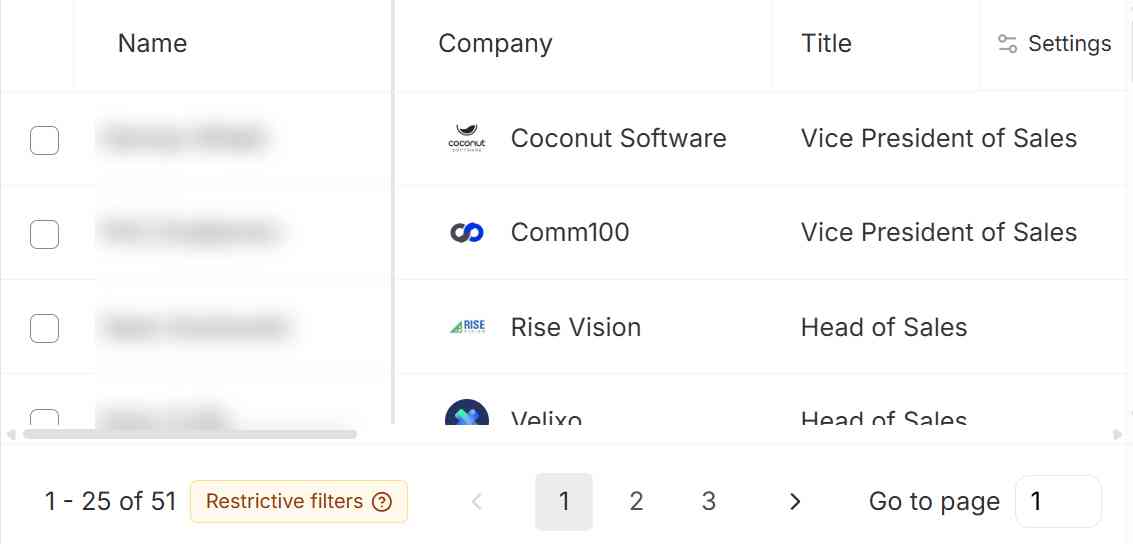
51 people, about a third of Sales Navigator.
Test 3: Finding emails
12 of 20 correct, and none were wrong. It even unlocks US contacts on the free plan.
Pricing (updated November 2026)
- Free: $0, 100 credits/month
- Starter: $49/month per user ($37/month billed yearly), 2,000 credits/month
- Growth: $99/month per user ($74/month billed yearly), 5,000 credits/month, with job change tracking
See Prospeo’s pricing page for the latest.
What about Sales Navigator itself?
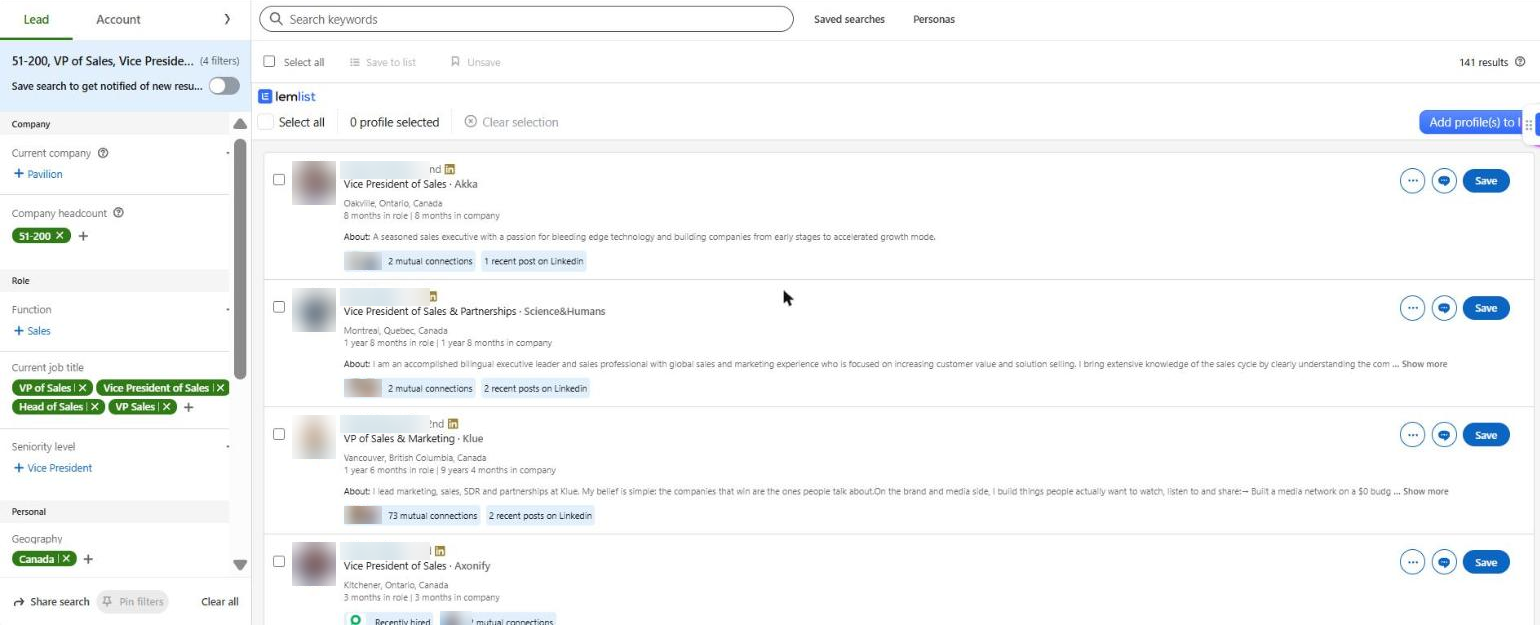
For comparison, here’s what you get with Sales Navigator: the 141 people for my search, each with their exact time in role, and a “Recently hired” badge on anyone who just started.
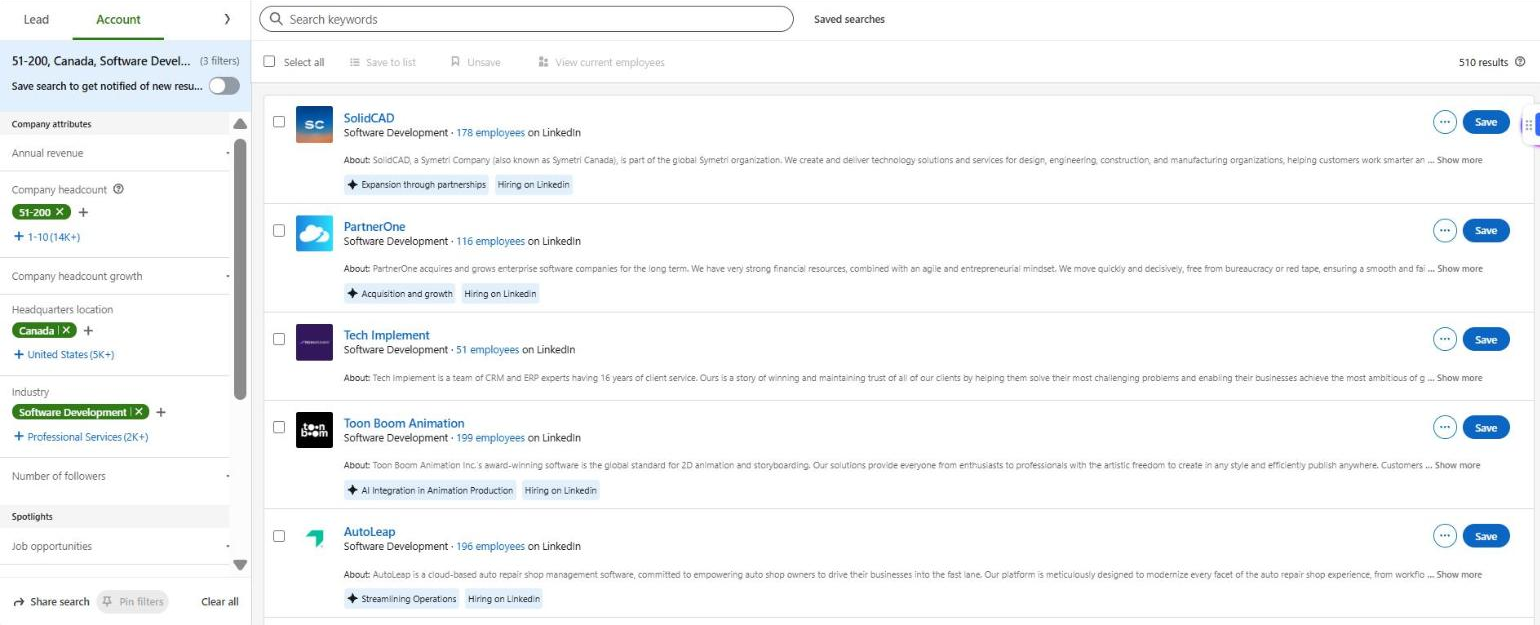
Out of curiosity, I also ran the same filters as an account search. It returned 510 companies, but only 141 sales leaders. So most of these companies don’t have a “VP” or “Head of Sales” in Canada on LinkedIn (at smaller companies, it’s often the founder doing the selling). So when a tool finds “only” 70 or 100 people, that may still be a big chunk of what’s actually out there.
Pricing (updated November 2026): Core is $119.99/month ($89.99/month billed yearly), Advanced is $159.99/month ($149.99/month billed yearly), and there’s a 30-day free trial that needs a card. No emails, no phone numbers, and no CSV export on any plan. See LinkedIn’s plan comparison page for the latest.
Results at a glance
| Tool | Job changers current (of 7) | Showed an old job | List-building search | Working emails (of 20) | Free plan |
|---|---|---|---|---|---|
| Sales Navigator | 7 (it’s LinkedIn) | 0 | 141 people | n/a (no emails) | 30-day trial (card needed) |
| Apollo.io | 5 | 1 | 273 people | 12 (+2 unconfirmed) | Free plan |
| AI Ark | 5 | 1 | 129 people | 12 (of the 17 I had LinkedIn URLs for) | 100 credits/month |
| lemlist | 4 | 0 | 70 people | 16 | 14-day trial, 200 credits |
| Seamless.AI | 5 | 2 | 28 people (Directors mixed in) | 16 (1 bounced) | 50 credits total |
| Lusha | 4 | 3 | 170 people | 5 | 40 credits/month |
| BlitzAPI | 2 | 3 | 141 people | 10 (of the 17 I had LinkedIn URLs for) | 1,000 records/month |
| Snov.io | 1 | 5 | 30 people (20 visible on free plan) | 16 | 50 credits/month |
| Lead411 | 1 | 3 | 285 people (size filter only goes 20–249) | 6 | 7-day trial, 50 exports |
| MoltSets | 1 | 3 | 1,001 people | 8 | 1,000 enrichments + 100 search results (lifetime) |
| FullEnrich | 0 | 5 | 79 people | 14 | 50 credits (one-time) |
| Prospeo | 0 | 5 | 51 people | 12 | 100 credits/month |
What I learned about job changes
Across all 11 tools, only about 1 in 3 of the job-changer checks came back current. A few things stood out:
- Promotions are harder to catch than company switches. When someone moves to a new company, there’s a new company page and a new email domain. When they get promoted, only the title changes. Several tools that caught the switchers still had the promoted people under their old title.
- Nobody caught one of the promotions. A VP of Business Development who became SVP of Sales 2 months earlier was still a VP of Business Development in all 11 tools.
- Small, new companies are a blind spot. Only Lusha had the VP of Sales who joined a small startup 2 months earlier.
- “Not found” beats “outdated”. lemlist was the only tool with zero outdated titles. If you personalize your outreach around someone’s role, a missing person is a lot less embarrassing than the wrong title.
And to put that in context: 8 of Sales Navigator’s 141 people had changed jobs in just 90 days. That’s about 6% of your list going stale every quarter.
So which one should you use?
No database matched LinkedIn on freshness, but a few came surprisingly close. Here’s how I’d pick:
- If you want to replace Sales Navigator completely: Apollo. 5 of 7 job changers current, a list almost double Sales Navigator’s, plus emails and sequences, for less than half the price.
- If you don’t want to pay anything: AI Ark. Just as fresh as Apollo in my test, Sales Navigator-style filters, and 100 free credits every month.
- If you want to keep Sales Navigator and just add emails: lemlist. Its extension works right inside Sales Navigator, it never gave me an outdated title, and its emails were among the most accurate.
- If you just need the biggest possible list: MoltSets (1,001 people) or Lead411 (285). Just double-check titles on LinkedIn before you personalize anything.
And whatever you pick, if someone’s job title matters for your message, take 10 seconds to check their LinkedIn profile first. Trust me, “Congrats on the VP role!” lands a lot worse when they’ve been SVP for two months 🙂