


Last Updated: May 15, 2026
Can you tell from the outside whether a company pays Cloudflare or uses the free plan? Cloudflare normally returns the exact same response headers and error bodies, no matter what type of customer you are. And for good reason.
But that wasn’t going to stop me, of course, so I went through a deep rabbit hole trying to find a way to find out if a company was a paid Cloudflare customer.
Ironically, when you’re mass-crawling the web, Cloudflare usually gets in the way. It blocks you, challenges you, makes you prove you’re human. This time I actually wanted Cloudflare to show up.
This is a write-up of every detection method I found, ranked from “definitely using Cloudflare as a simple CDN” to “likely Enterprise customer signing six-figure contracts.” Code is in Python but translate it to whatever language you want and paste it into your favorite LLM (like, come on, you just want the tactics, right?).
First, the obvious one: are they on Cloudflare at all?
This is table stakes, but still useful. Cloudflare publishes their entire IP range list at cloudflare.com/ips. If a domain’s A record is in that list, they’re on Cloudflare. If their nameservers contain “cloudflare,” they’re using Cloudflare DNS. If you’re just checking a single website, DNS Checker is a good tool to use.
If you wanted to a get a huge list of domains, you can ironically use Cloudflare for that. That’s because Cloudflare conveniently publishes Radar, which lists the most popular million domains by traffic. Download that, run DNS lookups, compare against the IP list, and you have your list of Cloudflare users.
def on_cloudflare(domain):
    a_records = dns_lookup_a(domain)
    if any(ip in cloudflare_ip_ranges for ip in a_records):
        return True

    ns_records = dns_lookup_ns(domain)
    return any("cloudflare" in ns for ns in ns_records)
This catches everyone on Cloudflare, free and paid.
But this basically gives you 20% of the websites in the world. Mom and pop stores, small blogs, random websites, you name it. The actual interesting question starts here: how do you know if a company is a paid Cloudflare customer? And actually compile a list of Cloudflare customers?
Signal #1: Dashboard SSO TXT records
Let’s start with the dumbest technique first. It’s almost embarrassing how simple it is. Cloudflare lets you set up SAML SSO for your team’s dashboard login. The setup requires adding a TXT record to your domain that looks like this:
cloudflare_dashboard_sso=1111111
That prefix is unique and stable. If a domain has a TXT record starting with cloudflare_dashboard_sso=, it means they’ve integrated their Cloudflare dashboard with their identity provider.
This used to be a very useful technique to find enterprise Cloudflare customers as SSO used to be an enterprise-only feature, but they recently made it available for free, so that no longer works.
But, in reality, nobody on a free plan is going to bother integrating SAML with Okta for a dashboard they barely log into. The friction (creating a connector, configuring the IdP, adding the DNS record) is high enough that doing it implies real organizational use, so it’s a good signal for finding companies that are seriously using Cloudflare.
def has_dashboard_sso(domain):
    txt_records = dns_lookup_txt(domain)
    return any("cloudflare_dashboard_sso=" in r for r in txt_records)
Run that code across the Radar top million and you’ve got a list of organizations using Cloudflare seriously enough to wire it into their identity stack.
But this still wasn’t good enough for me. How do we actually find companies that are 100% guaranteed to be paying customers?
Signal #2: Custom Error Pages
You’ve probably seen those default Cloudflare error pages if you’ve scraped a lot of websites. They have known signatures like: “Attention Required! | Cloudflare” for WAF blocks, _cf_chl_opt for challenge pages, and cf-error-details for the Error 1xxx diagnostic pages.
Pro plan and up ($25/month) lets you customize the error pages Cloudflare shows visitors. And a lot of paying customers configure these because the default Cloudflare error page looks bad next to their branding. Here’s an example from Compare the Market:
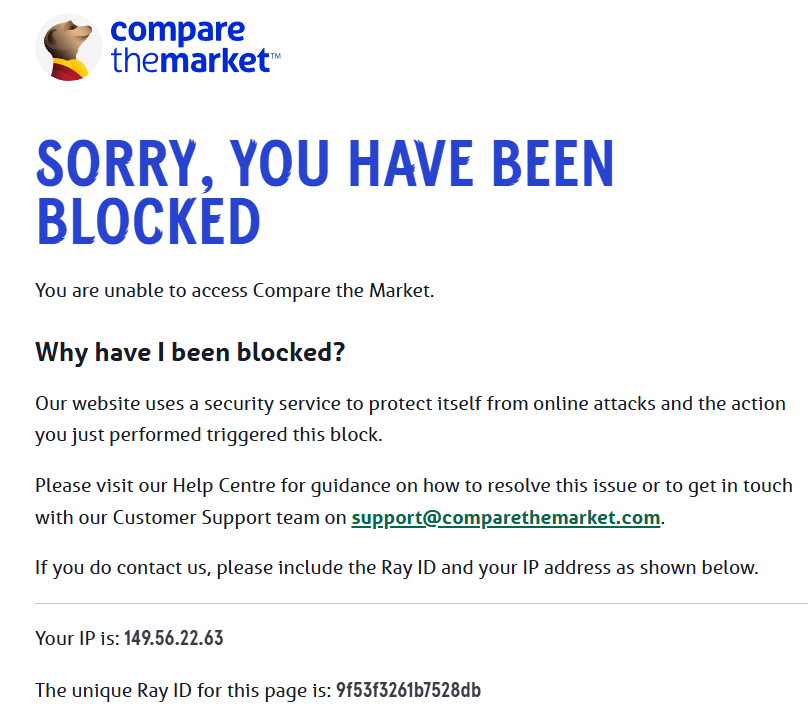
Notice that the Ray ID (an unique identifier) is still displayed in these error pages (this same Ray ID can be found in the response header “cf-ray”). The Ray ID is generated by Cloudflare per-request, so the customer’s origin server cannot possibly know it.
That means, if the Ray ID from the header shows up in the body, something at Cloudflare’s edge wrote that body. And if the body doesn’t look like the normal Cloudflare-templated error page, it’s a custom page, and a paying Cloudflare customer.
But there’s still one minor problem: How to trigger that error page?
The simplest way is to hit a non-existent API endpoint. Something like https://api.example.com/api/v1/zzzz_definitely_not_real works most of the time. If they have a WAF rule or just return a 4xx for unknown paths, you get a Cloudflare-rendered response, which is when their Custom Error Page (if configured) shows up.
Granted, this approach works best on domains with an api.* subdomain or APIs at /api/* paths, because APIs reliably return errors for malformed requests. For marketing-only sites without APIs, you’d need to probe paths likely to trigger WAF rules (like /wp-admin or /.env), which is more aggressive and higher-risk at scale (Disclosure: I would not recommend it).
One gotcha I hit: Cloudflare’s bot detection injects a JS beacon into normal HTML responses on protected sites. The beacon contains the Ray ID, which would falsely trigger our detector. The fix is to also exclude two markers Cloudflare uses for that beacon, so your detection code looks something like this:
def has_custom_error_page(response):
    if not (400 <= response.status < 600):
        return False
    if "cloudflare" not in response.headers.get("server", ""):
        return False

    ray_id = response.headers["cf-ray"].split("-")[0]
    if ray_id not in response.body:
        return False

    # exclude Cloudflare's default pages
    cloudflare_default_markers = [
        "Attention Required! | Cloudflare",
        "_cf_chl_opt",
        "cf-error-details",
        "__CF$cv$params",
        "/cdn-cgi/challenge-platform/scripts/jsd/main.js",
    ]
    return not any(m in response.body for m in cloudflare_default_markers)
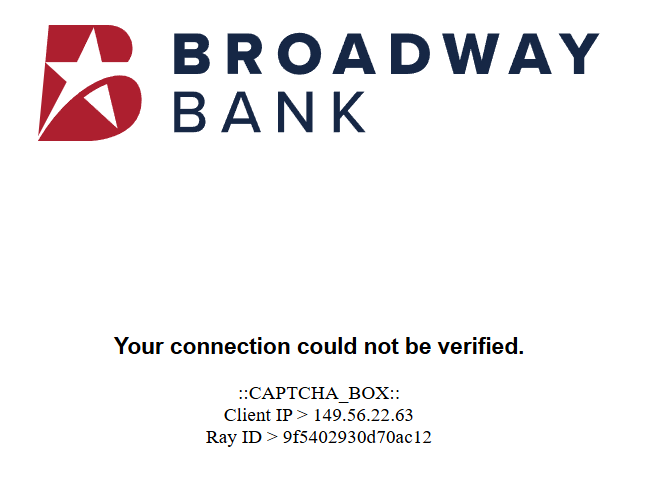
When I ran this across a few thousand api.* subdomains, the hits were exactly the kind of customers you’d expect. Tutti.ch (Swiss classifieds). Reserve Bank of New Zealand. Broadway Bank. Compare The Market. Regulated finance, government, large consumer brands.
Signal #3: The __cf_bm and _cfuvid cookies
Aside from error pages, Cloudflare also adds some cookies, which tells you a little about the products they’re using.
__cf_bm is the Bot Management family cookie. It gets set when Bot Management, Bot Fight Mode, or Super Bot Fight Mode is active. Bot Management proper is Enterprise-only. Bot Fight Mode is free but crude. Super Bot Fight Mode is Pro+. Seeing this cookie means at least some bot defense is configured.
_cfuvid is the more interesting one. It’s set when a customer enables NAT-aware unique-visitor tracking in their rate limiting rules, a feature of Advanced Rate Limiting, which is Enterprise. So if you see _cfuvid in a response cookie, there’s a very good chance the website is a paying Cloudflare customer.
def cookie_signals(response):
    cookies = response.headers.get("set-cookie", "")
    return {
        "bot_management": "__cf_bm=" in cookies,
        "advanced_rate_limiting": "_cfuvid=" in cookies,
    }
Signal #4: Cloudflare Access (Zero Trust)
Cloudflare Access is the Zero Trust product that puts a login gate in front of any web app. Customers use it to protect internal tools like GitLab, Grafana, Jenkins, internal admin panels, and these days, MCP servers.
When you hit an Access-protected URL without being authenticated, Cloudflare returns a 302 redirect to the customer’s team subdomain on cloudflareaccess.com. Every Access tenant gets one. Detection is dead simple: hit a candidate URL, capture the Location header, look for cloudflareaccess.com.
The trick is finding URLs to probe. Internal-tooling subdomain patterns are predictable. For each domain, try gitlab.<domain>, grafana.<domain>, jenkins.<domain>, wiki.<domain>, internal.<domain>, admin.<domain>. Most won’t resolve. The ones that do, hit and check the redirect.
def has_cloudflare_access(url):
    response = http_get(url, follow_redirects=False)
    if response.status not in (301, 302, 303, 307, 308):
        return False
    return "cloudflareaccess.com" in response.headers.get("location", "")
The MCP angle is worth highlighting. Lots of companies are deploying MCP servers right now and they all need auth. Cloudflare Access is one of the easier ways to bolt OAuth onto an MCP server, so mcp.<domain> is a particularly high-yield candidate to probe in 2026.
Access has a free tier (50 users) so this isn’t strictly Enterprise. But anyone who’s gone through the work of setting up Access policies, integrating an IdP, and putting it in front of internal tools is doing real engineering. The base rate of “uses Access AND uses other paid Cloudflare products” is high.
Signal #5: OV or EV SSL certificates
This is where things get interesting. Cloudflare’s free Universal SSL gives you a DV (domain-validated) cert. It just proves you control the domain. Cloudflare doesn’t issue OV or EV certificates.
If a domain is served from Cloudflare’s edge AND its certificate is OV or EV, the customer uploaded their own commercial cert via the Custom Certificates feature. Custom Certificates require Business plan minimum ($200/month per domain), and in practice almost everyone using this feature is Enterprise.
You can tell DV from OV from EV by inspecting the cert subject and issuer. DV certs only have a CN field. OV certs add O= (organization), L= (locality), ST=, C=. EV certs add fields like businessCategory, serialNumber, jurisdictionCountryName. The certificatePolicies extension also has specific OIDs: 2.23.140.1.2.1 for DV, 2.23.140.1.2.2 for OV, 2.23.140.1.1 for EV.
def cert_tier(host):
    cert = fetch_tls_cert(host)
    if has_ev_subject_fields(cert) or "2.23.140.1.1" in cert.policy_oids:
        return "EV"
    if "O=" in cert.subject and "2.23.140.1.2.2" in cert.policy_oids:
        return "OV"
    return "DV"
When I ran this against fendt.com (the German tractor brand owned by AGCO), I got back an OV cert from DigiCert with O=AGCO GmbH, served from Cloudflare’s IPs. AGCO is a $14B publicly traded multinational. Definitely Enterprise.
EV is dying as a UX signal because browsers stopped showing the green address bar. Companies still buying EV in 2026 are doing it for compliance reasons (banks, government, healthcare). OV catches a wider net of paying customers. For a “very likely Enterprise” filter, OV+ on Cloudflare is excellent. About 80-90% of hits will be Enterprise, with the rest being Business plan customers who tend to be sophisticated anyway.
Signal #6: Static IPs
This one took me a while to figure out and I almost convinced myself it wasn’t real.
Most Cloudflare customers share IPs. The whole anycast network is built around it. A given Cloudflare IP serves traffic for thousands of customer domains. Looking at A records usually doesn’t tell you anything about the customer specifically.
But Cloudflare offers a feature called Static IPs as an Enterprise product. They allocate fixed IPs from their range to a single customer. The IPs are still in Cloudflare’s published ranges, still owned by Cloudflare per WHOIS, but they’re assigned to one customer. The Cloudflare docs literally say “contact your account team,” which is Cloudflare-speak for Enterprise contract.
These IPs often come in sequential blocks. A customer will have A records pointing to 104.20.39.237 and 104.20.40.237. The third octet is sequential because Cloudflare allocated a contiguous range to that customer.
You can detect Static IPs at scale by building a frequency map. Take all the Cloudflare-served domains in your dataset and count how many domains each IP appears on. Shared anycast IPs will appear on tens of thousands of domains. Static IPs will appear on one or two (the customer’s apex and www). Filter for IPs that appear on very few domains and you’ve got Static IP candidates.
def find_static_ip_candidates(all_cloudflare_domains):
    ip_to_domains = {}
    for domain in all_cloudflare_domains:
        for ip in dns_lookup_a(domain):
            if ip in cloudflare_ip_ranges:
                ip_to_domains.setdefault(ip, []).append(domain)

    return {
        ip: domains
        for ip, domains in ip_to_domains.items()
        if len(domains) <= 3
    }
The sequential-octet pattern is corroboration. If a single domain has two A records with sequential third octets, both rare in the frequency map, it’s almost certainly Static IPs.
This signal requires aggregate data. You can’t detect Static IPs by looking at one domain. You need to scan a lot of domains first to build the frequency map, then identify the rare IPs.
Signal 7: Custom (vanity) nameservers
Normally Cloudflare gives you two randomly-named nameservers like dana.ns.cloudflare.com. With Custom Nameservers you brand them as ns1.yourcompany.com, and Cloudflare glues your hostnames to their anycast infrastructure underneath. It’s Enterprise-only with no free tier equivalent.
An example of a company that does this is Estee Lauder:
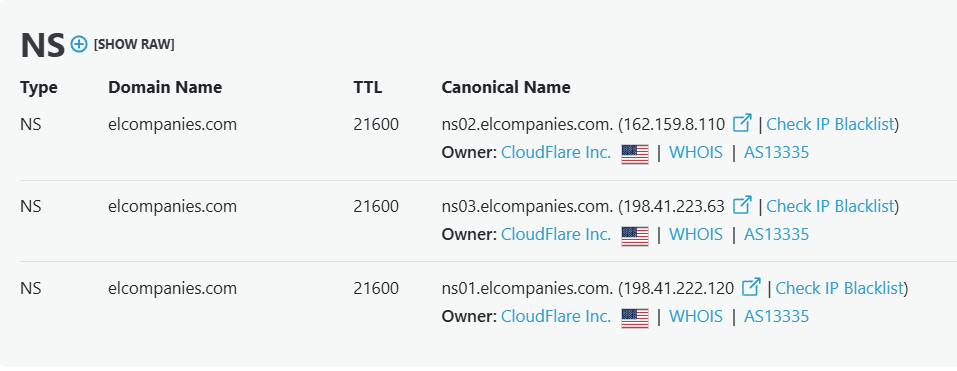
So the detection idea: find domains whose NS records point to non-Cloudflare-branded hostnames that still resolve into Cloudflare’s IP space.
def has_custom_nameservers(domain):
    ns_records = dns_lookup_ns(domain)
    if not ns_records:
        return False

    # obvious Cloudflare-branded NS means free/Pro/Business
    if any("cloudflare" in ns.lower() for ns in ns_records):
        return False

    # require NS to share a substring with the queried domain,
    # otherwise we'll false-positive on registrars and DNS hosts
    apex = domain.lower().split(".")[0]

    for ns in ns_records:
        if apex not in ns.lower():
            continue
        ips = dns_lookup_a(ns) + dns_lookup_aaaa(ns)
        if any(ip in cloudflare_ip_ranges for ip in ips):
            return True
    return False
Once you have a branded NS hostname like ns1.lumindigitalhosting.com, services like SecurityTrails or HackerTarget will return every domain delegated to it. For B2B SaaS platforms (Lumin, Vercel, Shopify Plus, Webflow), this is essentially their full customer list, leaked through DNS.
I ran this across a few thousand domains and the hits were exactly what you’d expect: banking platforms, holding companies sharing NS across subsidiaries, and a handful of Fortune 500s who turned it on for aesthetics. Of every signal in this post, this one has the cleanest “definitely paying for Enterprise” base rate.
A few caveats
Free-user detection is contaminated by hosting platform defaults. A lot of hosting platforms route their tenants through Cloudflare by default, even when the underlying customer doesn’t know it. Kinsta is a great example: every WordPress site they host runs through Cloudflare Enterprise, configured by Kinsta at the platform level.
The customer didn’t choose Cloudflare, didn’t configure anything, and may not even realize Cloudflare is in the path. WP Engine, Pantheon, and others do similar things. So when you detect a domain “on Cloudflare,” there’s a real chance the apparent customer is just a tenant of a hosting platform that uses Cloudflare. This is part of why detecting the paid signals matters more than detecting Cloudflare presence at all. The paid signals filter out the platform-default noise.
Don’t probe at scale without thinking about it. Sending malicious-pattern probes (SQLi-style queries to trigger WAF blocks) at scale across thousands of domains will get your scanning IP flagged by Cloudflare’s bot defenses. Stick to benign probes (non-existent paths, normal User-Agents) when possible.