


Last Updated: March 14, 2026
You’ve built a HubSpot integration. Or maybe you’re a HubSpot agency looking for clients who need migration help. Whatever your angle, you need a list of companies actively using HubSpot.
The obvious move is buying a database from ZoomInfo, Wappalyzer or Apollo. As a bootstrapped founder or small agency, that’s not happening.
Here’s what most people miss: HubSpot users leave footprints everywhere: from Slack communities, to job postings, to technical infrastructure.
Here are 7 proven techniques to find companies using HubSpot, with the exact searches and tools I use:
- 1. Search site:hs-sites.com for HubSpot CMS users
- 2. Join HubSpot Slack communities
- 3. Use Clay/Databar to detect HubSpot signals
- 4. Check support subdomain CNAMEs for Service Hub
- 5. Scrape HubSpot Partner Directory reviews
- 6. Search LinkedIn for INBOUND conference attendees
- 7. Search job postings on SMB job boards
1) Search site:hs-sites.com to find companies using HubSpot CMS
HubSpot’s CMS hosts customer websites on the hs-sites.com domain. When companies build their site with HubSpot CMS (part of their Content Hub), it lives on the subdomain hs-sites.com. So you can find them with a simple Google search.
site:hs-sites.com
This returns thousands of results. Every public website hosted on HubSpot CMS. You’ll see URLs like 39942715.hs-sites.com or 442271.hs-sites.com.
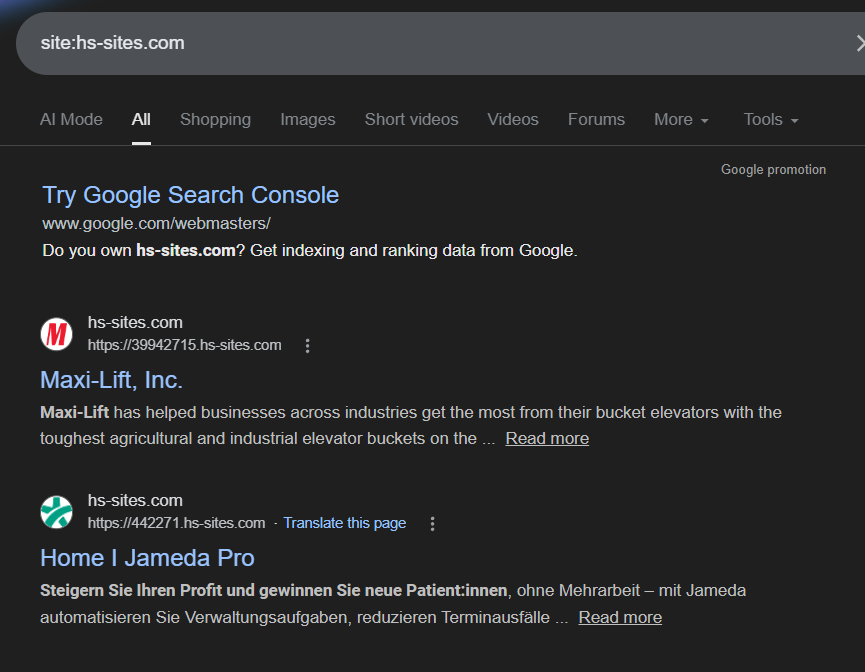
Here’s the catch: The subdomain is often just the HubSpot Portal ID (a number), not the company name. Don’t let this stop you. Click through to the actual site and you can identify the company in seconds by:
- The page title (usually has the company name)
- The logo and branding on the page
- The About Us or footer content
- The domain mentioned anywhere on the page
For example, 39942715.hs-sites.com loads a page titled “Maxi-Lift, Inc.” with their branding all over it. 442271.hs-sites.com shows “Home | Jameda Pro” in the title.
Why this works: HubSpot CMS is a significant product investment. Companies that build their entire website on HubSpot aren’t just using the free CRM. They’re bought into the ecosystem. These are serious HubSpot users who likely have Marketing Hub, Sales Hub, or both.
Pro tip: You can get more targeted by adding keywords to your search:
site:hs-sites.com "SaaS"
site:hs-sites.com "healthcare"
site:hs-sites.com "careers"
2) Join HubSpot Slack communities and lurk in intro and support channels
HubSpot has several active Slack communities where users congregate to ask questions, troubleshoot issues, and share best practices. These are goldmines for finding active HubSpot users, especially ones who need help right now.
The main communities:
HubSpot Developer Slack: The most active community. Developers, builders, and agency folks building on HubSpot. Key channels to monitor:
- #hs-get-started: New users asking basic setup questions
- #hs-apis: Developers working with HubSpot’s API
- #hs-workflows: People troubleshooting automation
- #hs-crm: Questions about CRM configuration
HubSpot Solutions Partner Slack: For HubSpot agency partners. If you sell to agencies, this is your target audience. Join at hubpartner.slack.com.
HubSpot for Startups Slack: For companies in HubSpot’s startup program. Usually venture-backed startups and companies in accelerators.
How to use these communities:
Don’t spam. Lurk in the support and intro channels. Look for:
- People asking “How do I…” questions (active implementation)
- “Does anyone know…” questions (they’re stuck on something)
- People introducing themselves with their company name
Most people use real names in Slack. If someone named “Sarah Chen” asks “How do I set up lead scoring in HubSpot?”, just Google:
"Sarah Chen" HubSpot linkedin
You’ll find her LinkedIn profile in seconds, complete with her company and job title.
Why this works: These aren’t passive HubSpot users from a stale database. They’re people actively implementing HubSpot features, hitting roadblocks, or expanding their usage. Someone asking “How do I migrate from Salesforce to HubSpot?” is a warm lead if you offer migration services. Someone asking “Why isn’t my workflow firing?” might need consulting help.
The timing is perfect. They have a problem today, not six months ago when some database vendor last refreshed their list.
3) Use Clay or Databar with your own OpenAI key to detect HubSpot at scale
If you already have a list of companies (from your target industry, a certain size, or a specific geography), you can use enrichment tools to filter for HubSpot users at scale. This is the fastest method if you’re working with volume.
Here’s the key insight most people miss: Clay and Databar have built-in tech stack enrichment features, but those cost credits (often expensive ones). The smarter move? Use their AI enrichment features with your own OpenAI API key. This costs pennies instead of dollars per lookup.
The technical signals that reveal HubSpot usage:
HubSpot SPF records: Companies using HubSpot for email include “include:_spf.hubspot.com” in their DNS SPF records. SPF records are public and checkable.
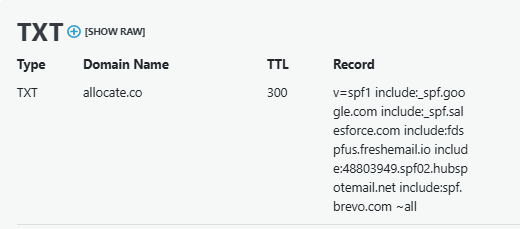
HubSpot tracking JavaScript: HubSpot injects tracking code on websites for analytics. The script domain is hs-analytics.net. You can detect this to confirm HubSpot usage.
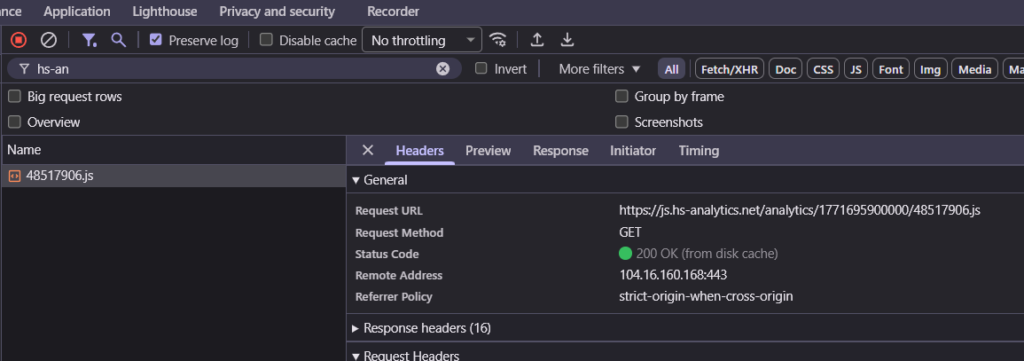
Here’s the workflow:
- Start with a company list (from LinkedIn Sales Nav exports, Apollo.io, or manual research)
- Upload to Clay or Databar
- Set up an AI enrichment column using your own OpenAI API key
- Use a prompt like this:
Visit {{company_website}} and check two things:
1. Does the page source contain "hs-analytics.net"?
2. Look up the SPF record for {{company_domain}}. Does it contain "hubspot"?

Return "YES" if either is true, "NO" if both are false.
- Filter your list to only companies that return “YES”
In Clay: Use the “HTTP API” enrichment or “Claygent” with your OpenAI key configured. The prompt runs against each company and returns YES/NO.
In Databar: Similar setup using their AI agent feature with your own API key.
Even better: Code it yourself to avoid AI costs entirely. Honestly, using AI to check SPF records and JavaScript is overkill if you know how to code. Here’s a simple Python script that does both checks:
import dns.resolver
import requests

def check_hubspot_usage(domain):
    # Check SPF record
    try:
        answers = dns.resolver.resolve(domain, 'TXT')
        for rdata in answers:
            txt_string = str(rdata)
            if 'spf' in txt_string.lower() and 'hubspot' in txt_string.lower():
                return True, "SPF"
    except:
        pass

    # Check for HubSpot tracking JavaScript
    try:
        response = requests.get(f'https://{domain}', timeout=5)
        if 'hs-analytics.net' in response.text or 'hs-scripts.com' in response.text:
            return True, "JavaScript"
    except:
        pass

    return False, None

# Usage
companies = ['example.com', 'another.com']
for company in companies:
    uses_hubspot, signal = check_hubspot_usage(company)
    print(f"{company}: {uses_hubspot} ({signal})")
This script checks both signals and costs you exactly $0 (just your time). Run it against 1,000 domains and you’re done in a few minutes.
Why this approach is better:
- Costs pennies with OpenAI: Each lookup costs $0.001-0.003 instead of $0.10-0.50 using built-in tech stack enrichment
- Costs nothing if you code it: SPF lookups and HTTP requests are free
- Fast: Process 1,000 companies in under 10 minutes
- Accurate: These are technical confirmations, not database guesses
- Current: You’re checking live infrastructure, not quarterly-updated databases
The downside? You need a starting list. This method doesn’t help with discovery, it helps with qualification at scale. Use it after you’ve built an initial target list using other methods.
If you’re targeting a specific industry (like e-commerce, SaaS, or real estate) and want to qualify hundreds or thousands of companies fast, this is your move.
4) Use Clay or Databar to detect HubSpot Service Hub via support subdomain CNAMEs
Here’s a similar technical method that’s particularly effective for finding companies using HubSpot Service Hub (their customer support product).
The signal: Companies using HubSpot Service Hub often host their knowledge base or support portal on subdomains like kb.company.com or support.company.com. These subdomains point to HubSpot via CNAME records containing “hubspot” or “hs-sites” in the string.

How it works:
- Start with a list of companies (your target accounts, competitors’ customers, whatever)
- Upload to Clay or Databar
- Create a workflow that:
- Generates potential support subdomains: kb.[domain], support.[domain], help.[domain], docs.[domain]
- Checks the CNAME record for each subdomain
- Flags companies where the CNAME contains “hubspot” or “hs-sites”
In Clay: You can use Claygent (their AI agent) with a prompt like:
Check if kb.{{domain}}, support.{{domain}}, or help.{{domain}}
points to a HubSpot site. Look for "hubspot" or "hs-sites"
in the CNAME record. Return TRUE if found, FALSE if not.
In Databar: Use their AI agent feature with a similar prompt.
If you want to save on AI costs: Code it yourself. It’s a simple one-liner to get the CNAME of a subdomain. In Python:
import dns.resolver

def check_hubspot_cname(domain):
    subdomains = ['kb', 'support', 'help', 'docs']
    for sub in subdomains:
        try:
            answers = dns.resolver.resolve(f'{sub}.{domain}', 'CNAME')
            for rdata in answers:
                if 'hubspot' in str(rdata) or 'hs-sites' in str(rdata):
                    return True
        except:
            continue
    return False
Run this against your company list and you’ll get a filtered list of companies using HubSpot Service Hub.
Why this works: Service Hub is a paid product. Companies investing in it aren’t just kicking the tires on HubSpot’s free CRM. They’re using it for customer support at scale. If you sell Service Hub integrations, chatbot tools, or customer success software, these are your people.
Plus, this method finds companies that might not show up in other searches. Their main website might not be on HubSpot CMS, but their support portal is.
5) Scrape HubSpot Partner Directory reviews to find companies who hired (and fired) agencies
This is a sneaky one that most people don’t know about. The HubSpot Partner Directory lists thousands of HubSpot agencies and consultancies. Each partner has reviews from clients.
In the UI, HubSpot only shows the reviewer’s first name and last initial (e.g., “Sarah M.”). But if you inspect the network requests, the API actually returns the full company name of the reviewer.
Here’s how to use this:
Step 1: Find a HubSpot agency that serves your target market. For example, if you target e-commerce companies, find agencies that specialize in e-commerce.
Step 2: Open their partner profile page and open your browser’s Developer Tools (F12). Go to the Network tab.
Step 3: Look at the API requests. You’ll see calls to HubSpot’s API that return review data. The response includes fields like “companyName” that aren’t displayed in the UI.
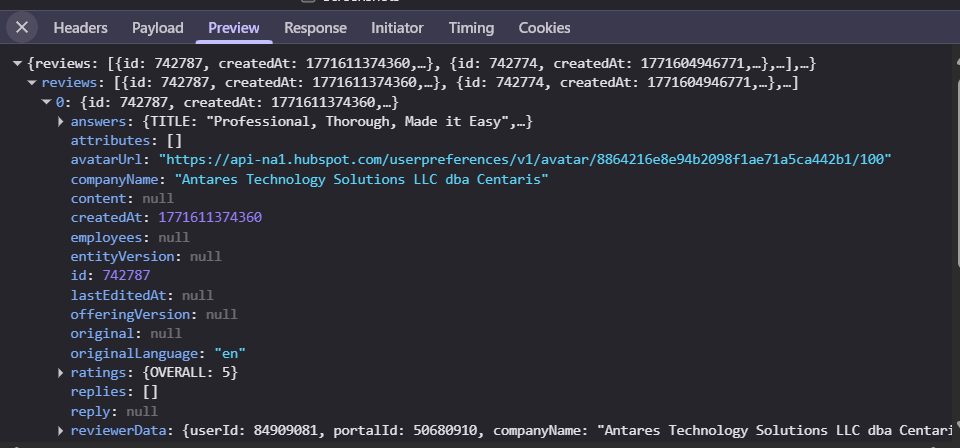
Step 4: If you’re technical, write a script to iterate through all reviews for that agency. You now have a list of every company that hired that agency.
The gold mine: Filter for negative reviews. If you’re smart, you can identify companies that left 1-3 star reviews. These are companies that:
- Use HubSpot (confirmed)
- Hired an agency (they have budget)
- Aren’t happy with that agency (they’re in the market for a replacement)
That’s about as warm a lead as you can get if you’re an agency or consultant. You’re literally finding companies that fired their last HubSpot partner.
Example use case: You’re a HubSpot agency specializing in migrations. You scrape reviews for agencies that do implementations but not migrations. You find companies that gave 2-star reviews mentioning “struggled with our complex setup.” Boom. That’s a company that needs specialized help.
This method requires some coding (or you can use tools like Apify to build a scraper), but the targeting precision is unmatched.
6) Search LinkedIn for people attending or mentioning HubSpot’s INBOUND conference
HubSpot runs an annual conference called INBOUND. It’s massive. Tens of thousands of attendees, mostly HubSpot power users, agencies, and companies heavily invested in the platform.
People love posting about attending conferences on LinkedIn. This gives you a searchable signal.
Search LinkedIn with these patterns:
Using LinkedIn’s search bar:
"INBOUND 2024" OR "INBOUND 2025" OR "INBOUND 2026"
"attending INBOUND"
"excited for INBOUND"
"see you at INBOUND"
Or use Google with LinkedIn site operators:
site:linkedin.com/in "INBOUND" "HubSpot"
site:linkedin.com "attending INBOUND 2025"
site:linkedin.com/posts "INBOUND conference"
You’ll find posts from people announcing they’re attending, sharing photos from the event, or posting takeaways. Each post tells you:
- Their name and face
- Their company
- Their job title
- That they’re engaged enough with HubSpot to attend a multi-day conference
Bonus approach: Search for INBOUND speakers and sponsors. Companies that sponsor INBOUND are deeply embedded in the HubSpot ecosystem, either as customers, partners, or both.
site:linkedin.com "INBOUND sponsor"
site:linkedin.com "speaking at INBOUND"
INBOUND typically happens in September. Search activity spikes in August-October, but you can find posts year-round from past events.
Why this works: Conference attendees aren’t casual users. They’re invested. INBOUND costs $500+ per ticket plus travel. Companies sending employees to INBOUND care about HubSpot and are likely using multiple Hubs (Marketing, Sales, Service, CMS). These are high-intent prospects.
7) Search job postings on SMB-focused job boards
Job postings are one of the most reliable signals. If a company is hiring for a “HubSpot Administrator” or “Marketing Manager with HubSpot required,” they’re obviously using it.
Most people search LinkedIn or Indeed for this. Don’t. Those platforms are flooded with recruiter spam. Instead, use Google with site operators to search job boards where companies post directly.
For SMBs and startups, focus on these job boards:
site:paylocity.com "HubSpot"
site:bamboohr.com "HubSpot"
site:workable.com "HubSpot"
site:recruitee.com "HubSpot"
site:applytojob.com "HubSpot"
These are the applicant tracking systems (ATS) that SMBs use. Paylocity and BambooHR are especially popular with growing companies in the 50-500 employee range.
For tech companies and startups:
site:job-boards.greenhouse.io "HubSpot"
site:jobs.ashbyhq.com "HubSpot"
site:lever.co "HubSpot"
Greenhouse, Ashby, and Lever are the go-to ATS for tech companies and well-funded startups.
For enterprise companies:
site:myworkdayjobs.com "HubSpot"
site:icims.com "HubSpot"
site:oraclecloud.com "HubSpot"
Workday and iCIMS are enterprise-grade ATS. Companies using these are larger and have more budget.
Get specific with your searches:
Want companies implementing HubSpot Marketing Hub specifically?
site:job-boards.greenhouse.io "HubSpot Marketing Hub"
Want companies hiring for RevOps roles using HubSpot?
site:jobs.ashbyhq.com "HubSpot" "revenue operations"
Want companies doing HubSpot + Salesforce integrations?
site:myworkdayjobs.com "HubSpot" "Salesforce"
Why this works:
- These are direct company postings, not recruiter spam
- You get the actual company name and a link to their careers page
- Companies hiring for HubSpot roles are actively investing in the platform
- You can target by company size/type based on which ATS they use
- The posting tells you exactly which HubSpot products they use
Every result is a company that’s spending money on HubSpot right now. If they’re hiring a HubSpot Admin, they’re probably expanding usage. If they’re hiring a “HubSpot Migration Specialist,” they’re literally announcing a migration project.
This takes 30 seconds and gives you a highly qualified list.
The Bottom Line
You don’t need a $10k/year database to find HubSpot users. Slack channels, CMS searches, enrichment tools with your own API keys, CNAME detection, partner review scraping, job postings, and LinkedIn activity all reveal who’s using HubSpot, often with the exact person to contact.
The real advantage isn’t just that these methods are free (or cheap). It’s that they surface companies with active needs. Someone asking a question in a Slack channel, hiring a HubSpot Admin, or leaving a negative review for their agency isn’t a passive name in a database. They’re actively working in HubSpot right now, with real problems and real budget. That’s fundamentally better signal.
For indie hackers, small agencies, and bootstrapped founders, this kind of scrappy research is how you compete. You can build a qualified prospect list in a weekend using nothing but Google, free tools, and some creativity. No credit card required.