
Last Updated: June 17, 2026
If you sell a product that integrates with another tool, offer consulting services around a specific platform, or work for a competitor trying to poach customers, you need a way to find companies that actually use a given technology.
The obvious move is to buy a list from ZoomInfo or use a technographic tool like Wappalyzer. But those lists are expensive, and often not up-to-date.
The better strategy is to follow the signals that companies leave behind when they adopt a technology. Job postings, community activity, DNS records, JavaScript snippets, public documents.
Here are 9 techniques I use to find companies that use a specific technology. All of them are free (or close to it), and most don’t require any technical expertise beyond some advanced Google searching.
- 1. Join the product’s Slack community (or forum)
- 2. Find relevant directories and registries
- 3. Search job postings using Google site: operators
- 4. Check if customers embed a JavaScript snippet on their website
- 5. Check if customers insert a DNS TXT record
- 6. Find companies with a tenant subdomain on the product’s domain
- 7. Find people who attended (or plan to attend) the product’s conference
- 8. Search .edu sites, .gov sites, and public PDFs for technology mentions
- 9. Find websites that link to a specific domain, when it implies they use that product
1) Join the product’s Slack community (or forum)
A lot of technology products have a Slack community that anyone can join. And these communities are goldmines for finding companies that use the product.
For example, Clay (the GTM tool) has an active Slack community with thousands of members, most of whom work for companies that use Clay. The two types of channels you want to pay attention to are introduction channels and support channels.
Introduction channels are where new members drop in and say who they are, what they do, and often link directly to their LinkedIn profile. This is where you can make a natural connection without any cold outreach friction.

Look at this introduction. Ayobami is a GTM Engineer who works with Clay, HubSpot, and Smartlead, and he’s linked his LinkedIn profile right there in the message. That’s a confirmed user of the product, a named contact, and a LinkedIn profile, all from browsing a single Slack channel.
Support channels are equally useful, but for a different reason. Someone asking “how do I set up a waterfall enrichment for phone numbers?” is actively building something in the product right now. They have a problem, and if you sell something that solves that problem, the timing couldn’t be better.
A word of caution though: don’t spam the community with pitches, or you’ll be banned. Be helpful first, add value, and answer questions. If you do want to reach out to someone, do it outside the community (on LinkedIn, for example) and reference something specific they said.
Nobody likes the person who joins a community just to sell.
If the product doesn’t have a Slack community, check if there’s a forum or community site. These are less effective though, because people usually don’t reveal their full name and company, but sometimes they do.
2) Find relevant directories and registries
This one requires a bit of creative thinking. Instead of searching directly for “companies that use X technology,” think about what kind of companies use that technology and where those companies list themselves publicly.
The thinking is this: certain types of companies tend to use certain types of tools. And those same companies often show up in industry-specific directories, registries, or certification databases.
For example, let’s say you’re looking for companies that use ESG (Environmental, Social, and Governance) software like Watershed. Companies that care deeply about ESG tend to pursue B Corp certification. And B Corp has a public directory where you can search and filter certified companies, sorted by newest to oldest.
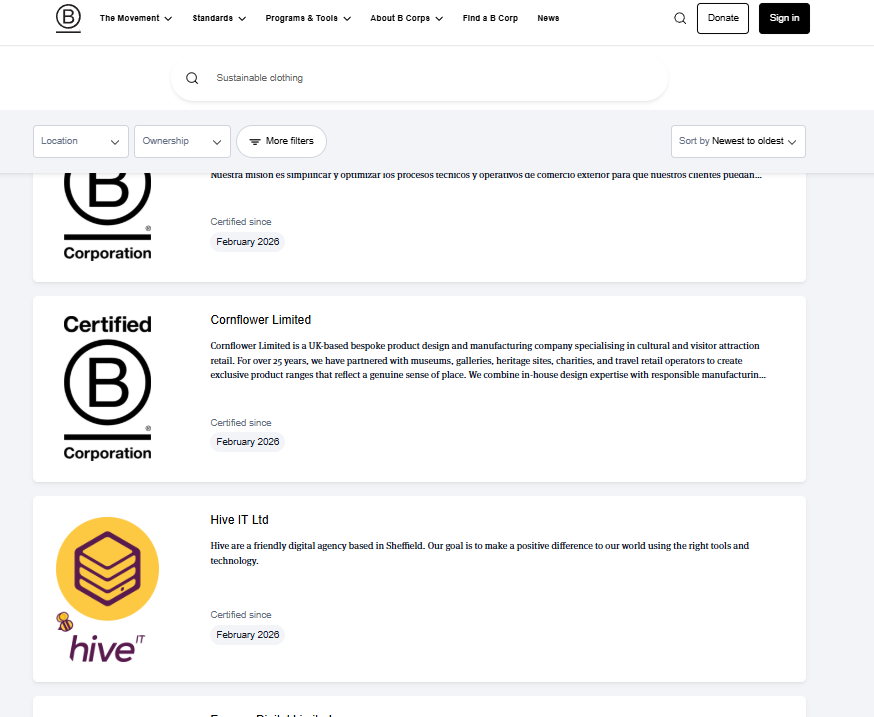
That’s a curated list of companies that care enough about ESG to go through a formal certification process. They’re far more likely to be using ESG tools than a random company pulled from a generic database.
Another example: if you’re selling financial compliance tools, look at companies that are registered with FINRA’s BrokerCheck. These are broker-dealers and investment advisers that are required to register, and FINRA’s database is fully searchable and public.
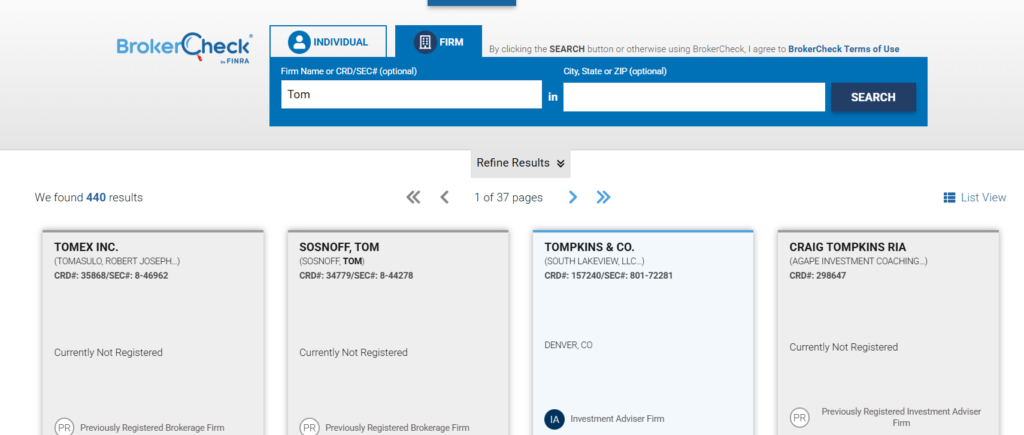
This doesn’t give you a list of companies that use one exact product. But it gives you something arguably more useful: a highly targeted list of companies that operate in the space where your technology is relevant. From there, it’s a much shorter path to finding out which specific tools they use.
One last example: if you sell application security testing tools, check HackerOne’s program directory. Every company listed there runs a public vulnerability disclosure or bug bounty program, which means they almost certainly use some kind of application security tooling. That’s your target market, neatly organized and searchable.
Think about your target market and ask: is there a directory, registry, certification body, or public database where these companies would list themselves? Trade associations, regulatory filings, certification directories, partner listings.
You have to use your brain cells for this (which is asking a lot these days, I know), but if you think hard enough, there’s probably one or two very good ones.
3) Search job postings using Google site: operators
Searching job postings for a technology name is a no-brainer. But if you’re doing this on LinkedIn or Indeed, you’re doing it wrong.
Here’s why: LinkedIn and Indeed are flooded with recruitment agencies posting the same roles over and over. You’ll spend half your time filtering out staffing firm listings. And many of the listings are months old, reposted to stay at the top of search results.
Instead, use Google’s site: operator to search the job boards that companies post to directly. These are the applicant tracking systems (ATS) where companies list their own jobs, with no recruiter middlemen.
For example, let’s say you want to find companies that use HubSpot. Here’s what you’d search:
site:job-boards.greenhouse.io “HubSpot”
site:jobs.ashbyhq.com “HubSpot”
site:lever.co “HubSpot”
Every result is a company that directly posted a job mentioning HubSpot.
The real power of this approach is that you can target companies by size and type. Different companies use different applicant tracking systems. So by changing which job board you search, you can focus on the companies that match your ideal customer profile.
If your ICP is startups and scaleups, search Greenhouse, Ashby, and Lever. These are the ATS platforms that tech companies use most often. If you’re targeting enterprises, search Workday (site:myworkdayjobs.com). For SMBs, try BambooHR (site:bamboohr.com), Paylocity (site:paylocity.com), or Workable (site:workable.com).
Now, some job postings will mention a technology in passing, buried in a long laundry list of tools. If you want to make sure the companies in your results actually rely on the technology, tighten your search query. Instead of just searching for the product name, search for a phrase that implies active usage:
site:jobs.ashbyhq.com “using HubSpot”
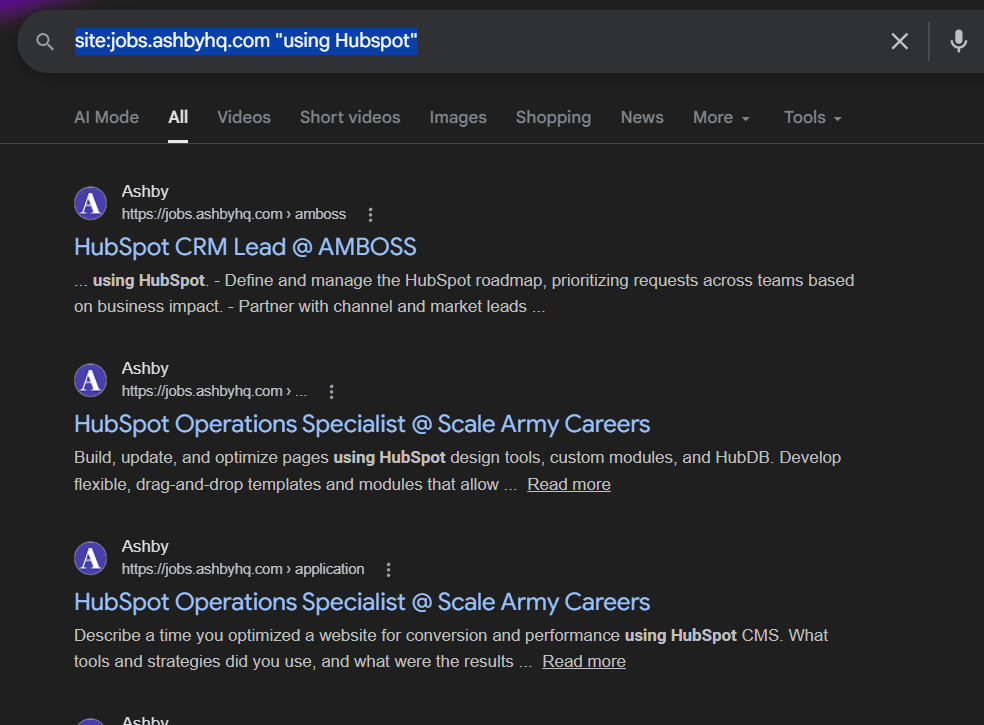
That small change filters out the noise and gives you companies that are specifically looking for someone to work with HubSpot, not just someone who’s heard of it.
This takes about 30 seconds per search and gives you a targeted list of companies that are actively spending money on a specific technology. Much better than scrolling through hundreds of recruiter posts on LinkedIn.
If you want to automate this and extract results at scale, you’ll need to use a Google SERP API like SerpAPI or OxyLabs. You’d write a script that iterates through the search results for each ATS domain, pulls out the company names and job URLs, and saves them to a spreadsheet or CRM. This is beyond the scope of this guide – but a hour of vide coding, ChatGPT/Claude Code, or Lovable can help you with this.
It’s a bit of upfront work, but once you have the script, you can run it on a schedule and get a fresh list of companies every week.
4) Check if customers embed a JavaScript snippet on their website
This one only works for technologies that have a website component, but when it works, it’s extremely reliable. Think tools like HubSpot, Intercom, Google Analytics, 6sense, Hotjar, and most A/B testing platforms.
Here’s the idea: many SaaS tools require their customers to embed a JavaScript snippet on their website for the product to work. A tracking pixel, an analytics tag, a chat widget loader. If you can identify what that snippet looks like, you can check any company’s website to see if they’re a customer.
How do you find out what the snippet looks like? Two ways. First, you can sign up for the product yourself, go through the onboarding process, and see if one of the setup steps asks you to add a script to your site. Second, just Google something like “[technology name] JavaScript setup” or “[technology name] install tracking script“.
For example, when I search for “6sense JavaScript setup,” the first result points me to a guide on how to install the 6sense WebTag on a website. And right there in the documentation, it shows me the exact script tag that customers need to embed, which loads from the domain 6sc.co.
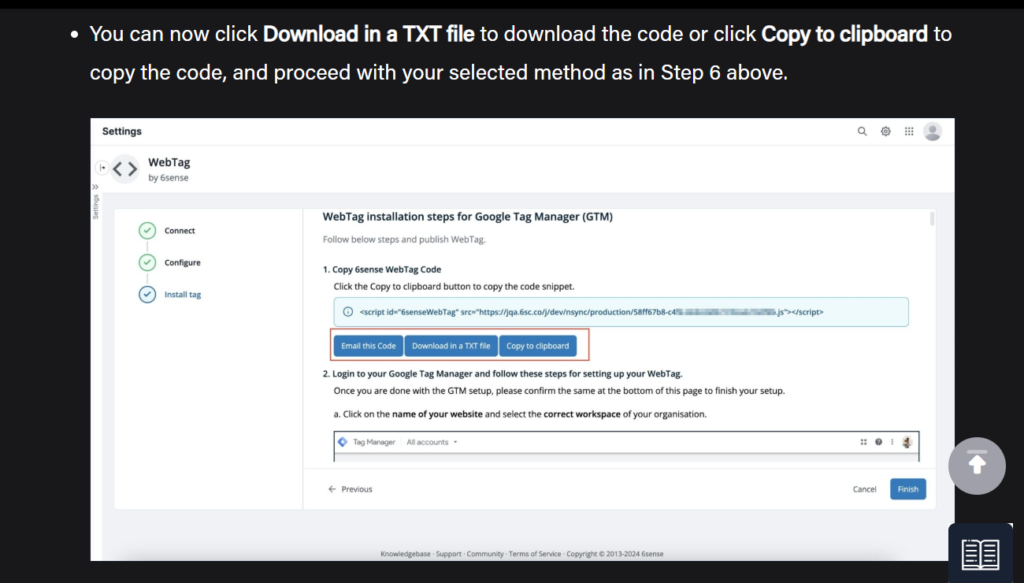
Now you have a fingerprint. Any website that loads a script from 6sc.co is a 6sense customer.
The question is: how do you check this at scale? You’re probably not going to manually view-source on thousands of websites.
This is where a tool like Databar.ai (or any data enrichment tool) comes in. If you have a list of company websites in Databar, you can add a column using their AI agent with a prompt like: “Visit this website and determine if this company is a 6sense customer based on whether they have a JavaScript tag loading from the domain ‘6sc.co’.”
Databar’s agent will crawl the page and give you a yes or no answer for each company.
The same principle works for any tool that requires a client-side script. HubSpot loads from js.hs-scripts.com. Intercom loads from widget.intercom.io. Drift loads from js.driftt.com. Find the domain, and you have your fingerprint.
5) Check if customers insert a DNS TXT record
This is similar to the JavaScript technique, but it works for a completely different category of tools: products that require domain verification.
Here’s the background. When a company deploys certain SaaS tools across their organization, the tool often needs to verify that the company actually owns their domain. The standard way to do this is by asking the company to add a TXT record to their DNS settings. It’s like adding a secret code to your domain’s configuration to prove you own it.
The important thing: DNS TXT records are public. Anyone can look them up.
For example, when you deploy Atlassian (Jira, Confluence, etc.) across your organization, Atlassian often requires you to insert a DNS TXT record that contains the string atlassian-domain-verification. So if a company has that string in their DNS records, they’re almost certainly an Atlassian customer.
How do you find out if a technology requires this? Same approach as the JavaScript method. Just search Google for something like “[technology name] verify domain DNS” or “[technology name] domain verification TXT record.” If the product requires it, you’ll find a setup guide that tells you exactly what string to look for.
And just like the JavaScript method, you can use a tool like Databar.ai or Clay to check this at scale. Add a column to your enrichment table and use their AI agent with a prompt like: “Analyze the DNS TXT records for this company’s domain and determine if they have a TXT record containing the string ‘atlassian-domain-verification’.”
This works for a wide range of products. Google Workspace, Microsoft 365, Atlassian, Salesforce, and many other enterprise SaaS tools all use DNS TXT records for domain verification. Each one has a distinct string that shows up in the DNS record, making it a reliable signal.
6) Find companies with a tenant subdomain on the product’s domain
Some SaaS products give each customer their own subdomain on the product’s domain. If you know the pattern, you can use Google to find every company that has one.
Zendesk is a classic example. Every Zendesk customer gets a support portal at companyname.zendesk.com. Workday is another: companies that use Workday for recruiting typically have a careers page at companyname.myworkdayjobs.com. Atlassian uses companyname.atlassian.net. Slack customers use companyname.slack.com
Once you know the pattern, finding customers is as simple as running a site: search in Google. For example, here’s what you get when you search for all subdomains on myworkdayjobs.com:
site:myworkdayjobs.com
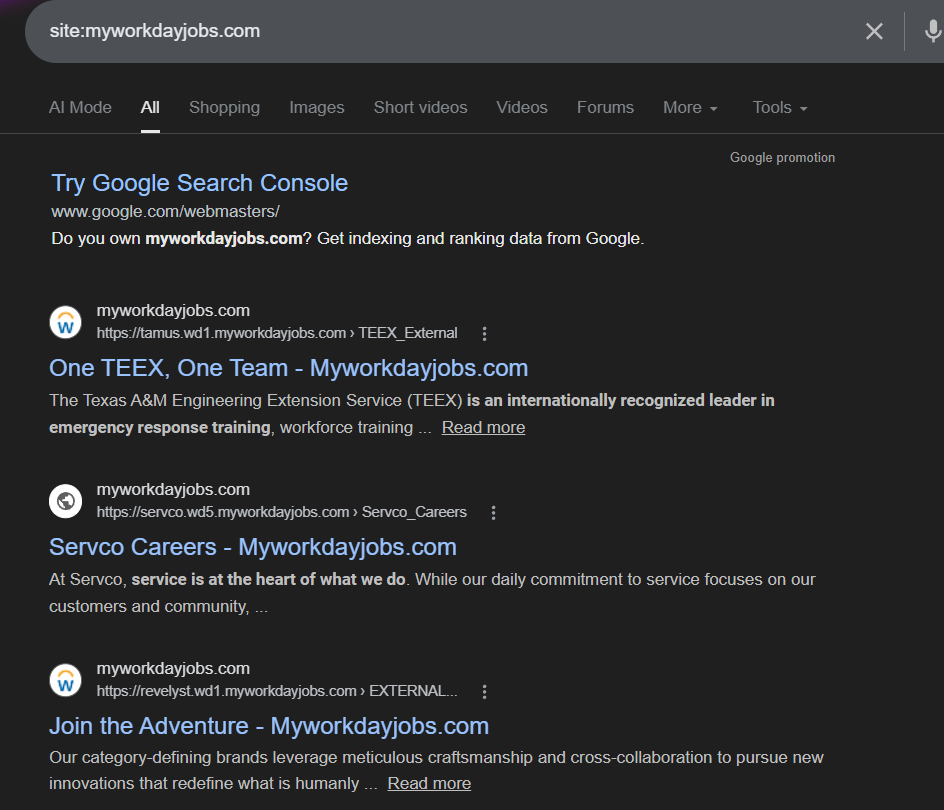
Each result is a different company’s Workday careers page. In most cases, you can infer the company from the subdomain alias they chose. TEEX (Texas A&M Engineering Extension Service) has tamus.wd1.myworkdayjobs.com. Servco has servco.wd5.myworkdayjobs.com. Click through any of them and you’ll land on that company’s branded careers page, confirming who it is.
You now have a way to find out companies that use Workday.
This works for any product where customers get a dedicated subdomain. If you’re not sure whether a product does this, just Google “[product name] custom subdomain” or “[product name] your-company.[product].com” and you’ll usually find out quickly.
7) Find people who attended (or plan to attend) the product’s conference
Most major technology companies run an annual conference. Salesforce has Dreamforce. HubSpot has INBOUND. AWS has re:Invent. Atlassian has Team. And the people who attend these conferences are, overwhelmingly, customers of the product.
Think about it: who pays to attend (or gets their company to pay for) a vendor-specific conference? People who use the product daily, are deep in the ecosystem, and want to learn more. That’s exactly the kind of person you want to find.
The easiest way to find these people is with a Google site: search on LinkedIn posts. People love to announce that they’re attending a conference, and they almost always do it on LinkedIn. Here’s the search:
site:linkedin.com/posts “attending Dreamforce”
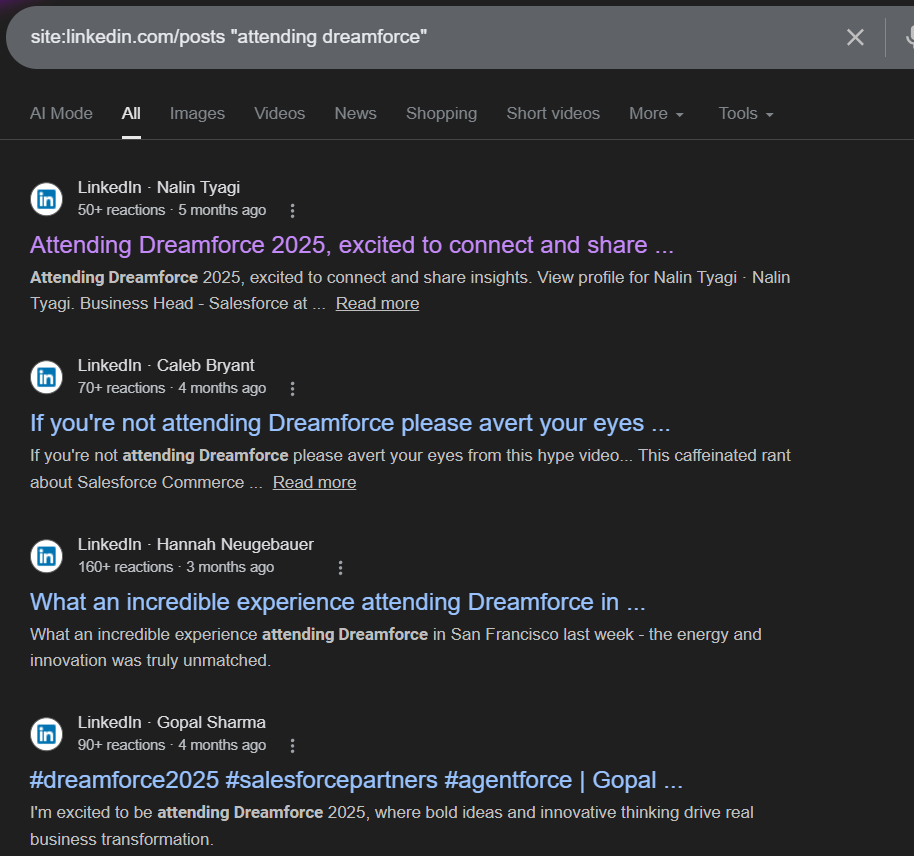
Each result is a LinkedIn post from someone publicly saying they’re going to the conference. Click through and you’ll see their full profile: name, title, company, and often a detailed post about what they’re hoping to learn or who they want to meet.
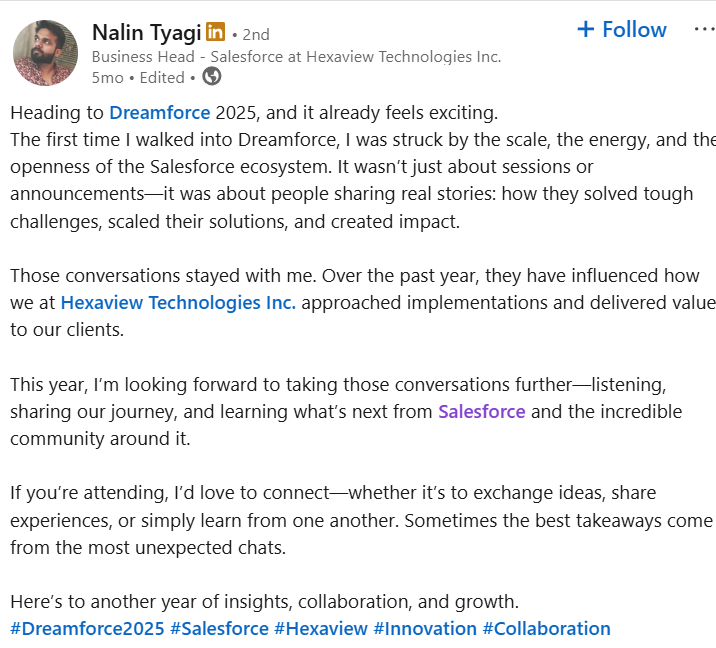
For example, the first result for “attending Dreamforce” shows Nalin Tyagi, a Business Head for Salesforce at Hexaview Technologies. His post mentions how he’s looking forward to learning what’s next from Salesforce. That’s a confirmed Salesforce user, a named contact, a company, and a job title.
You can swap in any conference name. site:linkedin.com/posts “attending INBOUND” for HubSpot users. site:linkedin.com/posts “attending re:Invent” for AWS users. The pattern works the same way every time.
8) Search .edu sites, .gov sites, and public PDFs for technology mentions
This method works especially well for security tools, HR and payroll tools, and products commonly used by government organizations and educational institutions.
The reason is simple: unlike corporations, which keep their internal documentation behind intranets, universities and government agencies often publish their setup guides, onboarding documentation, and IT support pages on the public web.
Universities have to, because students, faculty, and staff all need to access these instructions and most of them aren’t on a corporate VPN. Government agencies do it because many are legally required to make their spending and vendor decisions public.
This means that if a university uses a tool like Cisco Duo, Okta, or CrowdStrike, there’s a good chance they’ve published a public guide explaining how to install and configure it. And Google indexes those pages.
The search is simple:
site:*.edu “Cisco Duo”
That returns university pages that mention Cisco Duo, usually in the context of “how to set up two-factor authentication for your university account.” Each result is a confirmed customer.
You can also broaden this beyond universities by searching for public PDFs. This is where HR and payroll tools really shine. Companies often publish employee onboarding guides as PDFs, sometimes intentionally (linked from a job posting or new hire packet) and sometimes by accident. Either way, Google indexes them.
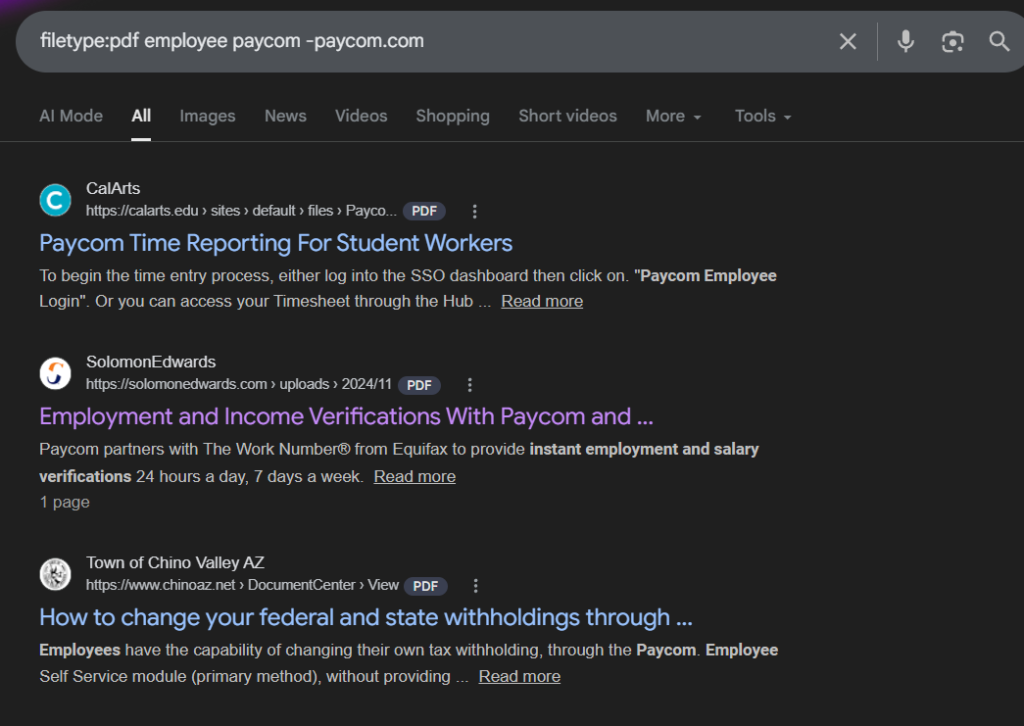
For instance, when I search for PDFs that mention Paycom, I find employee guides from companies like CalArts and the Town of Chino Valley explaining how to log into Paycom, submit timesheets, or change tax withholdings. Each one is a confirmed Paycom customer.
filetype:pdf employee paycom -paycom.com
For government organizations specifically, you’ll often find official budget documents and spending resolutions that list exactly which vendors they’re paying and how much. Most government agencies are obligated to make this information public, and these documents end up indexed by Google.
For example, when I search for government sites mentioning NetSuite in budget documents, I find results like the City of South Burlington’s FY27 budget mentioning their NetSuite implementation, and CalVans’ official resolution to renew their Oracle NetSuite contract.
These aren’t guesses or inferences. They’re official government records confirming exactly which products these organizations use and what they’re spending on them.
site:*.gov netsuite budget

9) Find websites that link to a specific domain, when it implies they use that product
This one is sneaky. Most companies don’t realize that when they publish their links – whether in a privacy policy, subprocessor list, community link, or public documentation – those links become searchable in backlink databases.
Tools like Ahrefs and Semrush crawl the entire web and track which domains link to which URLs. If you know the specific URL patterns a product uses, you can search for all the domains that link to that URL. And each domain linking to it is almost certainly a customer.
Here are some real-world examples:
Slack communities: Find companies with a public Slack workspace
If a company has a public Slack community (like a customer community or developer community), they’ll often link to it from their website or documentation. The URL pattern is usually something like join.slack.com/t/companyname/.
Search Ahrefs or Semrush for all domains linking to join.slack.com and you’ll get a list of every company with a public Slack workspace. Then filter that list to companies relevant to your market.
For example, if you’re selling to developer communities, search for Slack links on domains that also mention “developers” or “API” in their content. Each domain linking to a Slack invite URL is a company with an engaged community.
Discord communities: Same approach
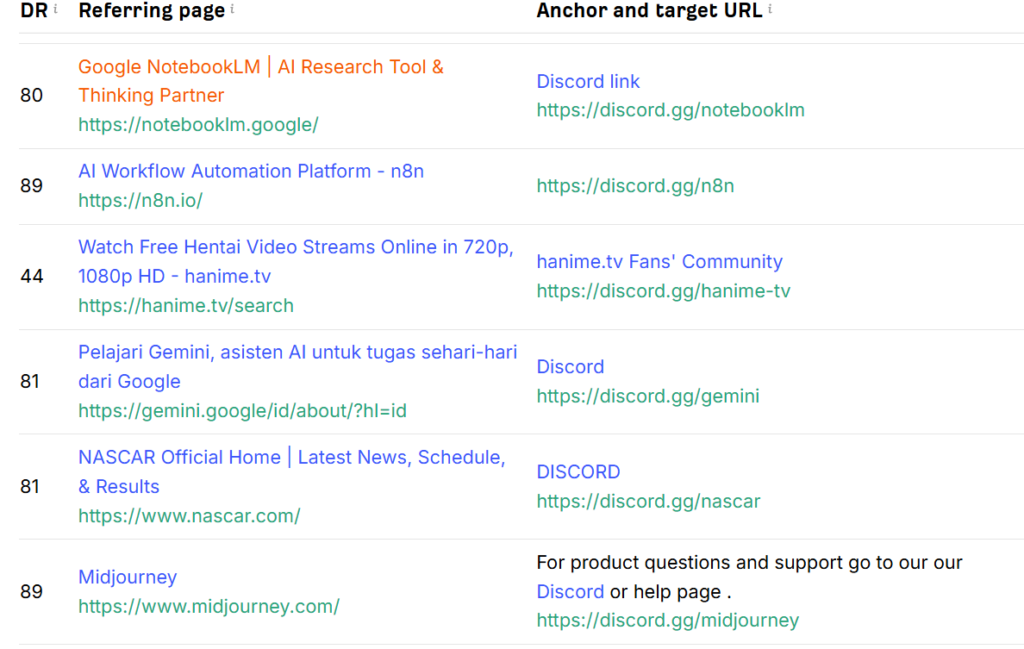
Discord links follow the pattern discord.gg/[code]. If you search Ahrefs for all domains linking to specific Discord communities, you find companies that maintain Discord servers. Again, each link is a company actively using Discord for community engagement.
When I tried this on Ahrefs, I got over 465K websites that linked to a Discord URL.
GitHub repositories: Find companies using GitHub for open source
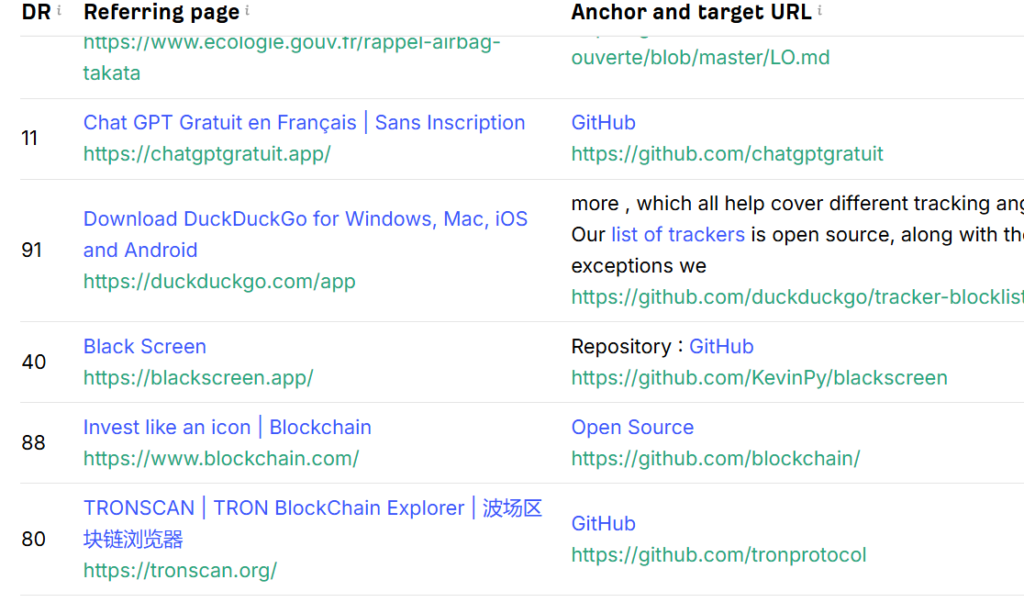
Search Ahrefs for all domains linking to github.com/companyname and you’ll find companies that link to their GitHub repos from their website. This is especially useful for finding tech companies that actively open-source their code. The link indicates they’re using GitHub to host projects, and often signals a developer-first company culture.
Privacy policies and subprocessor lists
Here’s where this gets really powerful. When companies publish their privacy policies or subprocessor lists (we covered these in another guide), they link to the product vendor’s domain. For example, they might link to slack.com, zendesk.com, or hubspot.com in their policy.
Search Ahrefs for all domains linking to a specific product domain, and you get a list of companies that mention the product in their official documentation. The assumption is: if they’re linking to a vendor in their privacy policy or subprocessor list, they’re almost certainly a customer.
This is particularly useful for finding users of compliance, security, and HR tools – products that show up in privacy policies and vendor disclosures.
The advantage over the other methods: this works at scale. Instead of manually checking one website at a time, you get a list of potentially hundreds of companies in minutes.
The bottom line
You don’t need an expensive technographic database to find companies that use a specific technology. Slack communities, industry directories, job postings, JavaScript snippets, DNS records, tenant subdomains, conference attendees, and public documentation all leak this information for free.
The real advantage of these methods isn’t just the cost. It’s the specificity. A Slack introduction gives you a named contact with a LinkedIn profile. A job posting tells you the company is actively investing in the technology right now. A JavaScript snippet or DNS record is hard proof of adoption, not an inference. These are all better signals than a row in a spreadsheet that was last updated six months ago.
Pick the methods that match the technology you’re researching, and you’ll have a targeted list of companies in less time than it takes to get a quote from a data vendor.