
Last Updated: March 14, 2026
If you sell Salesforce consulting services, build products that integrate with Salesforce, or work for a Salesforce competitor – you need a reliable way to find companies that use Salesforce.
The obvious move is to buy a list from ZoomInfo or use a tool like Wappalyzer. But those lists are stale and expensive.
The better move is to follow the signals – footprints that indicate a company (and often the specific individual) that is using Salesforce. Things like job postings, community forums, Slack communities, public-facing Salesforce instances, and trust center pages all leak this information.
Here are 7 techniques that I use to find companies that use Salesforce – especially companies that need Salesforce help right now.
1) Search job postings with Google search operators (not LinkedIn)
Yes, searching job postings for “Salesforce” sounds obvious. But if you’re doing this on LinkedIn or Indeed, you’re doing it wrong (and also, subjecting yourself to unnecessary pain, given how horrible Indeed’s user experience is).
Here’s why: LinkedIn and Indeed are flooded with recruitment agencies posting the same roles over and over. You’ll spend half your time filtering out Randstad and Robert Half listings that tell you nothing about who the actual end customer is.
Instead, search Google using “site:” operators to target the job boards that companies post to directly.
Here’s an example:
site:job-boards.greenhouse.io “Salesforce”
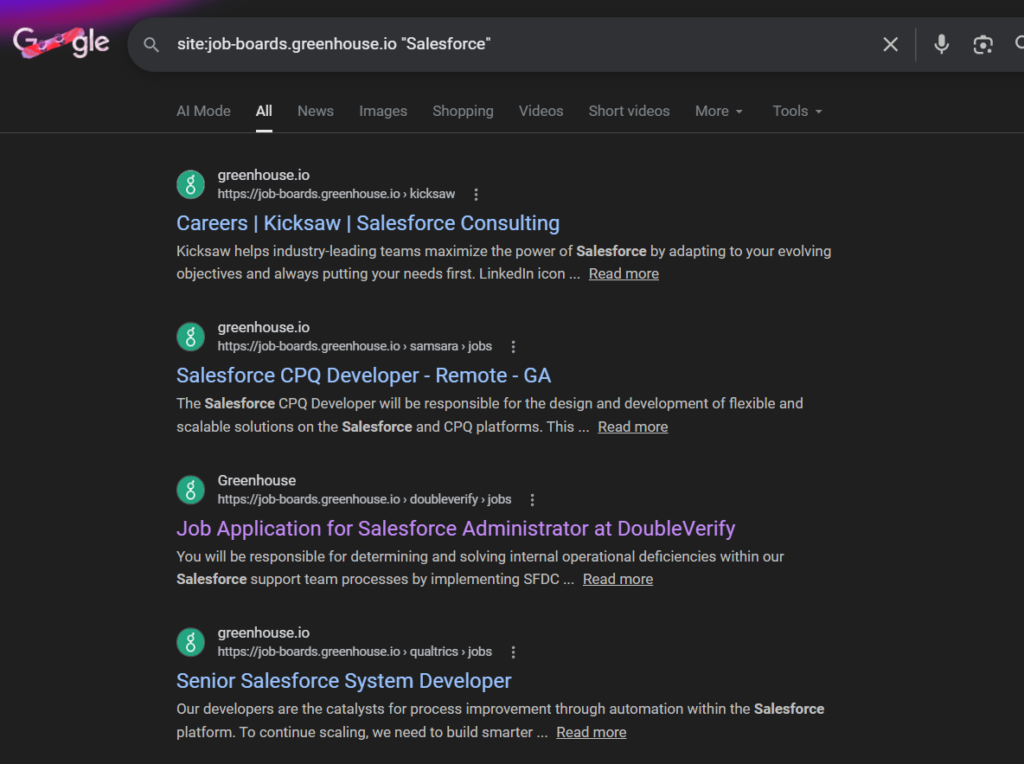
This searches Greenhouse’s job board – one of the most popular applicant tracking systems for tech companies – for any posting that mentions Salesforce. Every result you get is a company that directly posted that job. No recruiter spam.
This is better than searching Linkedin/Indeed for a few reasons:
You get recent, real postings. Google indexes these pages quickly, so you’re seeing jobs that were posted days or weeks ago, not stale listings that have been sitting around for months (which is very common for Linkedin Jobs).
This means you can target companies that are looking for Salesforce help right now, not months ago.
You get the actual company. Every result links to the company’s own job board. No guessing who the end client is.
You can target companies by size and type. This is the real valuable time-saver. Different types of companies use different applicant tracking systems. So by changing which job board you search, you can target specific company profiles
Targeting startups and tech companies? Use these search operators to find companies that post a Salesforce job posting on Greenhouse, Ashby, Lever,
site:job-boards.greenhouse.io “Salesforce”
site:jobs.ashbyhq.com “Salesforce”
site:lever.co “Salesforce”
Targeting enterprise and large companies? You need to find companies that post Salesforce jobs using Workday, Oracle Cloud, and ICIMs.
site:myworkdayjobs.com “Salesforce”
site:oraclecloud.com “Salesforce”
site:icims.com “Salesforce”
site:ultipro.com “Salesforce”
Targeting SMBs? You need to find companies that post Salesforce jobs using Paylocity, BambooHR, Paycom, ApplicantPro and Workable.
site:paylocity.com “Salesforce”
site:bamboohr.com “Salesforce”
site:paycomonline.net “Salesforce”
site:applytojob.com “Salesforce”
site:applicantpro.com “Salesforce”
site:workable.com “Salesforce”
site:recruitee.com “Salesforce”
Targeting companies with a big EU presence? You need to find companies that post Salesforce jobs using Personio, TeamTailor or SoftGarden.
site:personio.de “Salesforce”
site:teamtailor.com “Salesforce”
site:softgarden.de “Salesforce”
You can also get more specific. Want companies that use Salesforce *and* are hiring for a RevOps role? Add it to the query:
site:job-boards.greenhouse.io “Salesforce” “revenue operations”
Want companies that are implementing Salesforce CPQ specifically?
site:myworkdayjobs.com “Salesforce CPQ”
This takes about 30 seconds and gives you a highly targeted list of companies that are actively spending money on Salesforce. Much better than just searching across all types of companies on Linkedin/Indeed, most of whom aren’t in your ICP.
2) Visit the Salesforce Trailblazer Community and find people asking questions
Here’s a technique that most people overlook entirely: go to The Salesforce Trailbrazer Community and browse the community forums.
The Trailblazer Community is where Salesforce admins, developers, and architects go to ask questions, troubleshoot issues, and share solutions. It’s active, it’s searchable, and – here’s the key part – people use their real names.
Unlike Reddit or anonymous forums, Trailblazer Community members typically have their full name, a profile photo, and often their job title and company name visible on their profile. For instance, when I browse the Agentforce section, I can see Milke Kaitlin, a Salesforce administrator for a company called Next-Mark is using Salesforce in her company.
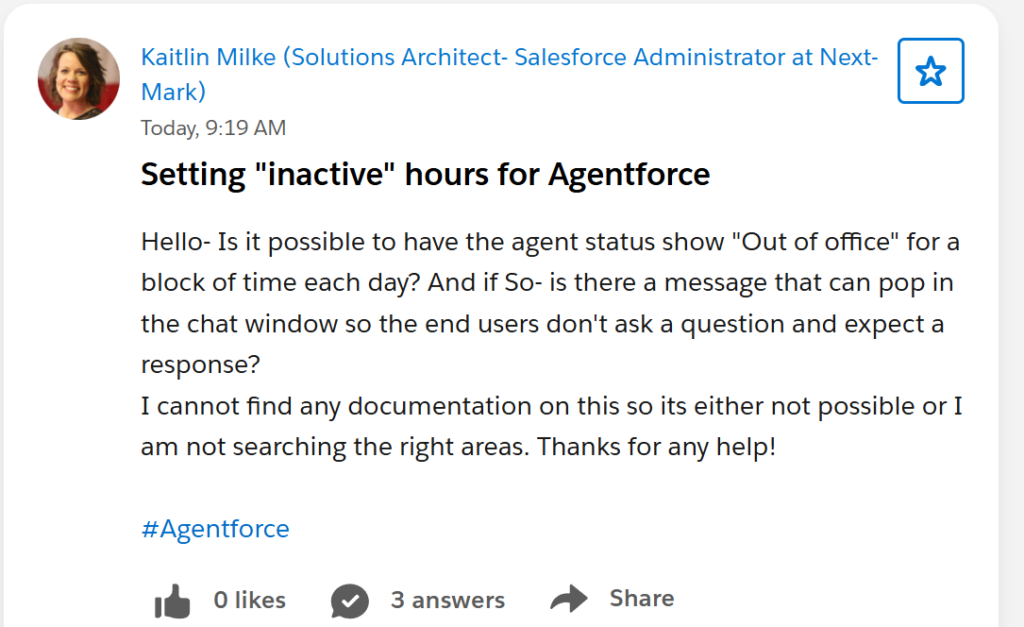
And here she is in Linkedin…
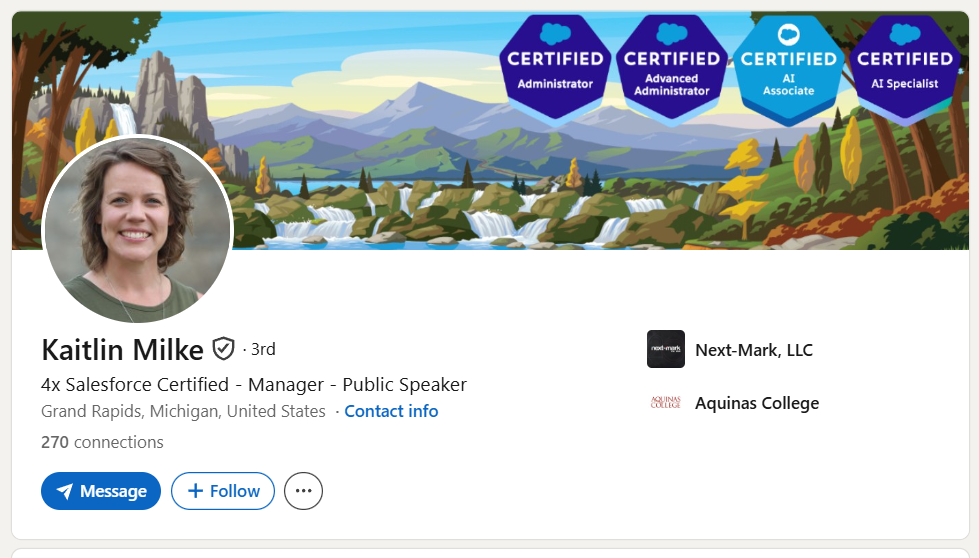
With all this information, you can do lots of sophisticated, personalized outreach such as:
– Find companies actively implementing specific Salesforce products. There are specific sections for each type of Salesforce product. For instance, there’s a section for asking questions about CRM Implementations, Data Cloud, Tableau, Salesforce Einstein and much more.
So if someone is asking questions about Agentforce, CPQ, Marketing Cloud, or any specific Salesforce product, their company is either currently using it or in the process of rolling it out.
– Identify the exact person to reach out to. You’re not guessing who the Salesforce admin is – they’re right there, asking questions with their real name. And the best thing is you’re probably reaching out to them in the right time: when they have a problem with Salesforce.
Find them on LinkedIn and you have a warm(ish) outreach target.
– Gauge how sophisticated their implementation is. Someone asking basic setup questions is at a very different stage than someone troubleshooting complex automation flows. This tells you what kind of help they might need.
Search the community for specific Salesforce products or features you care about, find the people asking questions, and look them up on LinkedIn. It’s that simple.
3) Read Salesforce AppExchange reviews of relevant Salesforce apps
The Salesforce AppExchange is Salesforce’s app marketplace — thousands of add-ons, integrations, and tools that plug into Salesforce. Every one of these apps has a reviews section, and every review is written by a verified Salesforce customer.
What makes this so useful: reviewers use their real names, often show their Trailblazer rank, and frequently mention their company in the review itself. Some even link directly to their LinkedIn profile from their Trailblazer profile.
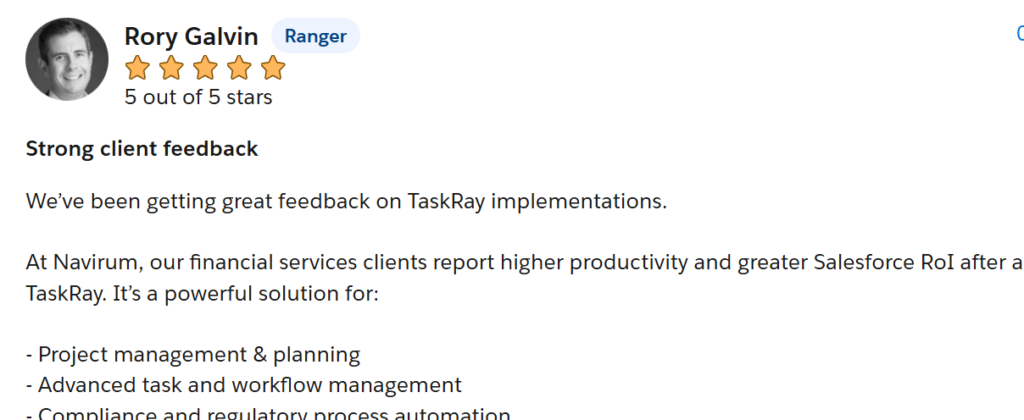
Look at this review. Rory Galvin reviews TaskRay and mentions he’s from Navirum, a Salesforce consultancy working with financial services clients. Click through to his Trailblazer profile and you’ll find a link to his LinkedIn, his company, and his role – CEO and Founder.
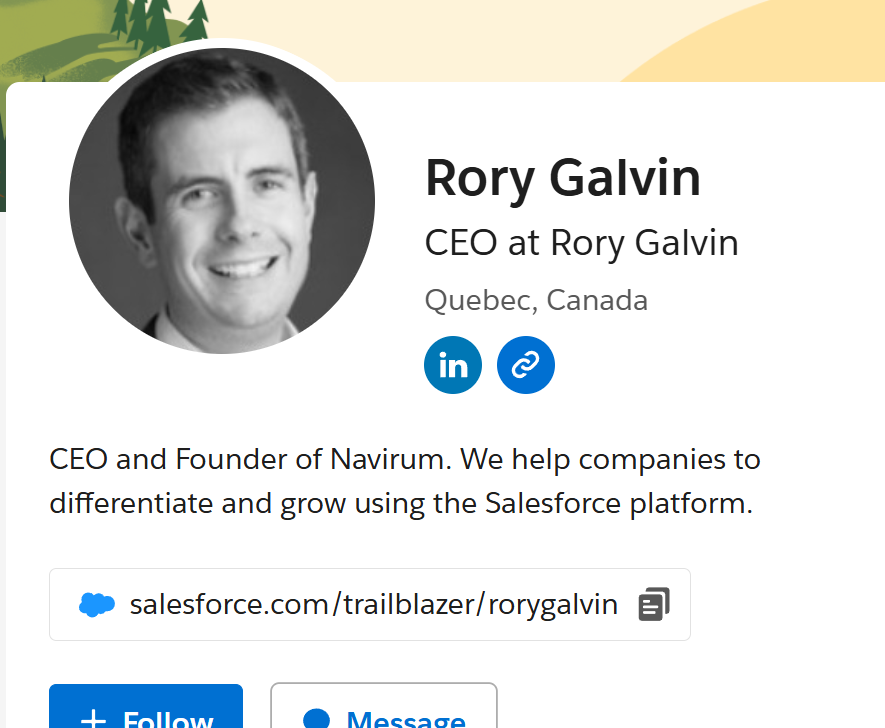
That’s a confirmed Salesforce customer, a named contact, and a LinkedIn profile — all from reading a single app review.
The real trick: pick the right app to find the right customers
The AppExchange has apps for every part of the Salesforce ecosystem. So instead of browsing randomly, think about what type of Salesforce user you’re trying to find, then go read reviews for the apps they’d use:
- Targeting companies with complex CPQ setups? Read reviews on Conga
- Targeting companies doing project management inside Salesforce? Read TaskRay or Inspire Planner reviews.
- Targeting companies with heavy data migration needs? Read Dataloader.io or Ownbackup reviews.
- Targeting companies using Marketing Cloud? Read reviews on DESelect or Salesforce Marketing Cloud-specific apps.
- Targeting companies using Salesforce Service Cloud? Read reviews on Talkdesk for Salesforce
Every review section is basically a curated list of companies that use Salesforce and care enough about a specific use case to have bought an app for it. That’s way more targeted than a generic “uses Salesforce” signal.
People who leave reviews also tend to be the hands-on admins and architects – the people who actually make purchasing decisions about Salesforce tooling. These aren’t random employees. They’re exactly who you want to talk to.
4) Search Google for public Salesforce instances
Many companies run public-facing Salesforce pages without even realizing how visible they are. Two types in particular are easy to find:
Salesforce Experience Cloud sites
Experience Cloud (formerly Community Cloud) is what companies use to build partner portals, customer support sites, and help centers on top of Salesforce. These sites are usually public – they have to be, since partners and customers need to access them – and most of them get indexed by Google.
They all live on the my.site.com domain. So searching Google for them is trivial:
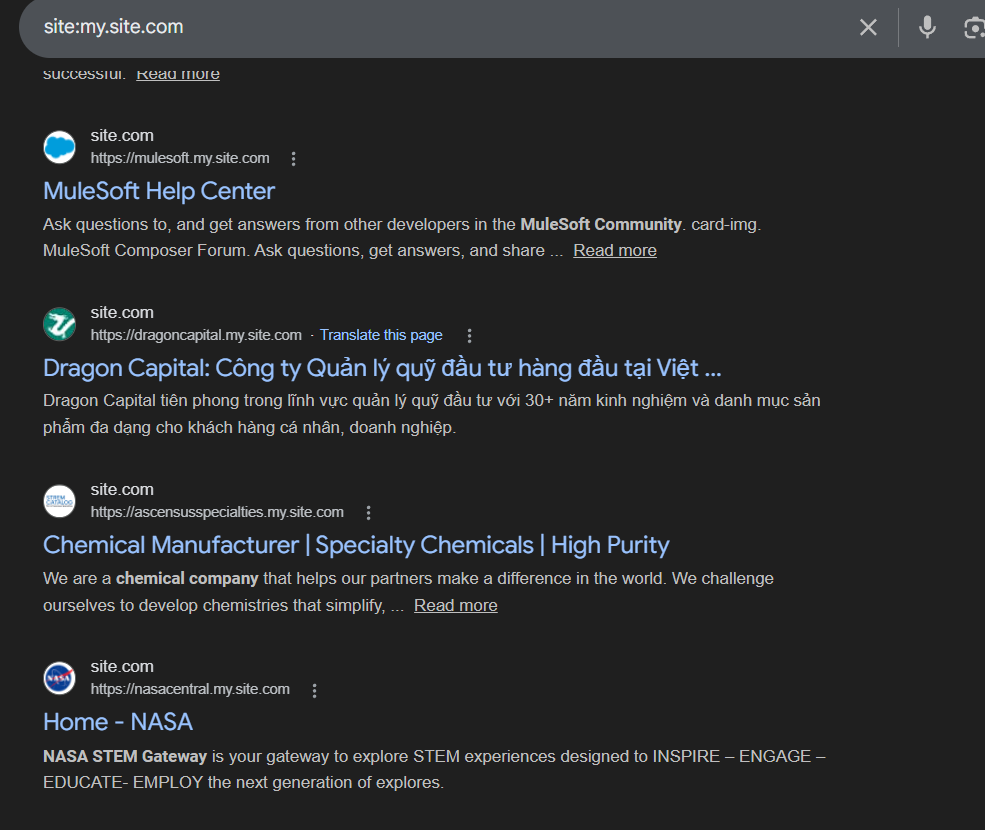
You can often figure out which company owns each site from the subdomain prefix. A URL like nasacentral.my.site.com, as shown above is obviously NASA’s Salesforce site.
If the prefix isn’t clear, just click through – the site usually has the company’s branding all over it. For instance, here is what Patagonia’s Salesforce site looks like. It’s pretty clear it’s them based on their logo.

Another subdomain to search for is site:force.com. This is also another Salesforce subdomain that companies use to host customer support forums, communities, or partner portals.
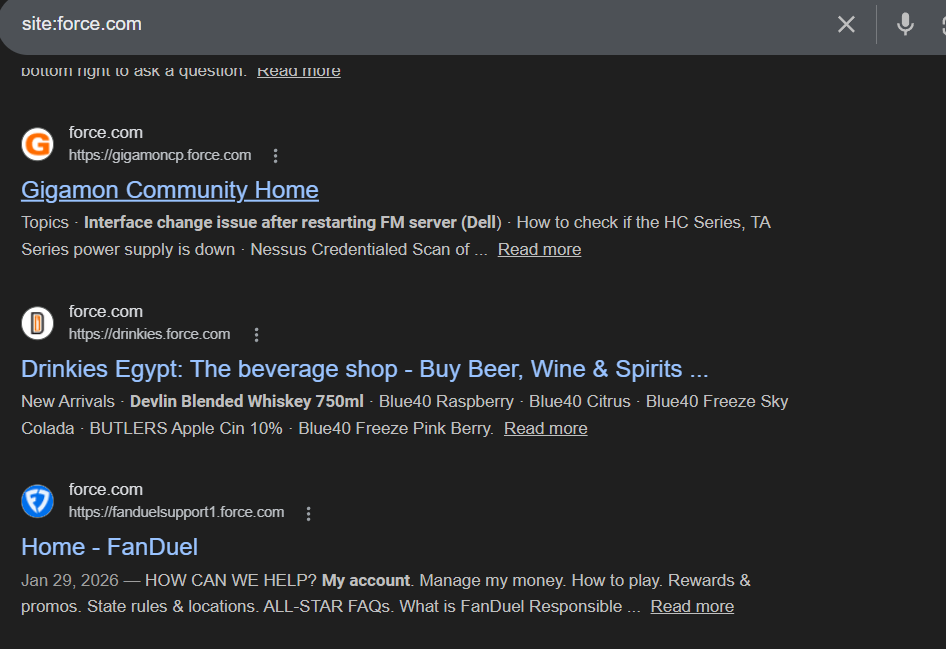
Like my.site.com, it’s fairly easy to see what company is using that Salesforce site (fanduelsupport1.force.com obviously translate to Fan Duel, the company)
Salesforce org instances
You can also find actual Salesforce org instances – the my.salesforce.com URLs that companies use internally. While these typically require login, the URLs themselves are publicly discoverable.
A tool called URLScan.io makes this easy. urlscan.io is a free service that scans and indexes URLs across the internet. You can search it for any domain pattern and see what’s been recently crawled.
For instance, when I search for page.domain:my.salesforce.com URLScan.io shows me all the Salesforce instances it was able to detect with that domain
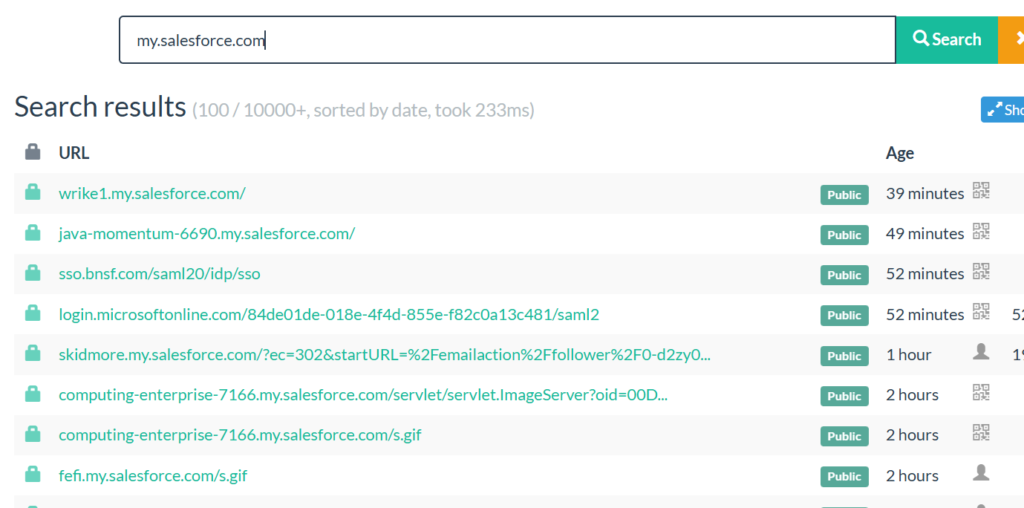
You’ll get a list of `*.my.salesforce.com` subdomains, each one belonging to a different company. The prefix usually contains the company name or a recognizable abbreviation.
The one slightly annoying thing with the search results it doesn’t show you unique subdomains. For instance, you might see lots of urls belonging to one salesforce subdomain.
Secondly, some of the URLS might be hard to translate to actual companies. For instance, it’s hard to tell what company is using ‘computing-enterprise-7166.my.salesforce.com.
5) Find who’s commenting on Salesforce’s LinkedIn posts
This one is almost too simple: go to Salesforce’s Linkedin page, find their popular posts (especially product announcements and feature launches), and look at who’s commenting.
Think about it – who comments on a Salesforce product post about Agentforce 360? Not random people. It’s Salesforce admins, consultants who implement it, and users who are excited about the feature. In other words: confirmed Salesforce customers and people deep in the ecosystem.
The posts with the most engagement are the best targets. A post with 500+ reactions and 19 comments gives you a concentrated list of people who care enough about Salesforce to publicly engage with the brand.
If you want to do this at scale, you can use a tool like Databar.ai or similar LinkedIn scraping tools to extract the names and profiles of everyone who commented on or reacted to a specific post. For example, here’s a guide on how to do this in Databar.
This works for any vendor, by the way – not just Salesforce. Find the vendor’s LinkedIn page, find their popular posts, and harvest the commenters. It’s a repeatable playbook.
6) Search trust centers for Salesforce mentions
Here’s one more trick that piggybacks on something I covered in a previous article about finding a company’s tech stack.
Many companies – especially SaaS companies selling to enterprises – publish a “trust center” or “security center” on their website. It’s hosted by providers like Drata or Vanta. A trust center is basically a page where a company lists all the third-party vendors that touch their customers’ data. They do this because regulations like GDPR and certifications like SOC 2 require them to disclose these vendors (called “subprocessors”).
If a company uses Salesforce to manage customer data, they’re often required to list it on their trust center. And since trust centers are public web pages, Google indexes them.
Here’s the search:
site:trust.*.com salesforce -salesforce.com
The `-salesforce.com` part excludes Salesforce’s own trust page from the results, so you only see other companies mentioning Salesforce as a vendor they use.
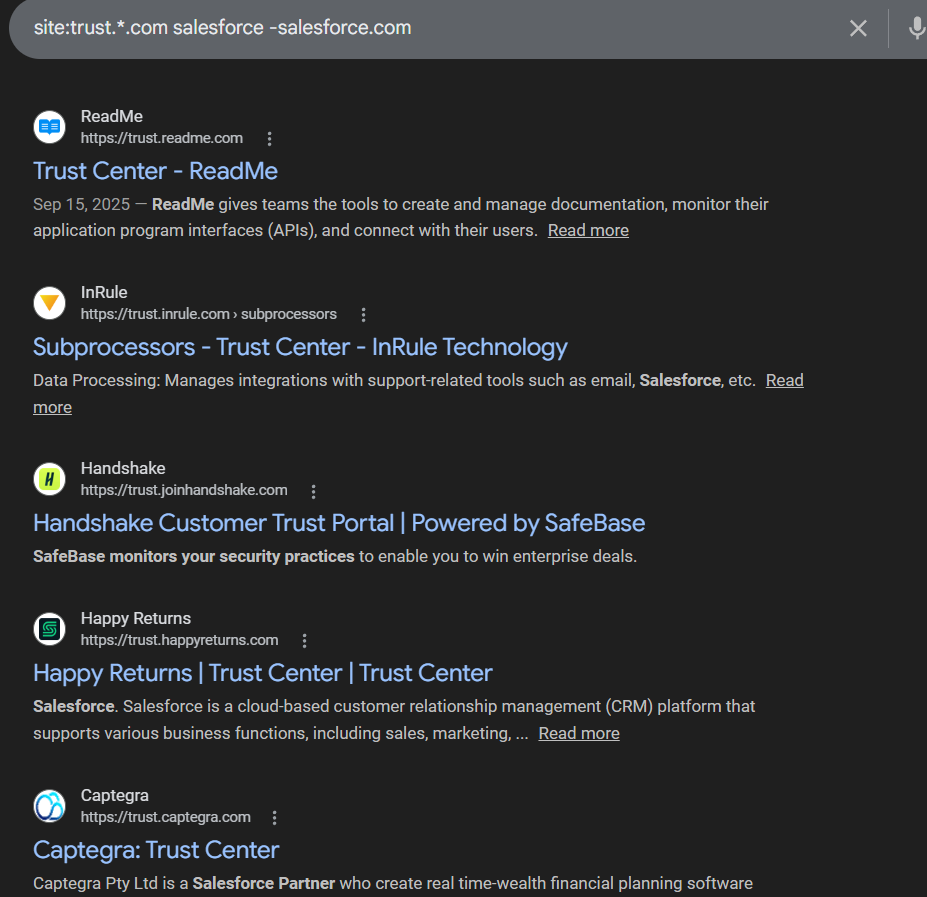
As you can see above, each result is a company that has publicly, contractually confirmed they use Salesforce. It doesn’t get more reliable than that – these aren’t inferred signals or guesses. They’re legal disclosures.
7) Join Salesforce Slack communities and monitor the right channels
There’s an active Salesforce community on Slack called Ohana Slack. These are where Salesforce admins, developers, and consultants go to ask each other questions in real time — and there are thousands of members.
What makes Slack communities especially useful is the channel structure. You don’t need to monitor the entire community. Just join the channels relevant to what you sell or what kind of Salesforce user you’re targeting:
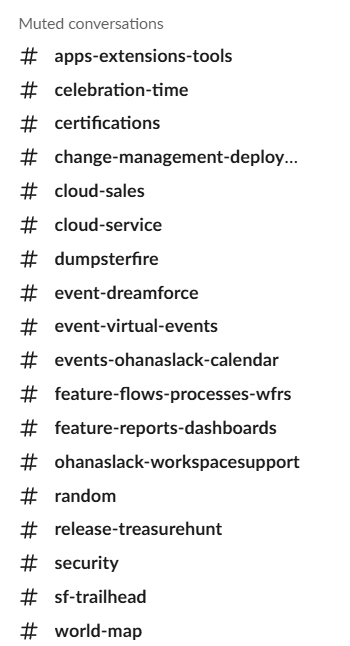
Each channel is a self-selecting group of people working with a specific part of Salesforce. If you sell Service Cloud consulting, camp on the Service Cloud channel. If you build apps that extend Lightning, watch the Lightning configuration channel. You get the idea.
The people asking questions here use their real names (Slack culture tends toward real names, unlike Discord). You can see their profile photo and their first and last name right in the conversation.
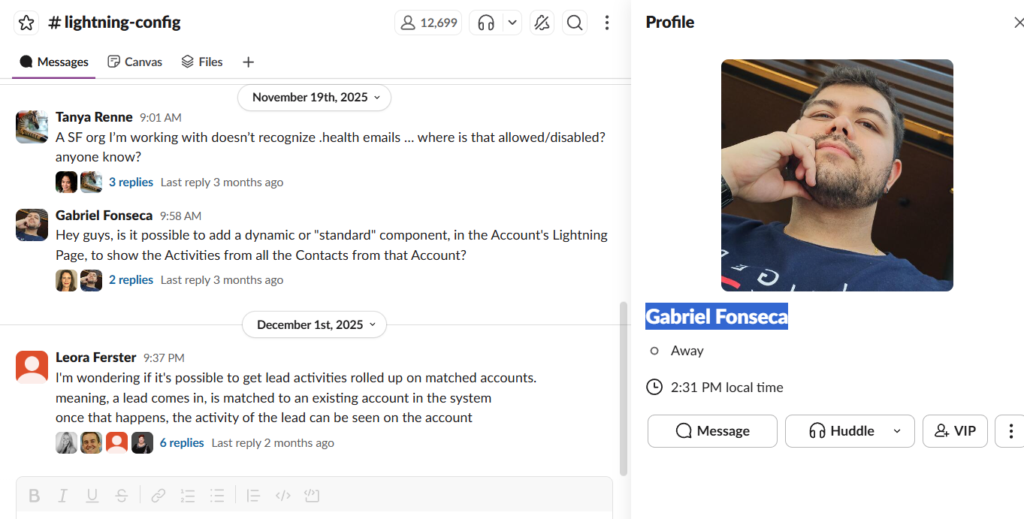
Now, unlike the Trailblazer Community, most people don’t list their company in their Slack profile. But that’s easy to work around. If someone has a reasonably uncommon name, just Google it:
"Gabriel Fonseca" salesforce linkedin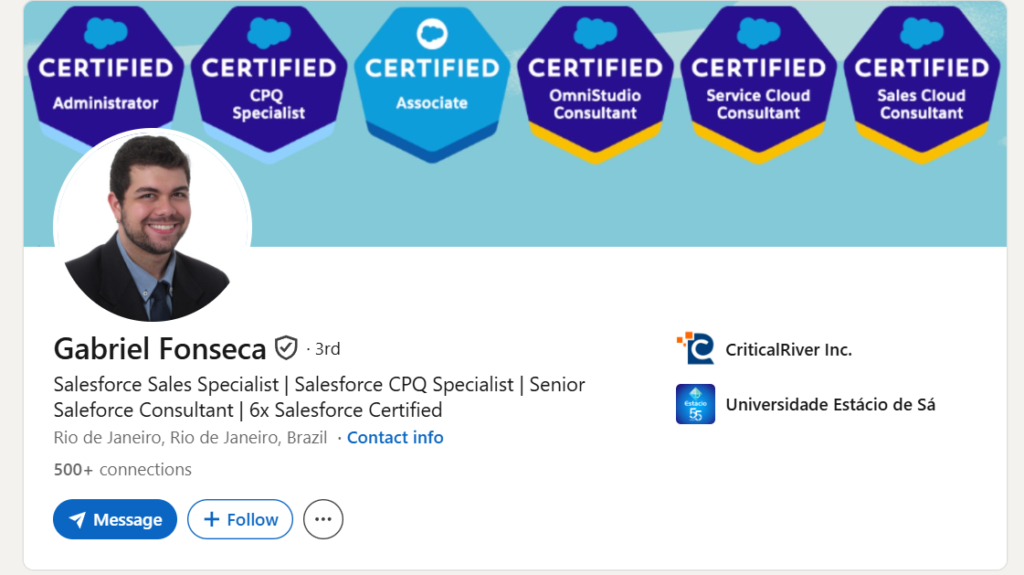
And there he is — Gabriel Fonseca, Salesforce Sales Specialist and CPQ Specialist at CriticalRiver Inc., 6x Salesforce Certified, based in Rio de Janeiro. From a Slack question to a full LinkedIn profile in about 10 seconds.
The real power of this method is timing. You’re not finding people from a stale database. You’re finding people who have a question or a problem right now. Someone asking “how do I add a dynamic component to an Account’s Lightning Page?” is actively building something in Salesforce today. That’s about as warm as a lead gets without them filling out your contact form.
The bottom line
You don’t need an expensive data provider to find companies that use Salesforce. Job boards, community forums, app reviews, public-facing Salesforce pages, LinkedIn comments, trust centers, and Slack communities all give you the same information — often with the exact person to reach out to attached.
The real advantage of these methods isn’t just that they’re free. It’s that they surface companies that need Salesforce help right now — not six months ago when some database vendor last refreshed their list. Someone posting a Salesforce admin job, asking a question in the Trailblazer Community, or troubleshooting flows in Slack has an active need today. That’s a fundamentally better lead than a name on a static list.